RW88 Modular Dashboard
rens watchfaces- EveryoneAge rating
- PersonalizationCategory
- Oct 6, 2026Updated
- $0.49Price
Links to the official Google Play listing of com.watchfacestudio.rens_watchface88. Last checked on Nov 13, 2026.
About this app
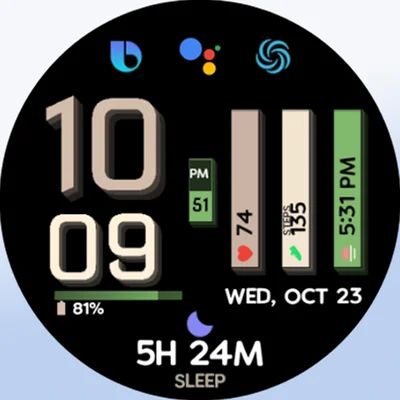
Modular Wear OS face with large time, 4 vertical complications, and shortcuts
RW88 Modular Dashboard Digital Watch Face for Wear OS
A highly organized, block-style digital watch face designed for clear data reading. Features a large, prominent time display alongside four vertical data columns. Perfect for users who want a structured, easy-to-scan layout for their daily metrics and apps.
SPECS & CUSTOMIZATION
Time Format: Large digital time display (12-hour / 24-hour)
App Shortcuts: 3 customizable app shortcuts (top block icons)
Complications: 4 customizable complication slots (vertical columns)
Battery Indicator: Dedicated battery percentage text with a progress bar
Color Themes: Multiple color themes available
Background: Solid black background (optimized for OLED screens)
Always-On Display (AOD): Supported
HOW TO INSTALL
1. Open the companion app on your phone.
2. Tap "Install Watch Face"
3. Select your device.
4. Long press your current watch face to select "RW88 Modular Dashboard"
ALLOW/ENABLE all permissions from Settings > Applications > Permissions
*some features may not be available on some watches.
Thank you for your support!
**************
Full Collection: rens watchfaces
Contact us at: renswatchface@gmail.com
Facebook Page: https://www.facebook.com/renswatchfaces
Data safety
What rens watchfaces declares on Google Play about the data this app collects and shares.
- No data shared with third partiesLearn more about how developers declare sharing
- No data collectedLearn more about how developers declare collection
Developer contact
- Emailrenswatchface@gmail.com
- Privacy policysites.google.com
- Address0003 Blk 1 0 Lot Block BLK Dulo-Balon Batia Pantoc Meycauayan 3019 Philippines
Information
- Offered by
- rens watchfaces
- Category
- Personalization
- Updated
- Oct 6, 2026
- Released
- Oct 13, 2023
- Age rating
- Everyone
- Price
- $0.49
- Package name
- com.watchfacestudio.rens_watchface88