RW88 Modular Dashboard
rens watchfaces- USK ab 0 JahrenAltersfreigabe
- PersonalisierungKategorie
- 06.10.2026Aktualisiert
- 0,69 €Preis
Verlinkt auf den offiziellen Google Play-Eintrag von com.watchfacestudio.rens_watchface88. Zuletzt geprüft am 13.11.2026.
Über diese App
Automatische Übersetzung von Google. Originalsprache: Englisch (Vereinigte Staaten).
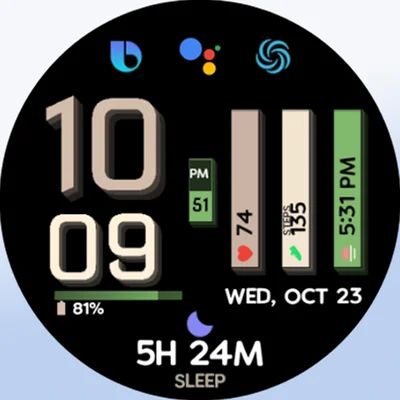
Modulares Wear OS-Zifferblatt mit großer Zeitanzeige, 4 vertikalen Komplikationen und Tastenkombinationen
RW88 Modulares Dashboard-Zifferblatt für Wear OS
Ein übersichtliches, blockartiges digitales Zifferblatt für optimale Lesbarkeit. Es bietet eine große, gut sichtbare Zeitanzeige und vier vertikale Datenspalten. Ideal für alle, die ihre täglichen Messwerte und Apps übersichtlich und schnell erfassen möchten.
SPEZIFIKATIONEN & ANPASSUNG
Zeitformat: Große digitale Zeitanzeige (12-Stunden-/24-Stunden-Anzeige)
App-Verknüpfungen: 3 anpassbare App-Verknüpfungen (Symbole oben)
Komplikationen: 4 anpassbare Komplikationsplätze (vertikale Spalten)
Akkustandsanzeige: Anzeige des Akkustands in Prozent mit Fortschrittsbalken
Farbthemen: Mehrere Farbthemen verfügbar
Hintergrund: Schwarzer Hintergrund (optimiert für OLED-Bildschirme)
Always-On-Display (AOD): Unterstützt
INSTALLATION
1. Öffnen Sie die zugehörige App auf Ihrem Smartphone.
2. Tippen Sie auf „Zifferblatt installieren“.
3. Wählen Sie Ihr Gerät aus.
4. Halten Sie Ihr aktuelles Zifferblatt gedrückt, um „RW88 Modular Dashboard“ auszuwählen.
Erlauben/Aktivieren Sie alle Berechtigungen unter Einstellungen > Anwendungen > Berechtigungen
*Einige Funktionen sind möglicherweise nicht auf allen Uhren verfügbar.
Vielen Dank für Ihre Unterstützung!
**************
Vollständige Kollektion: rens watchfaces
Kontakt: renswatchface@gmail.com Facebook-Seite: https://www.facebook.com/renswatchfaces
Originaltext anzeigen
RW88 Modular Dashboard Digital Watch Face for Wear OS
A highly organized, block-style digital watch face designed for clear data reading. Features a large, prominent time display alongside four vertical data columns. Perfect for users who want a structured, easy-to-scan layout for their daily metrics and apps.
SPECS & CUSTOMIZATION
Time Format: Large digital time display (12-hour / 24-hour)
App Shortcuts: 3 customizable app shortcuts (top block icons)
Complications: 4 customizable complication slots (vertical columns)
Battery Indicator: Dedicated battery percentage text with a progress bar
Color Themes: Multiple color themes available
Background: Solid black background (optimized for OLED screens)
Always-On Display (AOD): Supported
HOW TO INSTALL
1. Open the companion app on your phone.
2. Tap "Install Watch Face"
3. Select your device.
4. Long press your current watch face to select "RW88 Modular Dashboard"
ALLOW/ENABLE all permissions from Settings > Applications > Permissions
*some features may not be available on some watches.
Thank you for your support!
**************
Full Collection: rens watchfaces
Contact us at: renswatchface@gmail.com
Facebook Page: https://www.facebook.com/renswatchfaces
Datensicherheit
Was rens watchfaces bei Google Play zu den Daten angibt, die diese App erfasst und weitergibt.
- Keine Daten werden mit Drittunternehmen oder -organisationen geteiltWeitere Informationen dazu, wie Entwickler Angaben zur Weitergabe von Daten machen
- Keine Daten erhobenWeitere Informationen dazu, wie Entwickler Angaben zur Datenerhebung machen
Kontakt zum Entwickler
- E-Mailrenswatchface@gmail.com
- Datenschutzerklärungsites.google.com
- Adresse0003 Blk 1 0 Lot Block BLK Dulo-Balon Batia Pantoc Meycauayan 3019 Philippines
Informationen
- Angeboten von
- rens watchfaces
- Kategorie
- Personalisierung
- Aktualisiert
- 06.10.2026
- Veröffentlicht
- 13.10.2023
- Altersfreigabe
- USK ab 0 Jahren
- Preis
- 0,69 €
- Paketname
- com.watchfacestudio.rens_watchface88