Simple & Sober Watch Faces PRO
Systorso Inc.Contains ads
- EveryoneAge rating
- PersonalizationCategory
- Nov 10, 2025Updated
- $3.99Price
Links to the official Google Play listing of simplesoberwatchface.simplerichelegantwatchface.stylishminimalsimplewatchlook.pro. Last checked on Nov 13, 2026.
About this app
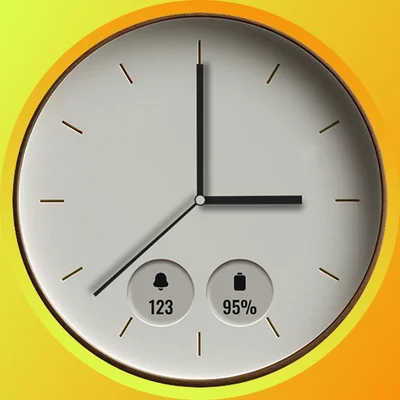
Minimal & elegant watch faces for Wear OS with a clean, timeless design
Simplicity meets sophistication with Simple & Sober Watch Faces PRO. Designed for those who appreciate elegance without the excess, these watch faces offer a refined, minimalistic look that fits every occasion and outfit.
Whether you’re at work, relaxing at home, or attending an event, these dials bring a calm and composed charm to your wrist. Enjoy a smooth, premium design aesthetic that makes your smartwatch feel effortlessly classy.
This Simple & Sober watchface app offers both elegant analog and digital dials. You can select the desired one and apply it to the watchscreen.
Each watch face is carefully designed to give your Wear OS a timeless look with modern features. This Simple & Sober watchface app supports Always-On Display (AOD). Now you can check the time at a glance without waking the screen.
Highlighted Features of the Simple & Sober Watchfaces App:
• Simple Minimalist Themed Analog & Digital Dials
• Customizable Complications
• AOD Support
• Supports Wear OS 4, Wear OS 5, Wear OS 6, and all above Wear OS Watches.
Supported Devices:
This Simple & Sober watchfaces app is compatible with devices (API Level 33 & above) that support Google's Watch Face Format.
- Samsung Galaxy Watch8 Classic
- Samsung Galaxy Watch 8
- Samsung Galaxy Watch 4/4 Classic
- Samsung Galaxy Watch 5/5 Pro
- Samsung Galaxy Watch 6/6 Classic
- Samsung Galaxy Watch 7/7 Ultra
- Google Pixel Watch 3
- Google Pixel Watch 4
- Fossil Gen 6 Wellness Edition
- Mobvoi TicWatch Pro 5 and newer models
Complications:
You can select and apply the following complications to your Wear OS smartwatch screen:
- Date
- Day of the week
- Day and date
- Next event
- Time
- Step count
- Sunrise and sunset
- Watch battery
- World clock
- and More
Steps to Customize Watch Face & Set Complications:
Step 1 -> Touch and hold the display.
Step 2 -> Tap on the "Customize" option to personalize the watchface (dial, or complication).
Step 3 -> In the complication fields, select the preferred data to view on the display.
How to Download "Simple & Sober Watch Faces PRO" on a Wear OS smartwatch:
1. Install via Companion App (Mobile App)
• Open the companion app on your phone and tap "Install" on your smartwatch.
• If you don’t see a prompt on your watch, try toggling Bluetooth/Wi-Fi off and on again to resolve the issue.
2. Download From the Wear OS Play Store
• Open the Play Store on your Wear OS smartwatch
• In the search section, search for "Simple & Sober Watch Faces PRO" and start the download.
How to Set "Simple & Sober Watch Faces PRO" Watch Face:
1. Touch and hold the display.
2. Swipe left or right to select the watch face, or tap "Add watchface" to select it from the Downloaded section.
3. Scroll and find the "Simple & Sober Watch Faces PRO" watchface and tap on that watch face to apply it.
Download now and give your smartwatch a fresh, minimalist upgrade!
Data safety
What Systorso Inc. declares on Google Play about the data this app collects and shares.
- This app may share these data types with third partiesDevice or other IDs
- No data collectedLearn more about how developers declare collection
- Data is encrypted in transit
- Data can’t be deleted
Developer contact
- Websitesystorsoinc.blogspot.com
- Emailsarashvp18@gmail.com
- Privacy policysites.google.com
- AddressD-404, Ram Laxman Appartment Behind Kharvar Nagar, Khatodra, Surat City Surat, Gujarat 395002 India
Information
- Offered by
- Systorso Inc.
- Category
- Personalization
- Updated
- Nov 10, 2025
- Released
- Nov 10, 2025
- Age rating
- Everyone
- Price
- $3.99
- Package name
- simplesoberwatchface.simplerichelegantwatchface.stylishminimalsimplewatchlook.pro