Simple & Sober Watch Faces PRO
Systorso Inc.広告を含む
- 3 歳以上対象年齢
- カスタマイズカテゴリ
- 2025/11/10更新日
- ¥680価格
simplesoberwatchface.simplerichelegantwatchface.stylishminimalsimplewatchlook.proのGoogle Play公式ページにリンクしています。最終確認:2026/11/13。
このアプリについて
Googleによる英語 (アメリカ合衆国)からの自動翻訳です。
シンプルでエレガントな、時代を超越したデザインの Wear OS 用ウォッチフェイス
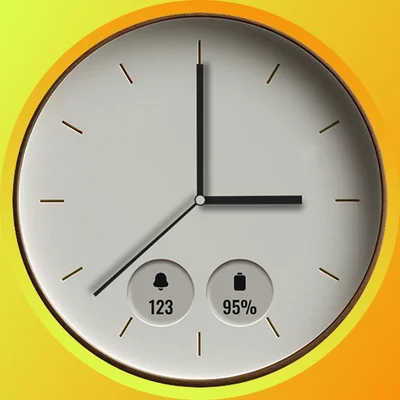
Simple & Sober Watch Faces PRO は、シンプルさと洗練さを融合させたウォッチフェイスです。無駄を削ぎ落としたエレガンスを求める方のためにデザインされたこれらのウォッチフェイスは、洗練されたミニマルなデザインで、あらゆるシーンや装いにマッチします。
仕事中でも、自宅でくつろいでいる時でも、イベントに参加する時でも、これらの文字盤は手首に落ち着きと落ち着きを与えてくれます。スマートウォッチをさりげなく上品に演出する、滑らかで高級感のあるデザインをお楽しみください。
この Simple & Sober ウォッチフェイスアプリは、エレガントなアナログ文字盤とデジタル文字盤の両方をご用意しています。お好みの文字盤を選んでウォッチ画面に適用できます。
それぞれのウォッチフェイスは、Wear OS に時代を超越したデザインと最新の機能を提供するよう、丹念にデザインされています。この Simple & Sober ウォッチフェイスアプリは、常時表示 (AOD) に対応しています。画面を起動することなく、一目で時刻を確認できます。
Simple & Sober Watchfaces アプリの主な機能:
• シンプルでミニマルなテーマのアナログ&デジタル文字盤
• カスタマイズ可能なコンプリケーション
• AOD サポート
• Wear OS 4、Wear OS 5、Wear OS 6、およびそれ以上の Wear OS ウォッチをサポート
対応デバイス:
この Simple & Sober Watchfaces アプリは、Google Watch Face Format をサポートするデバイス(API レベル 33 以上)と互換性があります。
- Samsung Galaxy Watch8 Classic
- Samsung Galaxy Watch 8
- Samsung Galaxy Watch 4/4 Classic
- Samsung Galaxy Watch 5/5 Pro
- Samsung Galaxy Watch 6/6 Classic
- Samsung Galaxy Watch 7/7 Ultra
- Google Pixel Watch 3
- Google Pixel Watch 4
- Fossil Gen 6 Wellness Edition
- Mobvoi TicWatch Pro 5 以降のモデル
コンプリケーション:
Wear OS スマートウォッチの画面に、以下のコンプリケーションを選択して適用できます。
- 日付
- 曜日
- 日付と曜日
- 次のイベント
- 時刻
- 歩数
- 日の出と日の入り
- 時計のバッテリー残量
- 世界時計
- その他
ウォッチフェイスのカスタマイズとコンプリケーションの設定手順:
手順 1 -> 画面を長押しします。
手順 2 -> 「カスタマイズ」オプションをタップして、ウォッチフェイス(文字盤またはコンプリケーション)をカスタマイズします。
ステップ3 -> コンプリケーションのフィールドで、ディスプレイに表示するデータを選択します。
Wear OSスマートウォッチに「Simple & Sober Watch Faces PRO」をダウンロードする方法:
1. コンパニオンアプリ(モバイルアプリ)からインストールする
• スマートフォンでコンパニオンアプリを開き、スマートウォッチで「インストール」をタップします。
• ウォッチにプロンプトが表示されない場合は、Bluetooth/Wi-Fiのオン/オフを切り替えて問題を解決してください。
2. Wear OS Playストアからダウンロードする
• Wear OSスマートウォッチでPlayストアを開きます。
• 検索セクションで「Simple & Sober Watch Faces PRO」を検索し、ダウンロードを開始します。
「Simple & Sober Watch Faces PRO」ウォッチフェイスの設定方法:
1. 画面を長押しします。
2. 左右にスワイプしてウォッチフェイスを選択するか、「ウォッチフェイスを追加」をタップしてダウンロード済みセクションから選択します。
3. スクロールして「Simple & Sober Watch Faces PRO」ウォッチフェイスを見つけ、タップして適用します。
今すぐダウンロードして、スマートウォッチをフレッシュでミニマルなデザインにアップグレードしましょう!
原文を表示
Simplicity meets sophistication with Simple & Sober Watch Faces PRO. Designed for those who appreciate elegance without the excess, these watch faces offer a refined, minimalistic look that fits every occasion and outfit.
Whether you’re at work, relaxing at home, or attending an event, these dials bring a calm and composed charm to your wrist. Enjoy a smooth, premium design aesthetic that makes your smartwatch feel effortlessly classy.
This Simple & Sober watchface app offers both elegant analog and digital dials. You can select the desired one and apply it to the watchscreen.
Each watch face is carefully designed to give your Wear OS a timeless look with modern features. This Simple & Sober watchface app supports Always-On Display (AOD). Now you can check the time at a glance without waking the screen.
Highlighted Features of the Simple & Sober Watchfaces App:
• Simple Minimalist Themed Analog & Digital Dials
• Customizable Complications
• AOD Support
• Supports Wear OS 4, Wear OS 5, Wear OS 6, and all above Wear OS Watches.
Supported Devices:
This Simple & Sober watchfaces app is compatible with devices (API Level 33 & above) that support Google's Watch Face Format.
- Samsung Galaxy Watch8 Classic
- Samsung Galaxy Watch 8
- Samsung Galaxy Watch 4/4 Classic
- Samsung Galaxy Watch 5/5 Pro
- Samsung Galaxy Watch 6/6 Classic
- Samsung Galaxy Watch 7/7 Ultra
- Google Pixel Watch 3
- Google Pixel Watch 4
- Fossil Gen 6 Wellness Edition
- Mobvoi TicWatch Pro 5 and newer models
Complications:
You can select and apply the following complications to your Wear OS smartwatch screen:
- Date
- Day of the week
- Day and date
- Next event
- Time
- Step count
- Sunrise and sunset
- Watch battery
- World clock
- and More
Steps to Customize Watch Face & Set Complications:
Step 1 -> Touch and hold the display.
Step 2 -> Tap on the "Customize" option to personalize the watchface (dial, or complication).
Step 3 -> In the complication fields, select the preferred data to view on the display.
How to Download "Simple & Sober Watch Faces PRO" on a Wear OS smartwatch:
1. Install via Companion App (Mobile App)
• Open the companion app on your phone and tap "Install" on your smartwatch.
• If you don’t see a prompt on your watch, try toggling Bluetooth/Wi-Fi off and on again to resolve the issue.
2. Download From the Wear OS Play Store
• Open the Play Store on your Wear OS smartwatch
• In the search section, search for "Simple & Sober Watch Faces PRO" and start the download.
How to Set "Simple & Sober Watch Faces PRO" Watch Face:
1. Touch and hold the display.
2. Swipe left or right to select the watch face, or tap "Add watchface" to select it from the Downloaded section.
3. Scroll and find the "Simple & Sober Watch Faces PRO" watchface and tap on that watch face to apply it.
Download now and give your smartwatch a fresh, minimalist upgrade!
データ セーフティ
このアプリが収集・共有するデータについて、Systorso Inc.がGoogle Playで申告している内容です。
- このアプリはサードパーティと以下の種類のデータを共有することがありますファイル、ドキュメント
- データは収集されません詳しくは、デベロッパーが収集を申告する方法についての説明をご覧ください
- データは送信中に暗号化されます
- データを削除できません
開発元の連絡先
- ウェブサイトsystorsoinc.blogspot.com
- メールsarashvp18@gmail.com
- プライバシーポリシーsites.google.com
- 住所D-404, Ram Laxman Appartment Behind Kharvar Nagar, Khatodra, Surat City Surat, Gujarat 395002 India
情報
- 提供元
- Systorso Inc.
- カテゴリ
- カスタマイズ
- 更新日
- 2025/11/10
- リリース
- 2025/11/10
- 対象年齢
- 3 歳以上
- 価格
- ¥680
- パッケージ名
- simplesoberwatchface.simplerichelegantwatchface.stylishminimalsimplewatchlook.pro