Time Fill
Gondwana Software- EveryoneAge rating
- PersonalizationCategory
- May 8, 2025Updated
- FreePrice
Links to the official Google Play listing of au.gondwanasoftware.timefill. Last checked on Nov 23, 2026.
About this app
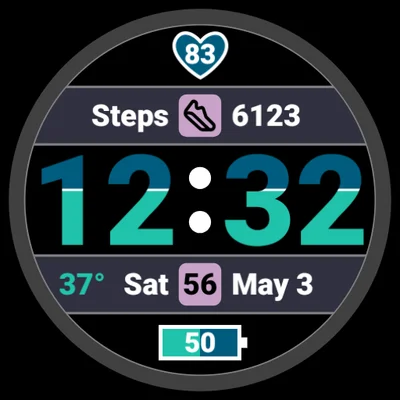
Time digits fill with colour as the value of a complication changes.
Time Fill is a simple Wear OS watch face that fills the time digits with colours that depend on the value of the complication you select. It uses large text and icons so it’s easy to read.
You can choose between nine colour themes. Each theme specifies three colours that can fill the time digits. How the colours are used depends on the type of complication being used:
- Goal Progress. Goal Progress complications are intended for measures for which the current value can exceed a specified goal; eg, your daily step count. Goal Progress complications are relatively new, so you may not have many complications that can provide this format. When your progress is behind your goal, Time Fill will fill the time with a colour that rises up the height of the text in proportion to your progress toward the goal. When your achievement exceeds your goal, a lighter colour will appear above the goal colour, pushing the latter lower down. In this case, the height of the goal colour indicates the proportion of the goal compared to your achievement; eg, if you do 15,000 steps and have a goal of 10,000 steps, the goal colour will fill two-thirds of the height of the time digits.
- Ranged Value (Asymmetric). Ranged Value complications have a maximum value that can't be exceeded, such as the watch battery charge level. Some watches also use Ranged Value complications for activity measures such as step count. As the complication's value increases, a lighter colour will rise up the time digits; it will totally fill the digits when the maximum is reached.
- Ranged Value (Symmetric). This is a sub-type of Ranged Value, in which the minimum value is the negative of the maximum value. This is useful for complications that indicate the extent to which you're above or below a target (eg, the On Track app). When the value is zero (eg, you're exactly on target), the time digits will be filled with the goal colour. If you're below the target, a darker colour will encroach. If you're above the target, a lighter colour will encroach.
Time Fill's heart-rate icon blinks at approximately the correct rate. Its accuracy is limited by the watch face refresh rate, so irregularities are to be expected.
Data safety
What Gondwana Software declares on Google Play about the data this app collects and shares.
- No data shared with third partiesLearn more about how developers declare sharing
- No data collectedLearn more about how developers declare collection
- Committed to follow the Play Families Policy
What’s new
Version 1.0.0 · May 8, 2025
Initial release.
Developer contact
- Websitegondwanasoftware.au
- Emailwear@gondwanasoftware.au
- Privacy policygondwanasoftware.au
- Address13 Thomas Hales Pl Gordon ACT 2906 Australia
Information
- Offered by
- Gondwana Software
- Category
- Personalization
- Version
- 1.0.0
- Updated
- May 8, 2025
- Released
- May 8, 2025
- Age rating
- Everyone
- Price
- Free
- Package name
- au.gondwanasoftware.timefill