Time Fill
Gondwana Software- 3 歳以上対象年齢
- カスタマイズカテゴリ
- 2025/5/8更新日
- 無料価格
au.gondwanasoftware.timefillのGoogle Play公式ページにリンクしています。最終確認:2026/11/23。
このアプリについて
Googleによる英語 (アメリカ合衆国)からの自動翻訳です。
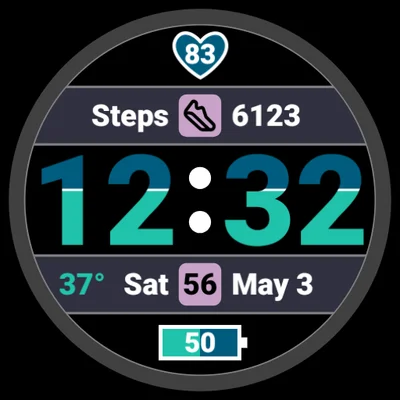
複雑機構の値が変化すると、時間の数字が色で塗りつぶされます。
Time Fill は、選択した追加機能の値に応じて時間の桁を色で塗りつぶす、シンプルな Wear OS ウォッチフェイスです。大きな文字とアイコンを使用しているので読みやすいです。
9 つのカラーテーマから選択できます。各テーマでは、時間の桁を埋めることができる 3 つの色を指定します。色の使用方法は、使用されている合併症のタイプによって異なります。
- 目標の進捗状況。目標進捗状況の追加機能は、現在の値が指定された目標を超える可能性があるメジャーを対象としています。たとえば、毎日の歩数。目標進行状況のコンプリケーションは比較的新しいため、この形式を提供できるコンプリケーションはあまりないかもしれません。進捗状況が目標よりも遅れている場合、Time Fill は、目標に向けた進捗状況に比例してテキストの高さが上がる色で時間を塗りつぶします。達成度が目標を超えると、目標の色の上に明るい色が表示され、目標の色が下に押し下げられます。この場合、目標の色の高さは、達成度と比較した目標の割合を示します。たとえば、15,000 歩を実行し、10,000 歩の目標がある場合、目標の色は時間の桁の高さの 3 分の 2 を占めます。
- 範囲値 (非対称)。 Ranged Value コンプリケーションには、時計のバッテリー充電レベルなど、超えることのできない最大値があります。一部の時計では、歩数などのアクティビティ測定に範囲値コンプリケーションを使用しています。複雑機構の値が増加すると、時間の桁が明るい色になります。最大値に達すると、桁が完全に埋められます。
- 範囲の値 (対称)。これは Ranged Value のサブタイプで、最小値が最大値の負の値になります。これは、目標を上回っているか下回っているかを示す合併症に役立ちます (たとえば、On Track アプリ)。値がゼロの場合 (たとえば、目標を正確に達成している場合)、時間の桁は目標の色で塗りつぶされます。目標を下回ると、より暗い色が侵入します。ターゲットより上にある場合は、明るい色が侵入します。
Time Fill の心拍数アイコンは、ほぼ正確な心拍数で点滅します。その精度は文字盤のリフレッシュ レートによって制限されるため、不規則性が予想されます。
原文を表示
Time Fill is a simple Wear OS watch face that fills the time digits with colours that depend on the value of the complication you select. It uses large text and icons so it’s easy to read.
You can choose between nine colour themes. Each theme specifies three colours that can fill the time digits. How the colours are used depends on the type of complication being used:
- Goal Progress. Goal Progress complications are intended for measures for which the current value can exceed a specified goal; eg, your daily step count. Goal Progress complications are relatively new, so you may not have many complications that can provide this format. When your progress is behind your goal, Time Fill will fill the time with a colour that rises up the height of the text in proportion to your progress toward the goal. When your achievement exceeds your goal, a lighter colour will appear above the goal colour, pushing the latter lower down. In this case, the height of the goal colour indicates the proportion of the goal compared to your achievement; eg, if you do 15,000 steps and have a goal of 10,000 steps, the goal colour will fill two-thirds of the height of the time digits.
- Ranged Value (Asymmetric). Ranged Value complications have a maximum value that can't be exceeded, such as the watch battery charge level. Some watches also use Ranged Value complications for activity measures such as step count. As the complication's value increases, a lighter colour will rise up the time digits; it will totally fill the digits when the maximum is reached.
- Ranged Value (Symmetric). This is a sub-type of Ranged Value, in which the minimum value is the negative of the maximum value. This is useful for complications that indicate the extent to which you're above or below a target (eg, the On Track app). When the value is zero (eg, you're exactly on target), the time digits will be filled with the goal colour. If you're below the target, a darker colour will encroach. If you're above the target, a lighter colour will encroach.
Time Fill's heart-rate icon blinks at approximately the correct rate. Its accuracy is limited by the watch face refresh rate, so irregularities are to be expected.
データ セーフティ
このアプリが収集・共有するデータについて、Gondwana SoftwareがGoogle Playで申告している内容です。
- 第三者と共有されるデータはありません詳しくは、デベロッパーが共有を申告する方法についての説明をご覧ください
- データは収集されません詳しくは、デベロッパーが収集を申告する方法についての説明をご覧ください
- Play ファミリー ポリシーの遵守に努めています
新機能
バージョン 1.0.0 · 2025/5/8
Initial release.
開発元の連絡先
- ウェブサイトgondwanasoftware.au
- メールwear@gondwanasoftware.au
- プライバシーポリシーgondwanasoftware.au
- 住所13 Thomas Hales Pl Gordon ACT 2906 Australia
情報
- 提供元
- Gondwana Software
- カテゴリ
- カスタマイズ
- バージョン
- 1.0.0
- 更新日
- 2025/5/8
- リリース
- 2025/5/8
- 対象年齢
- 3 歳以上
- 価格
- 無料
- パッケージ名
- au.gondwanasoftware.timefill