Velvora Watch Face
VOKKI- EveryoneAge rating
- PersonalizationCategory
- Oct 25, 2025Updated
- FreePrice
Links to the official Google Play listing of com.watchfacestudio.velvora. Last checked on Nov 13, 2026.
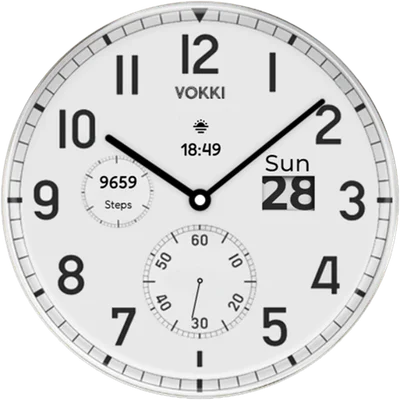
About this app
Elevate Your Wear OS Experience!
🔄 Customization Options: Unleash your creativity with Velvora's customizable interface featuring 2 color options. Personalize your smartwatch with a palette that reflects your mood and style.
🕒 Always-On Display: Enjoy the convenience of an always-on display that keeps the time and your chosen complications visible at all times without compromising battery life.
Elevate your Wear OS experience – download Velvora now and make every glance at your wrist uniquely yours!
Installation instructions:
1. Make sure your watch is connected to your cell phone via Bluetooth.
2. Install the watch face and make sure to select your watch.
3. You can also install the watch face by opening the Play Store via your web browser.
4. You can install the watch face directly on your watch by opening the Play Store and search and install your watch face.
How to install a watch face in detail:
https://developer.samsung.com/sdp/blog/en-us/2022/04/05/how-to-install-wear-os-powered-by-samsung-watch-faces
Please note that the developer of the watch face has no control over the installation process in the Play Store.
If you need further assistance, please contact v.akgul60@gmail.com.
Gizlilik politikası için https://justpaste.it/b8svf
Data safety
What VOKKI declares on Google Play about the data this app collects and shares.
- No data shared with third partiesLearn more about how developers declare sharing
- No data collectedLearn more about how developers declare collection
What’s new
Version 1.0.0 · Oct 25, 2025
• 16KB page size support added
• Updated to Android API 36
Developer contact
- Emailv.akgul60@gmail.com
- Privacy policysites.google.com
- AddressYeşilkent Mahallesi 1891 Sokak No 8-10 Daire 7 Karakuş apt. 34515 Esenyurt/İstanbul Türkiye
Information
- Offered by
- VOKKI
- Category
- Personalization
- Version
- 1.0.0
- Updated
- Oct 25, 2025
- Released
- Jan 13, 2024
- Age rating
- Everyone
- Price
- Free
- Package name
- com.watchfacestudio.velvora