Watch face M21
VG Faces- EveryoneAge rating
- PersonalizationCategory
- Aug 12, 2026Updated
- $0.99Price
Links to the official Google Play listing of com.watchfacestudio.m21. Last checked on Nov 13, 2026.
About this app
Watch face M21 for Wear OS - Minimal, modern, and full of features
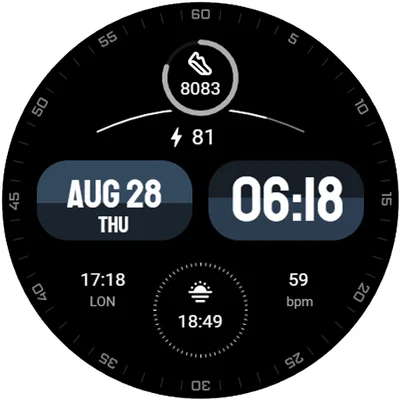
Watchface M21 - Clean Digital Layout with Bold Date and Time
Minimal, modern, and full of features – Watchface M21 is perfect for users who want a functional yet stylish watch face for Wear OS. The bold layout ensures perfect readability in all lighting conditions.
🕒 Main Features
✔️ Time and Date - Large and easy to read
✔️ Battery Indicator - Always keep track
✔️ 4 Customizable Complications - Add your calendar, steps, heart rate, or any app shortcut
✔️ Color Options - Choose from multiple combinations
✔️ Always-On Display (AOD) - Power-saving dark theme with crisp display
🌟 Why Choose M21
Highly legible design
Ideal for everyday use
Fully customizable to match your style
Clean look with essential data upfront
Installation:
1. Ensure your watch is connected via Bluetooth.
2. Download from the Google Play Store.
3. Long-press your watch screen, scroll to the end, and select the watch face to apply.
Compatibility:
Designed exclusively for Wear OS 5+ devices, including:
• Samsung Galaxy Watch 8 & Ultra
• Google Pixel Watch 4
• And other newer devices running Wear OS 5 or higher.
Data safety
What VG Faces declares on Google Play about the data this app collects and shares.
- No data shared with third partiesLearn more about how developers declare sharing
- No data collectedLearn more about how developers declare collection
- Committed to follow the Play Families Policy
What’s new
Aug 12, 2026
Updating targetSDK
Developer contact
- Emailvolder83@gmail.com
- Privacy policysites.google.com
- AddressW.-I.-Lenin-Straße 51 19370 Parchim Germany
Information
- Offered by
- VG Faces
- Category
- Personalization
- Updated
- Aug 12, 2026
- Released
- Apr 11, 2025
- Age rating
- Everyone
- Price
- $0.99
- Package name
- com.watchfacestudio.m21