Watch face M21
VG Faces- USK ab 0 JahrenAltersfreigabe
- PersonalisierungKategorie
- 12.08.2026Aktualisiert
- 1,19 €Preis
Verlinkt auf den offiziellen Google Play-Eintrag von com.watchfacestudio.m21. Zuletzt geprüft am 13.11.2026.
Über diese App
Automatische Übersetzung von Google. Originalsprache: Englisch (Vereinigte Staaten).
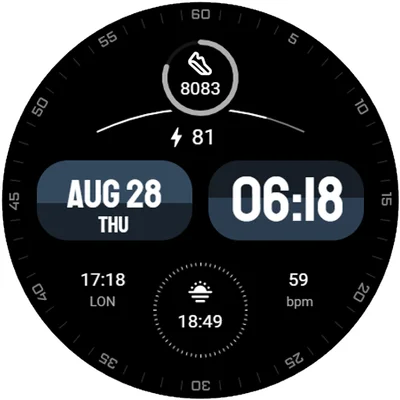
Zifferblatt M21 für Wear OS – minimalistisch, modern und voller Funktionen
Watchface M21 – Klares digitales Layout mit gut lesbarem Datum und Uhrzeit
Minimalistisch, modern und funktionsreich – Watchface M21 ist perfekt für alle, die ein funktionales und gleichzeitig stilvolles Zifferblatt für Wear OS suchen. Das gut lesbare Layout garantiert optimale Lesbarkeit bei allen Lichtverhältnissen.
🕒 Hauptfunktionen
✔️ Uhrzeit und Datum – Groß und gut lesbar
✔️ Akkuanzeige – Immer den Überblick behalten
✔️ 4 anpassbare Komplikationen – Kalender, Schritte, Herzfrequenz oder App-Verknüpfungen hinzufügen
✔️ Farboptionen – Wählen Sie aus verschiedenen Farbkombinationen
✔️ Always-On-Display (AOD) – Energiesparendes dunkles Design mit gestochen scharfer Anzeige
🌟 Warum M21?
Hervorragendes Design
Ideal für den täglichen Gebrauch
Vollständig anpassbar an Ihren Stil
Klares Design mit allen wichtigen Daten auf einen Blick
Installation:
1. Stellen Sie sicher, dass Ihre Uhr per Bluetooth verbunden ist.
2. Laden Sie die App im Google Play Store herunter.
3. Halten Sie den Bildschirm Ihrer Uhr gedrückt, scrollen Sie bis zum Ende und wählen Sie das gewünschte Zifferblatt aus.
Kompatibilität:
Exklusiv für Wear OS 5+ Geräte, darunter:
• Samsung Galaxy Watch 8 & Ultra
• Google Pixel Watch 4
• Und andere neuere Geräte mit Wear OS 5 oder höher.
Originaltext anzeigen
Watchface M21 - Clean Digital Layout with Bold Date and Time
Minimal, modern, and full of features – Watchface M21 is perfect for users who want a functional yet stylish watch face for Wear OS. The bold layout ensures perfect readability in all lighting conditions.
🕒 Main Features
✔️ Time and Date - Large and easy to read
✔️ Battery Indicator - Always keep track
✔️ 4 Customizable Complications - Add your calendar, steps, heart rate, or any app shortcut
✔️ Color Options - Choose from multiple combinations
✔️ Always-On Display (AOD) - Power-saving dark theme with crisp display
🌟 Why Choose M21
Highly legible design
Ideal for everyday use
Fully customizable to match your style
Clean look with essential data upfront
Installation:
1. Ensure your watch is connected via Bluetooth.
2. Download from the Google Play Store.
3. Long-press your watch screen, scroll to the end, and select the watch face to apply.
Compatibility:
Designed exclusively for Wear OS 5+ devices, including:
• Samsung Galaxy Watch 8 & Ultra
• Google Pixel Watch 4
• And other newer devices running Wear OS 5 or higher.
Datensicherheit
Was VG Faces bei Google Play zu den Daten angibt, die diese App erfasst und weitergibt.
- Keine Daten werden mit Drittunternehmen oder -organisationen geteiltWeitere Informationen dazu, wie Entwickler Angaben zur Weitergabe von Daten machen
- Keine Daten erhobenWeitere Informationen dazu, wie Entwickler Angaben zur Datenerhebung machen
- Hat sich verpflichtet, den Google Play-Richtlinien für familienfreundliche Inhalte zu folgen
Neue Funktionen
12.08.2026
Updating targetSDK
Kontakt zum Entwickler
- E-Mailvolder83@gmail.com
- Datenschutzerklärungsites.google.com
- AdresseW.-I.-Lenin-Straße 51 19370 Parchim Germany
Informationen
- Angeboten von
- VG Faces
- Kategorie
- Personalisierung
- Aktualisiert
- 12.08.2026
- Veröffentlicht
- 11.04.2025
- Altersfreigabe
- USK ab 0 Jahren
- Preis
- 1,19 €
- Paketname
- com.watchfacestudio.m21