Word Time – Watch Face
Bonsware- EveryoneAge rating
- PersonalizationCategory
- Oct 6, 2026Updated
- $0.99Price
Links to the official Google Play listing of be.bonsware.word_time. Last checked on Nov 24, 2026.
About this app
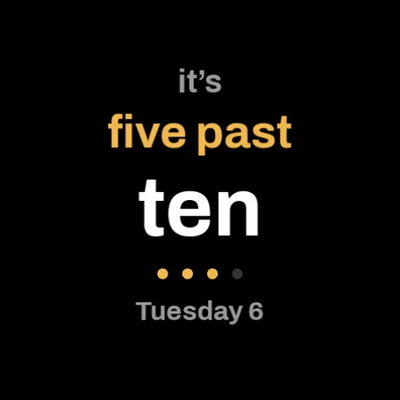
The time in words: “quarter past ten”, “half past noon”, “five to midnight”.
Word Time shows the time the way you say it, written out in words on your Wear OS watch.
“It’s quarter past ten.” “It’s twenty to eleven.” “It’s half past noon.”
NATURAL ENGLISH
• “Past” and “to”: from twenty-five to the hour, it shows the next hour (“twenty to eleven”)
• “O’clock” on the hour (“ten o’clock”)
• Noon and midnight instead of “twelve” (“half past noon”, “five to midnight”)
FEATURES
• Time to the nearest five minutes, plus four subtle dots for the minutes in between
• Day and date (“Saturday 3”)
• 6 accent colors: amber, coral, pink, lavender, sky and mint
• Large, bold, easy-to-read type on pure black
• Minimal, battery-friendly always-on mode
• No data collected, no ads
Word Time always displays in English, whatever your watch language.
Change the color: long-press the watch face, tap the pencil, then turn the crown.
Works on Wear OS 5 and later watches (Pixel Watch, Galaxy Watch, etc.).
How to apply: install from Google Play, then long-press your current watch face and pick “Word Time”.
Data safety
What Bonsware declares on Google Play about the data this app collects and shares.
- No data shared with third partiesLearn more about how developers declare sharing
- No data collectedLearn more about how developers declare collection
What’s new
Version 1.1 · Oct 6, 2026
• Larger, easier-to-read text
• New app icon showing the actual watch face
• Improved compatibility with the latest Wear OS watches
Developer contact
- Emailinfo@bonsware.be
- Privacy policybonsware.be
- AddressAdresse non disponible dans le Banque Carrefour 0000 Inconnu Belgium
Information
- Offered by
- Bonsware
- Category
- Personalization
- Version
- 1.1
- Updated
- Oct 6, 2026
- Released
- Oct 3, 2026
- Age rating
- Everyone
- Price
- $0.99
- Package name
- be.bonsware.word_time