Word Time – Watch Face
Bonsware- USK ab 0 JahrenAltersfreigabe
- PersonalisierungKategorie
- 06.10.2026Aktualisiert
- 1,09 €Preis
Verlinkt auf den offiziellen Google Play-Eintrag von be.bonsware.word_time. Zuletzt geprüft am 24.11.2026.
Über diese App
Automatische Übersetzung von Google. Originalsprache: Englisch (Vereinigte Staaten).
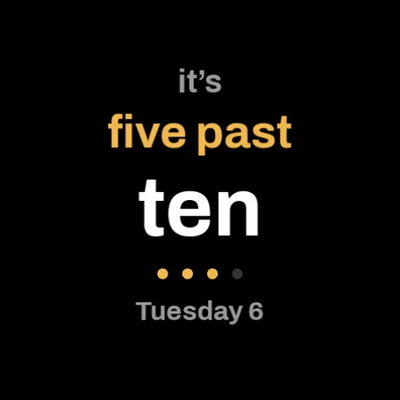
Die Uhrzeit in Worten: „Viertel nach zehn“, „halb eins“, „fünf vor Mitternacht“.
Word Time zeigt die Uhrzeit so an, wie Sie sie aussprechen – in Worten auf Ihrer Wear OS-Smartwatch.
„Es ist Viertel nach zehn.“ „Es ist zwanzig vor elf.“ „Es ist halb eins.“
NATÜRLICHES ENGLISCH
• „Nach“ und „bis“: Von 25 bis zur vollen Stunde wird die nächste Stunde angezeigt („20 vor 11“).
• „Uhr“ zur vollen Stunde („zehn Uhr“).
• Mittag und Mitternacht statt „12“ („halb vor 12“, „fünf vor Mitternacht“).
FUNKTIONEN
• Zeit auf die nächsten fünf Minuten genau, plus vier dezente Punkte für die Minuten dazwischen.
• Wochentag und Datum („Samstag 3“).
• 6 Akzentfarben: Bernstein, Koralle, Rosa, Lavendel, Himmelblau und Mint.
• Große, gut lesbare Schrift auf schwarzem Hintergrund.
• Energiesparender Always-on-Modus.
• Keine Datenerfassung, keine Werbung.
Word Time wird immer auf Englisch angezeigt, unabhängig von der Sprache Ihrer Uhr.
Farbe ändern: Halten Sie das Zifferblatt gedrückt, tippen Sie auf den Stift und drehen Sie dann die Krone.
Funktioniert mit Wear OS 5 und neueren Smartwatches (Pixel Watch, Galaxy Watch usw.).
Anwendung: Installieren Sie die App über Google Play, tippen Sie dann lange auf Ihr aktuelles Zifferblatt und wählen Sie „Word Time“.
Originaltext anzeigen
Word Time shows the time the way you say it, written out in words on your Wear OS watch.
“It’s quarter past ten.” “It’s twenty to eleven.” “It’s half past noon.”
NATURAL ENGLISH
• “Past” and “to”: from twenty-five to the hour, it shows the next hour (“twenty to eleven”)
• “O’clock” on the hour (“ten o’clock”)
• Noon and midnight instead of “twelve” (“half past noon”, “five to midnight”)
FEATURES
• Time to the nearest five minutes, plus four subtle dots for the minutes in between
• Day and date (“Saturday 3”)
• 6 accent colors: amber, coral, pink, lavender, sky and mint
• Large, bold, easy-to-read type on pure black
• Minimal, battery-friendly always-on mode
• No data collected, no ads
Word Time always displays in English, whatever your watch language.
Change the color: long-press the watch face, tap the pencil, then turn the crown.
Works on Wear OS 5 and later watches (Pixel Watch, Galaxy Watch, etc.).
How to apply: install from Google Play, then long-press your current watch face and pick “Word Time”.
Datensicherheit
Was Bonsware bei Google Play zu den Daten angibt, die diese App erfasst und weitergibt.
- Keine Daten werden mit Drittunternehmen oder -organisationen geteiltWeitere Informationen dazu, wie Entwickler Angaben zur Weitergabe von Daten machen
- Keine Daten erhobenWeitere Informationen dazu, wie Entwickler Angaben zur Datenerhebung machen
Neue Funktionen
Version 1.1 · 06.10.2026
• Larger, easier-to-read text
• New app icon showing the actual watch face
• Improved compatibility with the latest Wear OS watches
Kontakt zum Entwickler
- E-Mailinfo@bonsware.be
- Datenschutzerklärungbonsware.be
- AdresseAdresse non disponible dans le Banque Carrefour 0000 Inconnu Belgium
Informationen
- Angeboten von
- Bonsware
- Kategorie
- Personalisierung
- Version
- 1.1
- Aktualisiert
- 06.10.2026
- Veröffentlicht
- 03.10.2026
- Altersfreigabe
- USK ab 0 Jahren
- Preis
- 1,09 €
- Paketname
- be.bonsware.word_time