Alloy Deck Watch Face
Watcholate- USK ab 0 JahrenAltersfreigabe
- PersonalisierungKategorie
- 19.10.2026Aktualisiert
- KostenlosPreis
Verlinkt auf den offiziellen Google Play-Eintrag von com.watcholate.alloydeck. Zuletzt geprüft am 24.11.2026.
Über diese App
Automatische Übersetzung von Google. Originalsprache: Englisch (Vereinigte Staaten).
Gefrästes Metallzifferblatt: 13 Oberflächenausführungen, 5 Uhrenstile, fünf Anzeigen, zwei Messinstrumente.
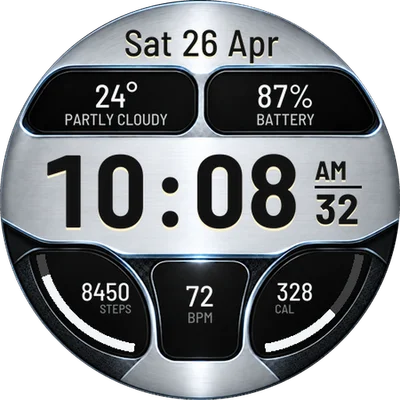
Alloy Deck ist ein digitales Zifferblatt für Wear OS, das im Watch Face Format von Google entwickelt wurde. Ein gefrästes Metallgehäuse beherbergt eine große, in das Metall eingearbeitete Uhr, die Datumsanzeige und fünf vertiefte Felder für Ihre Daten – zwei davon mit Live-Anzeigen.
FÜNF DATENFELDER
- Jedes Feld entspricht einem Standard-Komplikationsplatz von Wear OS: Wählen Sie unter „Anpassen“, was angezeigt werden soll – Schritte, Herzfrequenz, Akkustand, Wetter, Sonnenaufgang und Sonnenuntergang, Kalender oder beliebige App-Daten.
- Jedes Feld zeigt das Symbol, den Wert und den Titel der jeweiligen Datenquelle an. Ein Pod ohne Symbol oder Titel zentriert seinen Inhalt neu.
- Die beiden unteren Eck-Pods enthalten gebogene Anzeigen, die sich von unten nach oben füllen, je höher der Wert ist – zunächst Schritte und Akkustand, später jede beliebige Quelle, die einen Bereich liefert.
- Ein Pod kann auch eine App enthalten: Wählen Sie die App-Verknüpfung (Apps auf Galaxy Watches), und das zugehörige Symbol erscheint im Pod und kann mit einem Tippen geöffnet werden.
- Jeder Pod hat sein eigenes Tippziel; die Änderung eines Pods beeinflusst die anderen nicht.
DIE UHR
- Stunde und Minute sind in das Metall eingraviert, AM/PM und die Sekunden werden daneben angezeigt.
- Fünf Uhrenstile: Kompakt, Panel, Chubby, Neonröhre und Gebürstet
- Fünfzehn Uhrenfarben – Datum, Sekunden und AM/PM folgen der Uhrzeit.
- Dreizehn Textfarben für die Pods, ihre Symbole und beide Anzeigen.
DREIZEHN OBERFLÄCHEN UND FÜNF UHREN, DREI DAVON IHREN WÜNSCHEN
Die Oberflächen Sterling und Carbon Lime sind für dieses Zifferblatt verfügbar, ebenso wie die Oberfläche Kompakt. Die Uhr ist im Lieferumfang enthalten. Mit jeder Uhrfarbe, jeder Textfarbe und allen fünf Pods handelt es sich um vollständige, dauerhafte Designs – keine Testversion, und sie verfallen nicht. Farben und Pods sind niemals Premium.
Das Premium-Set umfasst elf weitere Oberflächen – Elfenbein, Azurblau, Karmesinrot, Bernstein, Gebürstetes Gold, Smaragdgrün, Türkis, Saphirblau, Violett, Roségold und Bronze – sowie vier weitere Uhrdesigns: Panel, Chubby, Neon Tube und Brush. Eine einmalige Zahlung von 1,99 US-Dollar schaltet alle Designs sofort frei. Es gibt kein Abonnement und keine wiederkehrenden Kosten.
Wenn Sie eine Premium-Oberfläche oder -Uhr noch nicht freigeschaltet haben, wird beim Tragen ein Premium-Design-Panel über der Uhr angezeigt. Ihre Pods bleiben weiterhin aktiv, sodass Sie vor dem Kauf sehen, was Sie erwerben würden.
SO schalten Sie die Premium-Designs frei:
1. Installieren Sie die kostenlose Watcholate Watch Faces App von Google Play auf Ihrem Smartphone.
2. Installieren Sie die Watcholate Watch Faces App auch auf Ihrer Smartwatch. Die Smartphone-App öffnet automatisch die richtige Seite auf Ihrer Smartwatch.
3. Öffnen Sie Alloy Deck in der Smartphone-App und tätigen Sie den einmaligen Kauf. Die Zahlung erfolgt über Google Play.
4. Die hochwertigen Designs und Uhren werden in der Regel innerhalb von ein bis zwei Sekunden auf Ihrer Smartwatch freigeschaltet. Sie müssen das Zifferblatt nicht neu laden.
Der Kauf ist mit Ihrem Google-Konto verknüpft und gilt daher für jede Smartwatch, mit der Sie sich anmelden. Er wird auch nach dem Zurücksetzen Ihrer Smartwatch oder dem Kauf einer neuen Smartwatch wiederhergestellt.
IMMER ANGEZEIGT
Die gleiche Uhr in Weiß auf Schwarz, in derselben Größe und an derselben Stelle, mit Datumsanzeige. Keine Sensoren und keine Anzeigetafel, sodass niemand Ihre Herzfrequenz sieht, wenn Sie Ihr Handgelenk anheben. Außerdem leuchtet nur ein kleiner Teil des Displays auf.
GUT ZU WISSEN
- Für die Wetteranzeige benötigen Sie eine Wetter-App auf Ihrer Smartwatch, die eine entsprechende Komplikation bietet. Wear OS verfügt über keine integrierte Wetterquelle. Daher startet das Feld oben links bei Sonnenaufgang und Sonnenuntergang.
- Die Uhrzeit wird im 12-Stunden-Format angezeigt, wahlweise mit AM oder PM.
- Funktioniert mit Wear OS 5 und höher (Android 14 oder höher), einschließlich Pixel Watch und Galaxy Watch.
So fügen Sie das Zifferblatt hinzu: Berühren und halten Sie Ihr aktuelles Zifferblatt, wischen Sie bis zum Ende, tippen Sie auf „Hinzufügen“ und wählen Sie „Alloy Deck“. Um das Design, die Uhrzeit, die Farben oder die Felder zu ändern: Berühren und halten Sie das Zifferblatt und tippen Sie auf „Anpassen“.
DATENSCHUTZ
Dieses Zifferblatt enthält keinen Code und sammelt keine Daten. Alle Daten, die Sie in die fünf Felder eingeben, werden von Wear OS selbst gelesen und dargestellt und verlassen Ihre Uhr nicht. Die vollständigen Datenschutzbestimmungen finden Sie hier: https://watcholate.com/privacy
HINWEIS
Die in den Feldern angezeigten Gesundheitsdaten stammen von den Sensoren Ihrer Uhr und sind nicht für medizinische Zwecke bestimmt. Die Wetterdaten werden, sofern hinzugefügt, von der von Ihnen gewählten Wetter-App bezogen.
Von Watcholate
Originaltext anzeigen
Alloy Deck is a digital watch face for Wear OS, built in Google's Watch Face Format. A machined metal chassis carries a large clock milled into the metal, the date, and five recessed pods for your data - two of them wrapped in live gauges.
FIVE DATA PODS
- Every pod is a standard Wear OS complication slot: choose what it shows in Customize - steps, heart rate, battery, weather, sunrise and sunset, calendar, or anything an app publishes
- Each pod draws its source's icon, value and title; a pod given no icon or title re-centers what it has
- The two lower corner pods carry curved gauges that fill from the bottom as the value rises - steps and battery to start with, or any source that sends a range
- A pod can also hold an app: pick App shortcut (Apps on Galaxy watches) and its icon sits in the pod, one tap from opening
- Every pod is its own tap target, and changing one never moves another
THE CLOCK
- Hour and minute milled into the metal, with AM or PM and the seconds stacked beside them
- Five clock styles: Condensed, Panel, Chubby, Neon Tube and Brush
- Fifteen clock colors - the date, the seconds and AM or PM follow the clock
- Thirteen text colors for the pods, their icons and both gauges
THIRTEEN FINISHES AND FIVE CLOCKS, THREE OF THEM YOURS
Sterling and Carbon Lime are the finishes included with this watch face, and Condensed is the included clock. With every clock color, every text color and all five pods, they are complete, permanent styles - not a trial, and they do not expire. Colors and pods are never premium.
The premium set is 11 more finishes - Ivory, Azure Steel, Crimson, Amber, Brushed Gold, Emerald, Turquoise, Sapphire, Violet, Rose Gold and Bronze - and 4 more clock styles: Panel, Chubby, Neon Tube and Brush. One single payment of US$1.99 unlocks all of them at once. There is no subscription and nothing recurring.
A premium finish or clock you have not unlocked shows a Premium styles panel over the clock when you wear it, with your pods still live on top, so you see what you would be buying before you decide.
HOW TO UNLOCK THE PREMIUM STYLES
1. Install the free Watcholate Watch Faces app on your phone from Google Play.
2. Install the Watcholate Watch Faces app on your watch as well - the phone app offers to open the right page on your watch for you.
3. Open Alloy Deck in the phone app and make the one-time purchase. Payment is handled by Google Play.
4. The premium finishes and clocks unlock on your watch, usually within a second or two. You do not need to reload the face.
The purchase is tied to your Google account, so it applies to every watch you sign in to, and it comes back if you reset your watch or buy a new one.
ALWAYS-ON
The same clock in white on black, at the same size and in the same place, with the date. No pods and no plate, so a raised wrist shows nobody your heart rate, and it lights only a small part of the screen.
GOOD TO KNOW
- Weather needs a weather app on your watch that offers a complication; Wear OS has no built-in weather source, so the top-left pod starts on sunrise and sunset
- The clock is 12-hour, with AM or PM
- Works on Wear OS 5 and later (Android 14 or later), including Pixel Watch and Galaxy Watch
To add it: touch and hold your current watch face, swipe to the end, tap Add, and choose Alloy Deck. To change the finish, clock, colors or pods: touch and hold the face and tap Customize.
PRIVACY
This watch face contains no code and collects nothing. Whatever you put in the five pods is read and drawn by Wear OS itself and never leaves your watch. Full policy: https://watcholate.com/privacy
DISCLAIMER
Health readings shown in the pods come from your watch's own sensors and are not for medical use. Weather, when you add it, comes from the weather app you choose.
From Watcholate.
Datensicherheit
Was Watcholate bei Google Play zu den Daten angibt, die diese App erfasst und weitergibt.
- Keine Daten werden mit Drittunternehmen oder -organisationen geteiltWeitere Informationen dazu, wie Entwickler Angaben zur Weitergabe von Daten machen
- Keine Daten erhobenWeitere Informationen dazu, wie Entwickler Angaben zur Datenerhebung machen
Neue Funktionen
Version 1.0.4 · 19.10.2026
Long complication text, such as a full date, now fits its pod instead of being cut off. Small complication text matches the color of the large text, and icons and titles appear as soon as a complication updates. Premium styles show a PREMIUM badge in the watch face editor. A smaller download.
Kontakt zum Entwickler
- Websitewatcholate.com
- E-Mailsupport@watcholate.com
- Datenschutzerklärungwatcholate.com
- Adresse14727 Cypress Creek Landing Houston, TX 77068-2527 United States
Informationen
- Angeboten von
- Watcholate
- Kategorie
- Personalisierung
- Version
- 1.0.4
- Aktualisiert
- 19.10.2026
- Veröffentlicht
- 25.09.2026
- Altersfreigabe
- USK ab 0 Jahren
- Preis
- Kostenlos
- Paketname
- com.watcholate.alloydeck