Alloy Deck Watch Face
Watcholate- 3 歳以上対象年齢
- カスタマイズカテゴリ
- 2026/10/19更新日
- 無料価格
com.watcholate.alloydeckのGoogle Play公式ページにリンクしています。最終確認:2026/11/24。
このアプリについて
Googleによる英語 (アメリカ合衆国)からの自動翻訳です。
機械加工された金属製の時計文字盤:13種類の仕上げ、5種類の時計スタイル、5種類のポッド、2種類のゲージ。
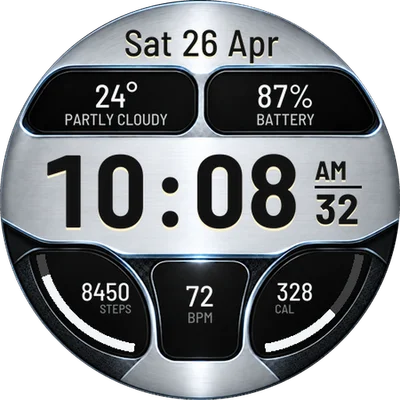
Alloy Deckは、GoogleのWatch Faceフォーマットで作成されたWear OS用デジタルウォッチフェイスです。削り出し加工された金属製シャーシには、金属に埋め込まれた大きな時計、日付、そしてデータを表示する5つの凹型ポッドが配置されています。そのうち2つはライブゲージで覆われています。
5つのデータポッド
- 各ポッドは標準的なWear OSコンプリケーションスロットです。カスタマイズで表示する項目を選択できます。歩数、心拍数、バッテリー残量、天気、日の出と日の入り、カレンダー、またはアプリが公開するあらゆるデータなど。
- 各ポッドには、データソースのアイコン、値、タイトルが表示されます。アイコンやタイトルが付けられていないポッドは、そのポッド内の情報を再中央に配置します。
- 下隅の2つのポッドには、値が上昇するにつれて下から満たされていく曲線状のゲージがあります。最初は歩数とバッテリー残量ですが、範囲を送信するあらゆるソースの情報も表示できます。
- ポッドにはアプリを配置することもできます。アプリのショートカット(Galaxy Watchのアプリ)を選択すると、ポッド内にアイコンが表示され、タップするだけで開きます。
- 各ポッドはそれぞれ独立したタップターゲットであり、1つのポッドを変更しても他のポッドは移動しません。
時計
- 時と分は金属に刻まれ、AM/PMと秒がその横に並んでいます。
- 5種類の時計スタイル:コンデンス、パネル、チャビー、ネオンチューブ、ブラシ
- 15種類の時計カラー - 日付、秒、AM/PMは時計に連動します。
- ポッド、アイコン、および両方のゲージのテキストカラーは13種類
13種類の仕上げと5種類の時計、そのうち3種類はあなただけのもの
このウォッチフェイスには、スターリングとカーボンライムの仕上げが含まれています。付属の時計は、簡略化されたデザインです。すべての時計の色、すべてのテキストの色、そして5つのポッドはすべて、完全な永久スタイルであり、試用版ではなく、有効期限もありません。色とポッドはプレミアムではありません。
プレミアムセットには、アイボリー、アジュールスチール、クリムゾン、アンバー、ブラッシュドゴールド、エメラルド、ターコイズ、サファイア、バイオレット、ローズゴールド、ブロンズの11種類の仕上げと、パネル、チャビー、ネオンチューブ、ブラシの4種類の時計スタイルが含まれています。1.99米ドルの1回限りの支払いで、これらすべてが一度にアンロックされます。サブスクリプションや定期購入はありません。
アンロックしていないプレミアム仕上げまたは時計を使用すると、時計の上にプレミアムスタイルパネルが表示され、その上にポッドが表示されるため、購入前にどのようなスタイルになるかを確認できます。
プレミアムスタイルのアンロック方法
1. Google Playから無料のWatcholate Watch Facesアプリをスマートフォンにインストールしてください。
2. Watcholate Watch Facesアプリをスマートウォッチにもインストールしてください。スマートフォンアプリから、スマートウォッチで適切なページを開くことができます。
3. スマートフォンアプリでAlloy Deckを開き、一度限りの購入手続きを行ってください。支払いはGoogle Playで行われます。
4. プレミアムな仕上げと時計がスマートウォッチに反映されます。通常、1~2秒で完了します。文字盤を再読み込みする必要はありません。
購入はGoogleアカウントに紐付けられるため、ログインしたすべてのスマートウォッチに適用され、スマートウォッチをリセットしたり、新しいスマートウォッチを購入したりしても、購入内容は復元されます。
常時表示
白地に黒文字で、同じサイズ、同じ位置に日付とともに時計が表示されます。ポッドやプレートがないため、手首を上げても心拍数は誰にも見えず、画面のごく一部だけが点灯します。
知っておくと便利な情報
- 天気予報を表示するには、スマートウォッチにコンプリケーション機能付きの天気予報アプリをインストールする必要があります。 Wear OSには天気予報機能が内蔵されていないため、左上のポッドは日の出と日の入りに合わせて表示されます。
- 時計は12時間表示で、午前/午後を選択できます。
- Wear OS 5以降(Android 14以降)に対応しており、Pixel WatchやGalaxy Watchも利用可能です。
追加するには:現在使用しているウォッチフェイスを長押しし、右端までスワイプして「追加」をタップし、「Alloy Deck」を選択します。仕上げ、時計、色、ポッドを変更するには:ウォッチフェイスを長押しし、「カスタマイズ」をタップします。
プライバシー
このウォッチフェイスにはコードは含まれておらず、データの収集も行いません。5つのポッドに入力した内容はWear OSによって読み取られ、表示されるだけで、ウォッチから外部に送信されることはありません。プライバシーポリシー全文はこちら:https://watcholate.com/privacy
免責事項
ポッドに表示される健康データは、ウォッチ本体のセンサーから取得したものであり、医療目的での使用はできません。天気予報は、追加した場合、選択した天気アプリから取得されます。
Watcholateより
原文を表示
Alloy Deck is a digital watch face for Wear OS, built in Google's Watch Face Format. A machined metal chassis carries a large clock milled into the metal, the date, and five recessed pods for your data - two of them wrapped in live gauges.
FIVE DATA PODS
- Every pod is a standard Wear OS complication slot: choose what it shows in Customize - steps, heart rate, battery, weather, sunrise and sunset, calendar, or anything an app publishes
- Each pod draws its source's icon, value and title; a pod given no icon or title re-centers what it has
- The two lower corner pods carry curved gauges that fill from the bottom as the value rises - steps and battery to start with, or any source that sends a range
- A pod can also hold an app: pick App shortcut (Apps on Galaxy watches) and its icon sits in the pod, one tap from opening
- Every pod is its own tap target, and changing one never moves another
THE CLOCK
- Hour and minute milled into the metal, with AM or PM and the seconds stacked beside them
- Five clock styles: Condensed, Panel, Chubby, Neon Tube and Brush
- Fifteen clock colors - the date, the seconds and AM or PM follow the clock
- Thirteen text colors for the pods, their icons and both gauges
THIRTEEN FINISHES AND FIVE CLOCKS, THREE OF THEM YOURS
Sterling and Carbon Lime are the finishes included with this watch face, and Condensed is the included clock. With every clock color, every text color and all five pods, they are complete, permanent styles - not a trial, and they do not expire. Colors and pods are never premium.
The premium set is 11 more finishes - Ivory, Azure Steel, Crimson, Amber, Brushed Gold, Emerald, Turquoise, Sapphire, Violet, Rose Gold and Bronze - and 4 more clock styles: Panel, Chubby, Neon Tube and Brush. One single payment of US$1.99 unlocks all of them at once. There is no subscription and nothing recurring.
A premium finish or clock you have not unlocked shows a Premium styles panel over the clock when you wear it, with your pods still live on top, so you see what you would be buying before you decide.
HOW TO UNLOCK THE PREMIUM STYLES
1. Install the free Watcholate Watch Faces app on your phone from Google Play.
2. Install the Watcholate Watch Faces app on your watch as well - the phone app offers to open the right page on your watch for you.
3. Open Alloy Deck in the phone app and make the one-time purchase. Payment is handled by Google Play.
4. The premium finishes and clocks unlock on your watch, usually within a second or two. You do not need to reload the face.
The purchase is tied to your Google account, so it applies to every watch you sign in to, and it comes back if you reset your watch or buy a new one.
ALWAYS-ON
The same clock in white on black, at the same size and in the same place, with the date. No pods and no plate, so a raised wrist shows nobody your heart rate, and it lights only a small part of the screen.
GOOD TO KNOW
- Weather needs a weather app on your watch that offers a complication; Wear OS has no built-in weather source, so the top-left pod starts on sunrise and sunset
- The clock is 12-hour, with AM or PM
- Works on Wear OS 5 and later (Android 14 or later), including Pixel Watch and Galaxy Watch
To add it: touch and hold your current watch face, swipe to the end, tap Add, and choose Alloy Deck. To change the finish, clock, colors or pods: touch and hold the face and tap Customize.
PRIVACY
This watch face contains no code and collects nothing. Whatever you put in the five pods is read and drawn by Wear OS itself and never leaves your watch. Full policy: https://watcholate.com/privacy
DISCLAIMER
Health readings shown in the pods come from your watch's own sensors and are not for medical use. Weather, when you add it, comes from the weather app you choose.
From Watcholate.
データ セーフティ
このアプリが収集・共有するデータについて、WatcholateがGoogle Playで申告している内容です。
- 第三者と共有されるデータはありません詳しくは、デベロッパーが共有を申告する方法についての説明をご覧ください
- データは収集されません詳しくは、デベロッパーが収集を申告する方法についての説明をご覧ください
新機能
バージョン 1.0.4 · 2026/10/19
Long complication text, such as a full date, now fits its pod instead of being cut off. Small complication text matches the color of the large text, and icons and titles appear as soon as a complication updates. Premium styles show a PREMIUM badge in the watch face editor. A smaller download.
開発元の連絡先
- ウェブサイトwatcholate.com
- メールsupport@watcholate.com
- プライバシーポリシーwatcholate.com
- 住所14727 Cypress Creek Landing Houston, TX 77068-2527 United States
情報
- 提供元
- Watcholate
- カテゴリ
- カスタマイズ
- バージョン
- 1.0.4
- 更新日
- 2026/10/19
- リリース
- 2026/9/25
- 対象年齢
- 3 歳以上
- 価格
- 無料
- パッケージ名
- com.watcholate.alloydeck