Analog Basic 40 Wear OS 5+
OQ Watchfaces- USK ab 0 JahrenAltersfreigabe
- PersonalisierungKategorie
- 25.07.2026Aktualisiert
- 1,49 €Preis
Verlinkt auf den offiziellen Google Play-Eintrag von com.watchfacestudio.ab40. Zuletzt geprüft am 13.11.2026.
Über diese App
Automatische Übersetzung von Google. Originalsprache: Englisch (Vereinigte Staaten).
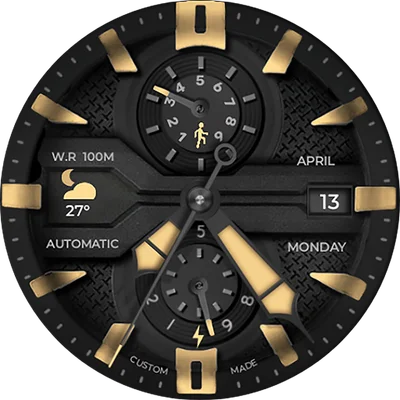
Ein stylischer analoger Chorono mit vielfältigen Anpassungs- und Personalisierungsoptionen.
========================================================
HINWEIS: LESEN SIE DIES VOR UND NACH DEM HERUNTERLADEN UNSERES ZIFFERBLATTS, UM UNERWÜNSCHTE SITUATIONEN ZU VERMEIDEN.
=======================================================
1. SO PASSEN SIE DIESES ZIFFERBLATT AM BESTEN AN:
A. BEI SAMSUNG WATCH-SERIE: LANGE DRÜCKEN SIE AUF DAS ZIFFERBLATT
STARTBILDSCHIRM UND ÖFFNEN SIE DAS MENÜ ZUR ANPASSUNG. SAMSUNG
WEARABLE-APPS SIND SEIT 5 JAHREN FEHLERHAFT.
B. Auf Google Pixel-Uhren funktionieren sowohl die Uhren- als auch die Smartphone-Methode einwandfrei.
C. Auf der Ticwatch 5 Pro ist die Ticwatch Health App die beste Methode.
Ein hochwertiges analoges Chronographen-Zifferblatt, entwickelt für Wear OS 5+-Geräte mit umfangreichen Anpassungsmöglichkeiten und moderner Funktionalität. Das Design bietet ein klassisches analoges Zifferblatt mit verschiedenen Komplikationen und vereint Eleganz mit nützlichen Informationen für den Alltag.
Dieses Zifferblatt für Wear OS wurde auf einer Google Pixel 4 Watch mit Wear OS 6.1, einer Samsung Watch Ultra mit Wear OS 6.0 und einer Samsung Watch 8 Classic mit Wear OS 6.0 getestet. Es unterstützt außerdem alle anderen Smartwatches mit Wear OS 5+. Es wurde mit der neuesten Version des Samsung Watch Face Studio erstellt und ist für optimale Leistung und Akkulaufzeit optimiert. Gleichzeitig bietet es volle Kontrolle über Aussehen und Funktionen.
======================================================
FUNKTIONEN UND FUNKTIONEN
=======================================================
Dieses Zifferblatt für Wear OS 5+ bietet folgende Funktionen:
1. Anpassungsoptionen
. 30 auswählbare Farbthemen
. 5 Hintergrundzifferblattstile
. Optionen für die Sekundenanzeige
. Option zum Ein-/Ausschalten der äußeren Minutenmarkierung
. Mehrere Helligkeitsstufen für die Hauptanzeige
. 3 Helligkeitsstufen für das Always-On-Display
. Insgesamt 8 Komplikationsplätze inklusive Komplikationsverknüpfungen
. Option zum Ein-/Ausschalten der äußeren Minutenmarkierung.
2. Komplikationen
Das Zifferblatt unterstützt bis zu 8 anpassbare Komplikationen, darunter auch unsichtbare Verknüpfungen auf dem Hauptdisplay. Die Komplikationsfelder über Schrittzähler und Batteriezähler sind bewusst frei gelassen, sodass Sie bei Bedarf weitere Verknüpfungen festlegen können.
3. Interaktive Verknüpfungen
Mehrere Bereiche auf dem Zifferblatt bieten schnellen Zugriff auf Uhrenfunktionen:
Tippen auf den Stundenindex bei 5 Uhr öffnet die Wähl-App.
Tippen auf das Datum öffnet die Kalender-App.
Tippen auf den Stundenindex bei 6 Uhr öffnet die Wecker-App.
Tippen auf den Stundenindex bei 8 Uhr öffnet Google Maps.
Tippen auf den Stundenindex bei 7 Uhr öffnet die Nachrichten-App.
Tippen auf den Stundenindex bei 4 Uhr öffnet den Google Play Store.
Optimierte Leistung
Das Zifferblatt wurde nach den neuesten Wear OS-Standards entwickelt und für eine reibungslose Performance und effiziente Batterienutzung optimiert.
Originaltext anzeigen
=======================================================
NOTICE: READ THIS ALWAYS BEFORE AND AFTER DOWNLOADING OUR WATCH FACE TO AVOID ANY SITUATION YOU DON'T LIKE.
=======================================================
1. BEST WAY TO CUSTOMIZE THIS WATCH FACE.
A. ON SAMSUNG WATCH SERIES IS BY LONG PRESSING ON WATCH FACE
HOME SCREEN & ACCESS THE CUSTOMIZATION MENU. SAMSUNG
WEARABLE APP HAS ALWAYS BEEN BUGGY FOR LAST 5 YEARS.
B. ON GOOGLE PIXEL WATCHES BOTH WATCH AND PHONE METHODS
WORK GOOD.
C. ON TICWATCH 5 PRO VIA TICWATCH HEALTH APP IS BEST WAY/
A premium analog chronograph watch face designed for Wear OS 5+ devices with extensive customization options and modern functionality.The design gives you a classic analog dial with multiple complications and aims to provide both elegance and useful daily information.
This Watch face for WEAR OS has been tested on a real Google Pixel 4 Watch running WEAR OS 6.1, Samsung Watch Ultra Wear OS 6.0 and Samsung Watch 8 Classic Devices running Wear OS 6.0. This watchface supports also all other smart watches running WEAR OS 5+ as well.It is made in the latest Samsung Watch face Studio available right now.It is optimized for performance and battery efficiency while giving users full control over appearance and behavior.
======================================================
FEATURES AND FUNCTIONS
======================================================
This watch face for WEAR OS 5+ has following features:-
1. Customization Options
. 30 select-able color theme Styles
. 5 background dial styles
. Seconds Movement Style Options.
. Minutes Outer Index On/Off option.
. Multiple dim mode settings Customization Option for main display.
. 3x Brightness Step Customization Option for Always On Display.
. Total 8 x Complications slots including complication shortcuts.
. Minutes Outer Index On/Off customization Option.
2. Complications
. The watch face supports up to 8 customizable complications including complications invisible shortcuts on the main display. The complication slots on top of Steps and Battery Chronometer have been intentionally kept open and not fixed so if user wants to set any other shortcut can set as well.
3. Interactive Shortcuts
Several areas on the watch face provide quick access to watch functions:
. Tapping at 5 o clock Hour Index bar opens watch dialer app.
. Tapping on Date text opens watch Calendar app.
.Tapping at 6 o clock Hour index bar opens alarm application.
.Tapping at 8 o clock Hour index bar opens Google Maps App on the watch.
. Tapping at 7 o clock Hour Index bar opens watch messaging app.
. Tapping at 4 o clock Hour index bar opens Google App Store on the watch.
Optimized Performance
The watch face is built using the latest Wear OS standards and optimized for smooth performance and efficient battery usage.
Datensicherheit
Was OQ Watchfaces bei Google Play zu den Daten angibt, die diese App erfasst und weitergibt.
- Keine Daten werden mit Drittunternehmen oder -organisationen geteiltWeitere Informationen dazu, wie Entwickler Angaben zur Weitergabe von Daten machen
- Keine Daten erhobenWeitere Informationen dazu, wie Entwickler Angaben zur Datenerhebung machen
Neue Funktionen
25.07.2026
V1.00 First Release.
Kontakt zum Entwickler
- E-Mailosmanqadir78@gmail.com
- Datenschutzerklärungsites.google.com
- AdresseHouse no 307 Sector C Street 12 Askari X Lahore Cantt, 54810 Pakistan
Informationen
- Angeboten von
- OQ Watchfaces
- Kategorie
- Personalisierung
- Aktualisiert
- 25.07.2026
- Veröffentlicht
- 14.04.2026
- Altersfreigabe
- USK ab 0 Jahren
- Preis
- 1,49 €
- Paketname
- com.watchfacestudio.ab40