Analog Basic 40 Wear OS 5+
OQ Watchfaces- 3 歳以上対象年齢
- カスタマイズカテゴリ
- 2026/7/25更新日
- ¥250価格
com.watchfacestudio.ab40のGoogle Play公式ページにリンクしています。最終確認:2026/11/13。
このアプリについて
Googleによる英語 (アメリカ合衆国)からの自動翻訳です。
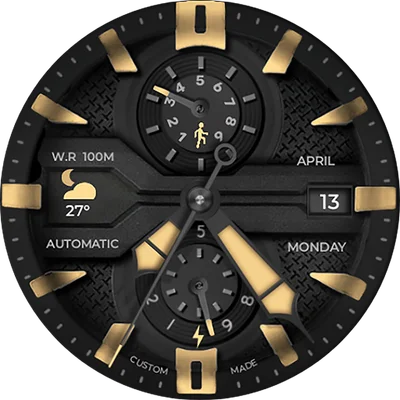
多彩なカスタマイズとパーソナライズオプションを備えた、スタイリッシュなアナログクロノグラフ。
=========================================================
注意:ウォッチフェイスをダウンロードする前と後に必ずお読みください。予期せぬ事態を避けるためです。
========================================================
1. このウォッチフェイスをカスタマイズする最適な方法
A. Samsung Watchシリーズの場合、ウォッチフェイスを長押しします。
ホーム画面からカスタマイズメニューにアクセスしてください。サムスン
ウェアラブルアプリは過去5年間ずっとバグだらけです。
B. Google Pixel Watchでは、時計とスマートフォンの両方の方法が
正常に動作します。
C. TikWatch 5 Proでは、TicWatch Healthアプリ経由が最適な方法です。
Wear OS 5+デバイス向けに設計された、豊富なカスタマイズオプションと最新機能を備えたプレミアムアナログクロノグラフウォッチフェイスです。クラシックなアナログダイヤルに複数のコンプリケーションを搭載し、エレガントさと日々の便利な情報を提供することを目指しています。
このWear OS用ウォッチフェイスは、Wear OS 6.1を搭載したGoogle Pixel 4、Wear OS 6.0を搭載したSamsung Watch Ultra、Wear OS 6.0を搭載したSamsung Watch 8 Classicでテスト済みです。このウォッチフェイスは、WEAR OS 5+を搭載した他のすべてのスマートウォッチにも対応しています。最新のSamsung Watch Face Studioで作成されており、パフォーマンスとバッテリー効率を最適化しながら、ユーザーが外観と動作を完全に制御できます。
========================================================
機能
========================================================
このWEAR OS 5+用ウォッチフェイスには、以下の機能があります。
1. カスタマイズオプション
・30種類のカラーテーマスタイルから選択可能
・5種類の背景文字盤スタイル
・秒針の動きのスタイルオプション
・分針外周インデックスのオン/オフオプション
メインディスプレイの調光モード設定を複数段階にカスタマイズできます。
常時表示ディスプレイの明るさを3段階に調整できます。
コンプリケーションショートカットを含む、合計8つのコンプリケーションスロットがあります。
分表示の外周インデックスの表示/非表示をカスタマイズできます。
2. コンプリケーション
ウォッチフェイスは、メインディスプレイに非表示のショートカットを含む、最大8つのカスタマイズ可能なコンプリケーションをサポートしています。歩数計とバッテリークロノメーターの上にあるコンプリケーションスロットは、ユーザーが他のショートカットを設定できるように、意図的に固定せずに空けています。
3. インタラクティブショートカット
ウォッチフェイスのいくつかの領域から、ウォッチの機能に素早くアクセスできます。
5時位置のインデックスバーをタップすると、ウォッチダイヤラーアプリが開きます。
日付テキストをタップすると、ウォッチカレンダーアプリが開きます。
6時位置のインデックスバーをタップすると、アラームアプリが開きます。
8時位置のインデックスバーをタップすると、ウォッチ上でGoogleマップアプリが開きます。
7時位置のインデックスバーをタップすると、ウォッチのメッセージアプリが開きます。
4時位置のインデックスバーをタップすると、ウォッチ上でGoogle Playストアが開きます。
最適化されたパフォーマンス
このウォッチフェイスは、最新のWear OS規格に基づいて構築されており、スムーズな動作と効率的なバッテリー使用を実現するように最適化されています。
原文を表示
=======================================================
NOTICE: READ THIS ALWAYS BEFORE AND AFTER DOWNLOADING OUR WATCH FACE TO AVOID ANY SITUATION YOU DON'T LIKE.
=======================================================
1. BEST WAY TO CUSTOMIZE THIS WATCH FACE.
A. ON SAMSUNG WATCH SERIES IS BY LONG PRESSING ON WATCH FACE
HOME SCREEN & ACCESS THE CUSTOMIZATION MENU. SAMSUNG
WEARABLE APP HAS ALWAYS BEEN BUGGY FOR LAST 5 YEARS.
B. ON GOOGLE PIXEL WATCHES BOTH WATCH AND PHONE METHODS
WORK GOOD.
C. ON TICWATCH 5 PRO VIA TICWATCH HEALTH APP IS BEST WAY/
A premium analog chronograph watch face designed for Wear OS 5+ devices with extensive customization options and modern functionality.The design gives you a classic analog dial with multiple complications and aims to provide both elegance and useful daily information.
This Watch face for WEAR OS has been tested on a real Google Pixel 4 Watch running WEAR OS 6.1, Samsung Watch Ultra Wear OS 6.0 and Samsung Watch 8 Classic Devices running Wear OS 6.0. This watchface supports also all other smart watches running WEAR OS 5+ as well.It is made in the latest Samsung Watch face Studio available right now.It is optimized for performance and battery efficiency while giving users full control over appearance and behavior.
======================================================
FEATURES AND FUNCTIONS
======================================================
This watch face for WEAR OS 5+ has following features:-
1. Customization Options
. 30 select-able color theme Styles
. 5 background dial styles
. Seconds Movement Style Options.
. Minutes Outer Index On/Off option.
. Multiple dim mode settings Customization Option for main display.
. 3x Brightness Step Customization Option for Always On Display.
. Total 8 x Complications slots including complication shortcuts.
. Minutes Outer Index On/Off customization Option.
2. Complications
. The watch face supports up to 8 customizable complications including complications invisible shortcuts on the main display. The complication slots on top of Steps and Battery Chronometer have been intentionally kept open and not fixed so if user wants to set any other shortcut can set as well.
3. Interactive Shortcuts
Several areas on the watch face provide quick access to watch functions:
. Tapping at 5 o clock Hour Index bar opens watch dialer app.
. Tapping on Date text opens watch Calendar app.
.Tapping at 6 o clock Hour index bar opens alarm application.
.Tapping at 8 o clock Hour index bar opens Google Maps App on the watch.
. Tapping at 7 o clock Hour Index bar opens watch messaging app.
. Tapping at 4 o clock Hour index bar opens Google App Store on the watch.
Optimized Performance
The watch face is built using the latest Wear OS standards and optimized for smooth performance and efficient battery usage.
データ セーフティ
このアプリが収集・共有するデータについて、OQ WatchfacesがGoogle Playで申告している内容です。
- 第三者と共有されるデータはありません詳しくは、デベロッパーが共有を申告する方法についての説明をご覧ください
- データは収集されません詳しくは、デベロッパーが収集を申告する方法についての説明をご覧ください
新機能
2026/7/25
V1.00 First Release.
開発元の連絡先
- メールosmanqadir78@gmail.com
- プライバシーポリシーsites.google.com
- 住所House no 307 Sector C Street 12 Askari X Lahore Cantt, 54810 Pakistan
情報
- 提供元
- OQ Watchfaces
- カテゴリ
- カスタマイズ
- 更新日
- 2026/7/25
- リリース
- 2026/4/14
- 対象年齢
- 3 歳以上
- 価格
- ¥250
- パッケージ名
- com.watchfacestudio.ab40