AWD Constellations
AIwatch- USK ab 0 JahrenAltersfreigabe
- PersonalisierungKategorie
- 15.08.2026Aktualisiert
- 1,29 €Preis
Verlinkt auf den offiziellen Google Play-Eintrag von com.watchfacestudio.awd_constellations. Zuletzt geprüft am 13.11.2026.
Über diese App
Automatische Übersetzung von Google. Originalsprache: Englisch (Vereinigte Staaten).
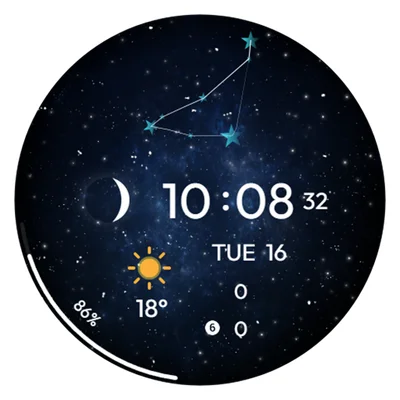
Zifferblatt mit Sternzeichen
+++ Es werden nur Geräte mit „Wear OS 5“ unterstützt. (Galaxy Watch 7, Watch Ultra)
Sternzeichen
12.22~01.19 Steinbock
01.20~02.18 Wassermann
02.19~03.20 Fische
21.03.19–04.19 Widder
04.20–05.20 Stier
05.21~06.21 Zwillinge
06.22~07.22 Krebs
23.07.–22.08. Löwe
08.23~09.22 Jungfrau
09.23~10.23 Waage
10,24–11,22 Skorpion
11.23~12.21 Schütze
Mondphase
Wettersymbol
Temp
(Das Wetter wird etwa alle 30 Minuten automatisch aktualisiert. Manuelle Aktualisierungsmethode: Greifen Sie auf die Wetter- oder UV-Komplikation zu und klicken Sie unten auf die Schaltfläche „Aktualisieren“.)
Wenn Sie die Uhr neu starten, werden möglicherweise keine Wetterinformationen angezeigt.
Wenden Sie in diesem Fall das Standard-Zifferblatt an und wenden Sie dann erneut das Wetter-Zifferblatt an.
Wetterinformationen werden normal angezeigt.
Wetterinformationen basieren auf der von Samsung bereitgestellten API.
Es kann zu Abweichungen von den Wetterinformationen anderer Unternehmen kommen.
Anpassen
- 6 x Änderung des Schriftfarbstils
- 8 x Änderung des Hintergrundstils
- 3 x Komplikationsbenutzereinstellung
- 1 x Appshortcut
- Unterstützen Sie Wear OS
- Wear OS API 34+
- Der Beobachtungsmodus mit quadratischem Bildschirm wird nicht unterstützt.
- Immer sichtbar
***Installationsanleitung***
Die mobile App ist eine Anleitungs-App zum Installieren des Zifferblatts.
Sobald der Uhrenbildschirm ordnungsgemäß installiert ist, können Sie die mobile App löschen.
1. Die Uhr und das Mobiltelefon müssen über Bluetooth verbunden sein.
2. Klicken Sie in der mobilen Guide-App auf die Schaltfläche „Klicken“.
3. Folgen Sie den Zifferblättern, um das Zifferblatt in wenigen Minuten zu installieren.
Sie können Zifferblätter auch direkt über die Google-App auf Ihrer Uhr suchen und installieren.
Sie können es in Ihrem mobilen Webbrowser suchen und installieren.
Kontaktieren Sie uns: aiwatchdesign@gmail.com
Originaltext anzeigen
+++ Only "wear OS 5" devices are supported. (Galaxy watch 7 , watch Ultra)
Zodiac sign
12.22~01.19 Capricorn
01.20~02.18 Aquarius
02.19~03.20 Pisces
03.21~04.19 Aries
04.20~05.20 Taurus
05.21~06.21 Gemini
06.22~07.22 Cancer
07.23~08.22 Leo
08.23~09.22 Virgo
09.23~10.23 Libra
10.24~11.22 Scorpio
11.23~12.21 Sagittarius
Moonphase
Weather Icon
Temp
(The weather is automatically updated about every 30 minutes. Manual update method: Access the weather or UV complication and press the update button at the bottom.)
When you restart the watch, weather information may not be displayed.
In this case, apply the default watch face and then reapply the weather watch face.
Weather information is displayed normally.
Weather information is based on the API provided by Samsung.
There may be differences from other companies’ weather information.
Customizing
- 6 x Font color style change
- 8 x Backgropund style change
- 3 x Complication user setting
- 1 x Appshortcut
- Support wear OS
- Wear OS API 34+
- Square screen watch mode is not supported.
- Always On Display
***Installation Guide***
The mobile app is a guide app for installing the watch face.
Once the watch screen is installed properly, you can delete the mobile app.
1. The watch and mobile phone must be connected via Bluetooth.
2. Press the “Click” button on the mobile guide app.
3. Follow the watch faces to install the watch face in a few minutes.
You can also search for and install watch faces directly from the Google app on your watch.
You can search and install it in your mobile web browser.
Contact us : aiwatchdesign@gmail.com
Datensicherheit
Was AIwatch bei Google Play zu den Daten angibt, die diese App erfasst und weitergibt.
- Keine Daten werden mit Drittunternehmen oder -organisationen geteiltWeitere Informationen dazu, wie Entwickler Angaben zur Weitergabe von Daten machen
- Keine Daten erhobenWeitere Informationen dazu, wie Entwickler Angaben zur Datenerhebung machen
Kontakt zum Entwickler
- Websiteinstagram.com
- E-Mailaiwatchdesign@gmail.com
- Datenschutzerklärungsites.google.com
- Adresse완정로65번안길 17 (마전동, 금호어울림아파트) 101동204호 검단구, 인천광역시 23469 South Korea
Informationen
- Angeboten von
- AIwatch
- Kategorie
- Personalisierung
- Aktualisiert
- 15.08.2026
- Veröffentlicht
- 03.11.2024
- Altersfreigabe
- USK ab 0 Jahren
- Preis
- 1,29 €
- Paketname
- com.watchfacestudio.awd_constellations