AWD Constellations
AIwatch- 3 歳以上対象年齢
- カスタマイズカテゴリ
- 2026/8/15更新日
- ¥210価格
com.watchfacestudio.awd_constellationsのGoogle Play公式ページにリンクしています。最終確認:2026/11/13。
このアプリについて
Googleによる英語 (アメリカ合衆国)からの自動翻訳です。
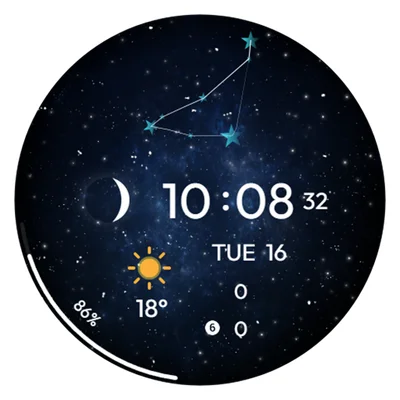
星座ウォッチフェイス
+++ 「wear OS 5」デバイスのみがサポートされています。 (Galaxy watch 7、watch Ultra)
星座
12.22~01.19 山羊座
01.20~02.18 水瓶座
02.19~03.20 うお座
03.21~04.19 牡羊座
04.20~05.20 おうし座
05.21~06.21 双子座
06.22~07.22 がん
07.23~08.22 獅子座
08.23~09.22 おとめ座
09.23~10.23 天秤座
10.24~11.22 さそり座
11.23~12.21 射手座
ムーンフェイズ
天気アイコン
温度
(天気は約30分ごとに自動更新されます。手動更新方法:天気またはUV合併症にアクセスし、下部の更新ボタンを押します。)
時計を再起動すると、天気情報が表示されなくなる場合があります。
この場合、デフォルトのウォッチフェイスを適用してから、天気ウォッチフェイスを再適用します。
気象情報は正常に表示されます。
気象情報はSamsungが提供するAPIに基づいています。
他社の気象情報とは異なる場合がございます。
カスタマイズ中
- 6 x フォントカラースタイル変更
- 8 x 背景スタイルの変更
- 3 x コンプリケーションのユーザー設定
- 1 x アプリのショートカット
- ウェアOSをサポート
- Wear OS API 34+
- スクエアスクリーンウォッチモードはサポートされていません。
- 常時表示
***インストールガイド***
モバイルアプリは、ウォッチフェイスをインストールするためのガイドアプリです。
時計画面が適切にインストールされたら、モバイル アプリを削除できます。
1. 時計と携帯電話は Bluetooth 経由で接続する必要があります。
2. モバイルガイドアプリの「クリック」ボタンを押します。
3. ウォッチフェイスに従って、数分でウォッチフェイスをインストールします。
ウォッチの Google アプリからウォッチフェイスを直接検索してインストールすることもできます。
モバイル Web ブラウザで検索してインストールできます。
お問い合わせ:aiwatchdesign@gmail.com
原文を表示
+++ Only "wear OS 5" devices are supported. (Galaxy watch 7 , watch Ultra)
Zodiac sign
12.22~01.19 Capricorn
01.20~02.18 Aquarius
02.19~03.20 Pisces
03.21~04.19 Aries
04.20~05.20 Taurus
05.21~06.21 Gemini
06.22~07.22 Cancer
07.23~08.22 Leo
08.23~09.22 Virgo
09.23~10.23 Libra
10.24~11.22 Scorpio
11.23~12.21 Sagittarius
Moonphase
Weather Icon
Temp
(The weather is automatically updated about every 30 minutes. Manual update method: Access the weather or UV complication and press the update button at the bottom.)
When you restart the watch, weather information may not be displayed.
In this case, apply the default watch face and then reapply the weather watch face.
Weather information is displayed normally.
Weather information is based on the API provided by Samsung.
There may be differences from other companies’ weather information.
Customizing
- 6 x Font color style change
- 8 x Backgropund style change
- 3 x Complication user setting
- 1 x Appshortcut
- Support wear OS
- Wear OS API 34+
- Square screen watch mode is not supported.
- Always On Display
***Installation Guide***
The mobile app is a guide app for installing the watch face.
Once the watch screen is installed properly, you can delete the mobile app.
1. The watch and mobile phone must be connected via Bluetooth.
2. Press the “Click” button on the mobile guide app.
3. Follow the watch faces to install the watch face in a few minutes.
You can also search for and install watch faces directly from the Google app on your watch.
You can search and install it in your mobile web browser.
Contact us : aiwatchdesign@gmail.com
データ セーフティ
このアプリが収集・共有するデータについて、AIwatchがGoogle Playで申告している内容です。
- 第三者と共有されるデータはありません詳しくは、デベロッパーが共有を申告する方法についての説明をご覧ください
- データは収集されません詳しくは、デベロッパーが収集を申告する方法についての説明をご覧ください
開発元の連絡先
- ウェブサイトinstagram.com
- メールaiwatchdesign@gmail.com
- プライバシーポリシーsites.google.com
- 住所완정로65번안길 17 (마전동, 금호어울림아파트) 101동204호 검단구, 인천광역시 23469 South Korea
情報
- 提供元
- AIwatch
- カテゴリ
- カスタマイズ
- 更新日
- 2026/8/15
- リリース
- 2024/11/3
- 対象年齢
- 3 歳以上
- 価格
- ¥210
- パッケージ名
- com.watchfacestudio.awd_constellations