Block Time Watch Face
Bonsware- USK ab 0 JahrenAltersfreigabe
- PersonalisierungKategorie
- 13.10.2026Aktualisiert
- 1,19 €Preis
Verlinkt auf den offiziellen Google Play-Eintrag von be.bonsware.block_time. Zuletzt geprüft am 22.11.2026.
Über diese App
Automatische Übersetzung von Google. Originalsprache: Englisch (Vereinigte Staaten).
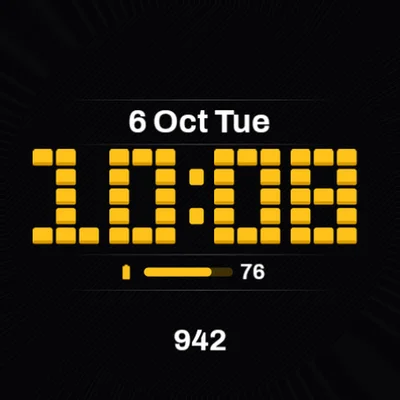
Riesige Blockziffern in 7 Farben, mit nächstem Ereignis, Akkustand und Schritten auf einen Blick
Block Time zeigt die Uhrzeit in großen, gut lesbaren Blockziffern auf schwarzem Hintergrund an.
AUF EINEN BLICK
• Große Blockziffern mit dezentem 3D-Rand
• Ihr nächster Kalendereintrag oben
• Datum in der Sprache Ihrer Uhr („4. Okt. So.“)
• Akkustand mit Farbbalken und Prozentangabe
• Tägliche Schrittzahl unten
7 FARBEN
Gelb, Orange, Rot, Grün, Cyan, Pink oder Weiß. Die Farbe wird für die Ziffern, den nächsten Eintrag und den Akkubalken verwendet.
ANPASSBAR
• Die Schrittanzeige kann durch andere Daten oder App-Verknüpfungen ersetzt werden.
Passt sich der 12- oder 24-Stunden-Einstellung Ihrer Uhr an.
Minimaler, energiesparender Always-on-Modus mit abgedunkelten Blöcken
• Keine Datenerfassung, keine Werbung
Farbe ändern: Halten Sie das Zifferblatt gedrückt, tippen Sie auf den Stift und drehen Sie dann die Krone.
Funktioniert mit Wear OS 5 und neueren Smartwatches (Pixel Watch, Galaxy Watch usw.).
Anwendung: Installieren Sie die App über Google Play, tippen Sie dann lange auf Ihr aktuelles Zifferblatt und wählen Sie „Zeit blockieren“.
Originaltext anzeigen
Block Time shows the time in huge, chunky block digits you can read at a glance, on a clean black background.
AT A GLANCE
• Big block digits with a subtle 3D edge
• Your next calendar event at the top
• Date in your watch’s language (“4 Oct Sun”)
• Battery level with a color bar and percentage
• Daily step count at the bottom
7 COLORS
Yellow, orange, red, green, cyan, pink or white. The color applies to the digits, the next event and the battery bar.
CUSTOMIZABLE
• The steps complication can be replaced with any other data or app shortcut
• Follows your watch’s 12h / 24h setting
• Minimal, battery-friendly always-on mode with dimmed blocks
• No data collected, no ads
Change the color: long-press the watch face, tap the pencil, then turn the crown.
Works on Wear OS 5 and later watches (Pixel Watch, Galaxy Watch, etc.).
How to apply: install from Google Play, then long-press your current watch face and pick “Block Time”.
Datensicherheit
Was Bonsware bei Google Play zu den Daten angibt, die diese App erfasst und weitergibt.
- Keine Daten werden mit Drittunternehmen oder -organisationen geteiltWeitere Informationen dazu, wie Entwickler Angaben zur Weitergabe von Daten machen
- Keine Daten erhobenWeitere Informationen dazu, wie Entwickler Angaben zur Datenerhebung machen
Kontakt zum Entwickler
- E-Mailinfo@bonsware.be
- Datenschutzerklärungbonsware.be
- AdresseAdresse non disponible dans le Banque Carrefour 0000 Inconnu Belgium
Informationen
- Angeboten von
- Bonsware
- Kategorie
- Personalisierung
- Version
- 1.0
- Aktualisiert
- 13.10.2026
- Veröffentlicht
- 04.10.2026
- Altersfreigabe
- USK ab 0 Jahren
- Preis
- 1,19 €
- Paketname
- be.bonsware.block_time