Block Time Watch Face
Bonsware- 3 歳以上対象年齢
- カスタマイズカテゴリ
- 2026/10/13更新日
- ¥190価格
be.bonsware.block_timeのGoogle Play公式ページにリンクしています。最終確認:2026/11/22。
このアプリについて
Googleによる英語 (アメリカ合衆国)からの自動翻訳です。
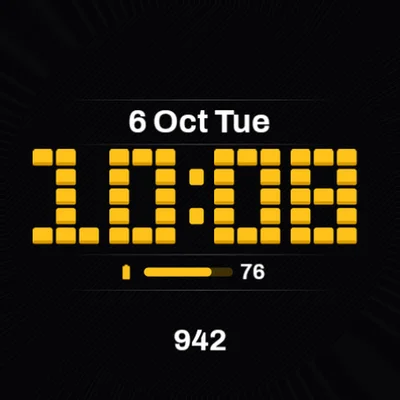
7色の大きなブロック数字で、次のイベント、バッテリー残量、歩数が一目でわかります。
ブロックタイムは、すっきりとした黒の背景に、一目で読み取れる大きくて太いブロック数字で時刻を表示します。
一目でわかる
• 控えめな3Dエッジの大きなブロック数字
• 上部に次の予定を表示
• 日付は時計の言語で表示(例:「10月4日 日」)
• バッテリー残量をカラーバーとパーセンテージで表示
• 下部に1日の歩数を表示
7色展開
イエロー、オレンジ、レッド、グリーン、シアン、ピンク、ホワイト。数字、次の予定、バッテリーバーの色は、選択した色で表示されます。
カスタマイズ可能
• 歩数表示は、他のデータやアプリのショートカットに変更できます
• 時計の12時間表示/24時間表示設定に対応
• ブロック数字を暗く表示する、バッテリー消費を抑えるミニマルな常時表示モード
• データ収集なし、広告表示なし
色の変更方法:文字盤を長押しし、鉛筆アイコンをタップしてから、リューズを回してください。
Wear OS 5以降を搭載した時計(Pixel Watch、Galaxy Watchなど)に対応しています。
適用方法:Google Playからインストール後、現在使用しているウォッチフェイスを長押しして「Block Time」を選択してください。
原文を表示
Block Time shows the time in huge, chunky block digits you can read at a glance, on a clean black background.
AT A GLANCE
• Big block digits with a subtle 3D edge
• Your next calendar event at the top
• Date in your watch’s language (“4 Oct Sun”)
• Battery level with a color bar and percentage
• Daily step count at the bottom
7 COLORS
Yellow, orange, red, green, cyan, pink or white. The color applies to the digits, the next event and the battery bar.
CUSTOMIZABLE
• The steps complication can be replaced with any other data or app shortcut
• Follows your watch’s 12h / 24h setting
• Minimal, battery-friendly always-on mode with dimmed blocks
• No data collected, no ads
Change the color: long-press the watch face, tap the pencil, then turn the crown.
Works on Wear OS 5 and later watches (Pixel Watch, Galaxy Watch, etc.).
How to apply: install from Google Play, then long-press your current watch face and pick “Block Time”.
データ セーフティ
このアプリが収集・共有するデータについて、BonswareがGoogle Playで申告している内容です。
- 第三者と共有されるデータはありません詳しくは、デベロッパーが共有を申告する方法についての説明をご覧ください
- データは収集されません詳しくは、デベロッパーが収集を申告する方法についての説明をご覧ください
開発元の連絡先
- メールinfo@bonsware.be
- プライバシーポリシーbonsware.be
- 住所Adresse non disponible dans le Banque Carrefour 0000 Inconnu Belgium
情報
- 提供元
- Bonsware
- カテゴリ
- カスタマイズ
- バージョン
- 1.0
- 更新日
- 2026/10/13
- リリース
- 2026/10/4
- 対象年齢
- 3 歳以上
- 価格
- ¥190
- パッケージ名
- be.bonsware.block_time