Clackboard: Split-Flap Clock
Hollingsworks- USK ab 0 JahrenAltersfreigabe
- PersonalisierungKategorie
- 16.10.2026Aktualisiert
- 1,09 €Preis
Verlinkt auf den offiziellen Google Play-Eintrag von com.hollingsworks.face.clackboard. Zuletzt geprüft am 13.11.2026.
Über diese App
Automatische Übersetzung von Google. Originalsprache: Englisch (Vereinigte Staaten).
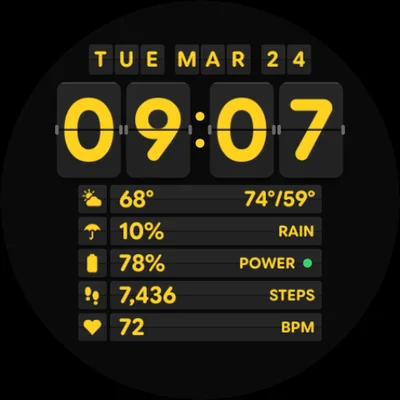
Eine geteilte Abflugtafel am Handgelenk. Die Klappen klappen jede Minute um.
Tragen Sie eine Abfahrtstafel. Jede Ziffer der Uhrzeit befindet sich auf einer eigenen Klappkarte, und beim Minutenwechsel klappen die Karten tatsächlich um: Das oberste Blatt klappt über das Scharnier und die neue Ziffer fällt an ihren Platz.
FUNKTIONEN
• Realistische Umklappanimation bei jeder Minute; Die Stunden wechseln mit dem Stundenwechsel.
• Detaillierte Klappen: ein dunkleres unteres Blatt, die Scharnierlinie mit Achsenstiften, die Kanten der darunterliegenden Klappen.
• Zeitplan-Layout: Datum auf kleinen Buchstabenklappen, große Zeitkarten und fünf Datenzeilen.
Layout mit großen Karten: vier große Karten (Stunden über Minuten) über Ihren zwei Datenzeilen.
• Große, kontrastreiche Zahlen und Werte, auf einen Blick lesbar.
• Zwei anpassbare Komplikationsplätze, in beiden Layouts sichtbar.
ANZEIGNETE DATEN
• Datum
• Zwei Komplikationszeilen, standardmäßig Schritte und Herzfrequenz (tauschen Sie die Daten Ihrer Uhr aus).
• Zeitplan-Layout zusätzlich: Aktuelles Wetter mit Höchst- und Tiefsttemperatur, Regenwahrscheinlichkeit, Batteriestand mit grüner oder roter Statusanzeige.
EINSTELLUNGEN
• Layout: Zeitplan / Große Karten
• Zifferblatt: 11 Farbschemata (Flughafengelb, Klassisch, Königsblau, Bahnhofsgrün, Creme, Signalrot, Mitternachtsbernstein, Mint, Eisblau, Kupfer, Violett)
• Zeitkarten: Dunkel oder farbig. Klappen
• Bewegung: Ein / Still
• Glasreflexion: Aus / Ein (ein sanfter Lichtstreifen wandert über das Glas)
• 12- oder 24-Stunden-Anzeige (passend zu Ihrer Uhreneinstellung)
AKKU
Zwischen den Klappvorgängen bleibt das Display statisch: Keine Einzelbildanimation, daher entspricht der Stromverbrauch in etwa dem eines statischen Zifferblatts. Der Always-On-Bildschirm ist tiefschwarz und zeigt weniger als 10 % der Pixel an: hohle Kartenkonturen mit umrandeten Ziffern und abgedunkelten Werten. Wählen Sie „Bewegung: Still“ für sofortige Ziffernänderungen.
KOMPATIBILITÄT
Funktioniert auf Wear OS 5+ Smartwatches (Pixel Watch, Galaxy Watch usw.). Erstellt im Watch Face Format. Es handelt sich um ein reines Smartwatch-Zifferblatt ohne Smartphone-App.
ANPASSUNG
Halten Sie das Smartwatch-Zifferblatt gedrückt und tippen Sie anschließend auf „Anpassen“ (oder verwenden Sie die Smartwatch-App Ihres Smartphones), um Layout, Display, Klappstil und Komplikationen auszuwählen.
DATENSCHUTZ
Dieses Smartwatch-Zifferblatt sammelt keine Daten. Wetterdaten, Schritte und Herzfrequenz werden von Ihrer Uhr erfasst und bleiben dort gespeichert.
Originaltext anzeigen
Wear a station departure board. Every digit of the time sits on its own flap card, and when the minute changes the cards really flip: the top leaf folds down over the hinge and the new digit drops into place.
FEATURES
• Real flip animation at every minute; the hours flip when the hour turns
• Detailed flap cards: a darker lower leaf, the hinge line with axle pins, the edges of the waiting flaps underneath
• Timetable layout: the date on little letter flaps, big time cards, and five board rows for your data
• Big cards layout: four big cards (hours over minutes) above your two data rows
• Large, high-contrast numbers and values, readable at a glance
• Two customizable complication slots, shown in both layouts
DATA SHOWN
• Date
• Two complication rows, steps and heart rate by default (swap in any data your watch offers)
• Timetable layout also: weather now with today's high and low, chance of rain, battery with a green or red status lamp
SETTINGS
• Layout: Timetable / Big cards
• Board: 11 color schemes (airport yellow, classic, royal blue, station green, cream, signal red, midnight amber, mint, ice blue, copper, violet)
• Time cards: dark or colored flaps
• Motion: On / Still
• Glass glare: Off / On (a soft band of light sweeps the glass)
• 12- or 24-hour time follows your watch setting
BATTERY
Between flips the board is completely still: no frame-by-frame animation, so it costs about as much as a static face. The always-on screen is true black and lights less than 10% of the pixels: hollow card outlines with outlined digits and dim values. Choose Motion: Still for instant digit changes.
COMPATIBILITY
Works on Wear OS 5+ watches (Pixel Watch, Galaxy Watch …). Built with the Watch Face Format. It is a watch face only, with no phone app.
HOW TO CUSTOMIZE
Long-press the watch face, then tap Customize (or use your phone's watch app) to pick the layout, board, flap style and complications.
PRIVACY
This watch face collects no data. Weather, steps and heart rate come from your watch and stay on it.
Datensicherheit
Was Hollingsworks bei Google Play zu den Daten angibt, die diese App erfasst und weitergibt.
- Keine Daten werden mit Drittunternehmen oder -organisationen geteiltWeitere Informationen dazu, wie Entwickler Angaben zur Weitergabe von Daten machen
- Keine Daten erhobenWeitere Informationen dazu, wie Entwickler Angaben zur Datenerhebung machen
Neue Funktionen
Version 1.2 · 16.10.2026
Weather and steps readouts now open their apps when tapped, and more data comes pre-filled with the real complications.
Kontakt zum Entwickler
- Websitejhworth8.github.io
- E-Mailjhworth8@gmail.com
- Datenschutzerklärunghollingsworks.com
- Adresse1828 Bowers St Birmingham, MI 48009-6812 United States
Informationen
- Angeboten von
- Hollingsworks
- Kategorie
- Personalisierung
- Version
- 1.2
- Aktualisiert
- 16.10.2026
- Veröffentlicht
- 12.10.2026
- Altersfreigabe
- USK ab 0 Jahren
- Preis
- 1,09 €
- Paketname
- com.hollingsworks.face.clackboard