Clackboard: Split-Flap Clock
Hollingsworks- 3 歳以上対象年齢
- カスタマイズカテゴリ
- 2026/10/16更新日
- ¥170価格
com.hollingsworks.face.clackboardのGoogle Play公式ページにリンクしています。最終確認:2026/11/13。
このアプリについて
Googleによる英語 (アメリカ合衆国)からの自動翻訳です。
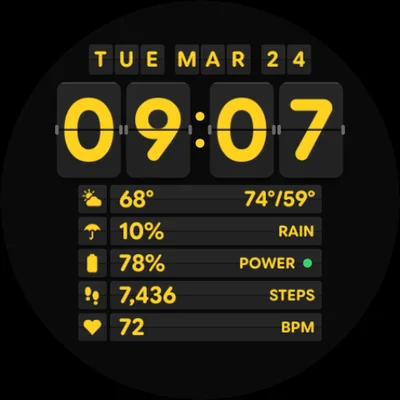
手首に装着する、フラップ式の出発案内板。フラップは1分ごとに切り替わります。
駅の出発時刻表を身につけましょう。時刻の各桁はそれぞれフラップ式のカードに表示され、分が変わるとカードが実際にめくれます。一番上のカードがヒンジ部分で折り畳まれ、新しい数字が所定の位置に収まります。
特徴
• 毎分、カードがめくれるリアルなアニメーション。時刻が変わると、時間表示が反転します。
• 詳細なフラップカード:下側のリーフは濃い色、ヒンジラインと軸ピン、下のフラップの縁がはっきりと見えます。
• 時刻表レイアウト:日付は小さな文字のフラップに、時刻は大きなカードに表示され、データ用のボードが5行あります。
• 大きなカードレイアウト:2行のデータの上に、4枚の大きなカード(時と分)が配置されています。
• 大きく、コントラストの高い数字と値で、一目で読み取れます。
• カスタマイズ可能なコンプリケーションスロットが2つあり、どちらのレイアウトにも表示されます。
表示データ
• 日付
• コンプリケーション2行(歩数と心拍数、デフォルトでは時計が提供する任意のデータに切り替え可能)
• 時刻表レイアウトには、今日の最高気温と最低気温、降水確率、バッテリー残量(緑または赤のステータスランプ付き)も表示されます。
設定
• レイアウト:時刻表/大きなカード
• ボード:11色のカラーバリエーション(エアポートイエロー、クラシック、ロイヤルブルー、ステーショングリーン、クリーム、シグナルレッド、ミッドナイトアンバー、ミント、アイスブルー、カッパー、バイオレット)
• 時刻カード:ダークまたはカラーフラップ
• モーション:オン/静止
• ガラス反射:オフ/オン(柔らかな光の帯がガラス面を照らします)
• 12時間表示または24時間表示は、お使いの時計の設定に従います
バッテリー
フリップの間、ボードは完全に静止します。フレームごとのアニメーションは行われないため、静止画の文字盤と同程度のバッテリー消費量です。常時表示画面は完全な黒色で、ピクセルの10%未満しか点灯しません。中空のカードの輪郭と、輪郭線付きの数字、そして暗い値が表示されます。数字が瞬時に切り替わるには、「モーション:静止」を選択してください。
互換性
Wear OS 5以降のスマートウォッチ(Pixel Watch、Galaxy Watchなど)に対応しています。ウォッチフェイスフォーマットで作成されています。これはウォッチフェイスのみで、スマートフォンアプリは付属していません。
カスタマイズ方法
ウォッチフェイスを長押しし、「カスタマイズ」をタップします(またはスマートフォンのウォッチアプリを使用します)。レイアウト、ボード、フラップスタイル、コンプリケーションを選択してください。
プライバシーについて
このウォッチフェイスはデータを収集しません。天気、歩数、心拍数はスマートウォッチから取得され、スマートウォッチ内に保存されます。
原文を表示
Wear a station departure board. Every digit of the time sits on its own flap card, and when the minute changes the cards really flip: the top leaf folds down over the hinge and the new digit drops into place.
FEATURES
• Real flip animation at every minute; the hours flip when the hour turns
• Detailed flap cards: a darker lower leaf, the hinge line with axle pins, the edges of the waiting flaps underneath
• Timetable layout: the date on little letter flaps, big time cards, and five board rows for your data
• Big cards layout: four big cards (hours over minutes) above your two data rows
• Large, high-contrast numbers and values, readable at a glance
• Two customizable complication slots, shown in both layouts
DATA SHOWN
• Date
• Two complication rows, steps and heart rate by default (swap in any data your watch offers)
• Timetable layout also: weather now with today's high and low, chance of rain, battery with a green or red status lamp
SETTINGS
• Layout: Timetable / Big cards
• Board: 11 color schemes (airport yellow, classic, royal blue, station green, cream, signal red, midnight amber, mint, ice blue, copper, violet)
• Time cards: dark or colored flaps
• Motion: On / Still
• Glass glare: Off / On (a soft band of light sweeps the glass)
• 12- or 24-hour time follows your watch setting
BATTERY
Between flips the board is completely still: no frame-by-frame animation, so it costs about as much as a static face. The always-on screen is true black and lights less than 10% of the pixels: hollow card outlines with outlined digits and dim values. Choose Motion: Still for instant digit changes.
COMPATIBILITY
Works on Wear OS 5+ watches (Pixel Watch, Galaxy Watch …). Built with the Watch Face Format. It is a watch face only, with no phone app.
HOW TO CUSTOMIZE
Long-press the watch face, then tap Customize (or use your phone's watch app) to pick the layout, board, flap style and complications.
PRIVACY
This watch face collects no data. Weather, steps and heart rate come from your watch and stay on it.
データ セーフティ
このアプリが収集・共有するデータについて、HollingsworksがGoogle Playで申告している内容です。
- 第三者と共有されるデータはありません詳しくは、デベロッパーが共有を申告する方法についての説明をご覧ください
- データは収集されません詳しくは、デベロッパーが収集を申告する方法についての説明をご覧ください
新機能
バージョン 1.2 · 2026/10/16
Weather and steps readouts now open their apps when tapped, and more data comes pre-filled with the real complications.
開発元の連絡先
- ウェブサイトjhworth8.github.io
- メールjhworth8@gmail.com
- プライバシーポリシーhollingsworks.com
- 住所1828 Bowers St Birmingham, MI 48009-6812 United States
情報
- 提供元
- Hollingsworks
- カテゴリ
- カスタマイズ
- バージョン
- 1.2
- 更新日
- 2026/10/16
- リリース
- 2026/10/12
- 対象年齢
- 3 歳以上
- 価格
- ¥170
- パッケージ名
- com.hollingsworks.face.clackboard