CV02 Split Max Bold Watch Face
Clear Vision Watch Faces- USK ab 0 JahrenAltersfreigabe
- PersonalisierungKategorie
- 23.09.2026Aktualisiert
- 1,39 €Preis
Verlinkt auf den offiziellen Google Play-Eintrag von com.clearvision.watchfaces.CV02SplitMax. Zuletzt geprüft am 15.11.2026.
Screenshots
Über diese App
Automatische Übersetzung von Google. Originalsprache: Polnisch (Polen).
Minimalistisches Wear OS-Zifferblatt mit 4 Komplikationen und Farbanpassung
Clear Vision CV02 Split Max
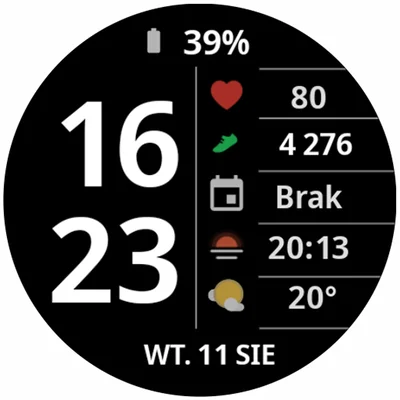
Ein minimalistisches Wear OS-Zifferblatt mit großer Stundenanzeige, vier anpassbaren Komplikationen, Farbanpassung und Always-On-Display.
Das CV02 Split Max ist ein modernes Zifferblatt für Wear OS-Smartwatches, das für optimale Lesbarkeit, hohen Kontrast und komfortable Anpassungsmöglichkeiten entwickelt wurde. Die große Stundenanzeige, das markante Split-Layout und die vier anpassbaren Komplikationen ermöglichen den schnellen Zugriff auf wichtige Informationen im Laufe des Tages.
Passen Sie die Farbe von Uhrzeit, Datum und Akkustand an Ihren Stil an. Das minimalistische Design sorgt dafür, dass die Informationen beim Arbeiten, Autofahren, Sport und im Alltag stets gut lesbar sind.
Hauptmerkmale
• Große Digitaluhr
• Minimalistisches Split-Layout
• Hoher Kontrast
• Datum
• Akkustand
• Herzfrequenz
• Schrittzähler
• Wetter oder Sonnenuntergangszeit
• 4 anpassbare Wear OS-Komplikationen
• Farbanpassung
• Stundenfarbe ändern
• Datumsfarbe ändern
• Akkustandfarbe ändern
• Always-On-Display (AOD)
• Reibungslose Bedienung
• Optimierter Stromverbrauch
Personalisierung
Passen Sie das Zifferblatt Ihren Vorlieben an.
Sie können die Farbe von Folgendem ändern:
• Uhrzeit
• Datum
• Akkustand
So können Sie das Zifferblatt ganz einfach an die Farbe Ihrer Uhr, Ihres Armbands oder Ihren persönlichen Stil anpassen.
Vier bearbeitbare Komplikationen
Die vier unteren Felder sind vollständig bearbeitbare Wear OS-Komplikationen.
Anzeige wichtiger Informationen wie:
• Wetter
• Sonnenuntergangszeit
• Kalenderereignisse
• Schrittzahl
• Herzfrequenz
• Akkustand
• anstehende Ereignisse
• Trainingseinheiten
• und viele weitere Daten von kompatiblen Komplikationsanbietern.
Always-On-Display
Das Always-On-Display wurde für hohe Lesbarkeit und geringen Stromverbrauch optimiert. So bleiben wichtige Informationen auch bei ausgeschaltetem Bildschirm sichtbar.
Warum Clear Vision?
Clear Vision Watch Faces ist eine Kollektion minimalistischer Wear OS-Zifferblätter für alle, die Wert auf Einfachheit, Lesbarkeit und Funktionalität legen.
Jedes Zifferblatt bietet einen schnellen Überblick über Uhrzeit und wichtige Informationen.
FAQ
Kann ich die angezeigten Informationen ändern?
Ja. Alle vier unteren Felder sind bearbeitbare Wear OS-Komplikationen und können individuell angepasst werden.
Kann ich die Farben des Zifferblatts ändern?
Ja. Sie können die Farbe für Uhrzeit, Datum und Akkustand ändern.
Warum sind nicht alle Komplikationen verfügbar?
Die Verfügbarkeit von Komplikationen hängt vom Uhrenmodell, der Wear OS-Version und den installierten Apps ab.
Warum sind manche Komplikationsnamen abgekürzt?
Einige Komplikationsanbieter beschränken die Textlänge oder die Datendarstellung. Dies ist ein Standardverhalten von Wear OS.
Fehlerbehebung
Komplikation zeigt keine Daten an
Einige Komplikationsanbieter benötigen zusätzliche Berechtigungen oder stellen Daten nicht in einem unterstützten Format bereit.
Komplikationsfeld bleibt leer
Nicht alle Apps unterstützen alle Wear OS-Komplikationstypen.
Wetterdaten werden nicht angezeigt
Die Wetteranzeige hängt vom ausgewählten Anbieter und dessen Berechtigungen ab.
Wichtige Informationen
Darstellung, Textlänge und Verfügbarkeit von Komplikationen hängen vom Uhrenmodell, der Wear OS-Version, den installierten Apps und dem ausgewählten Komplikationsanbieter ab.
Bei einigen Komplikationen werden möglicherweise abgekürzte Namen angezeigt, Felder leer gelassen oder Daten nicht übermittelt. Dies ist eine Einschränkung des Komplikationsanbieters oder von Wear OS, nicht des Zifferblatts selbst.
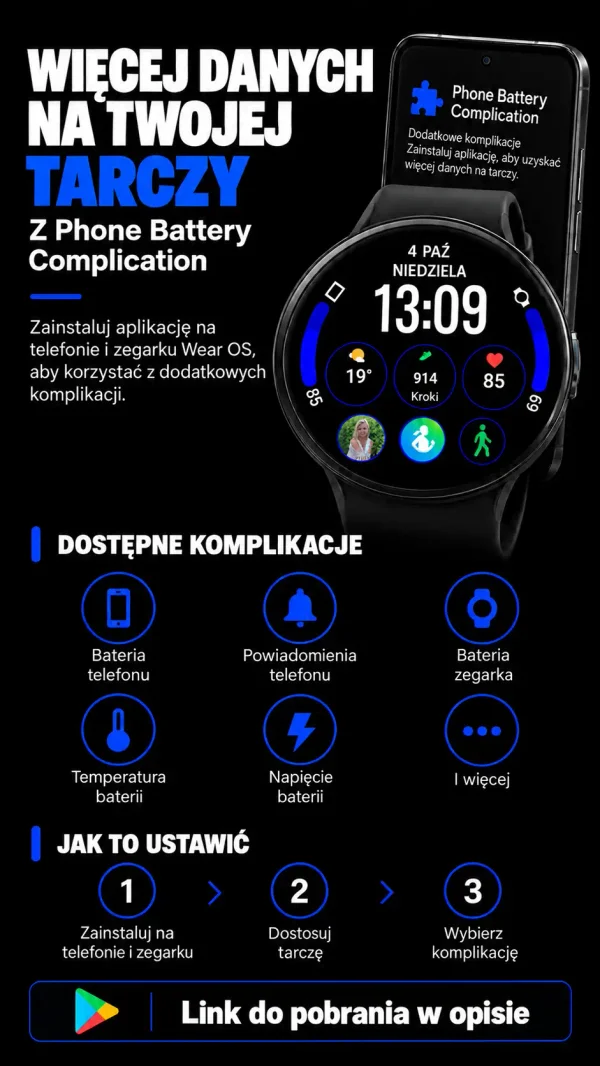
Möchten Sie den Akkustand Ihres Smartphones und weitere Komplikationen auf Ihrem Zifferblatt anzeigen lassen? Installieren Sie die App „Phone Battery Complication“ auf Ihrem Smartphone und Ihrer Wear OS-Smartwatch. Wählen Sie anschließend in den Zifferblatteinstellungen das Komplikationsfeld und die Daten dieser App aus.
App herunterladen:
https://play.google.com/store/apps/details?id=com.weartools.phonebattcomp
Weitere Informationen, Anleitungen und weitere Zifferblätter:
https://arturteam.github.io/clearvision/
Originaltext anzeigen
Clear Vision CV02 Split Max
Minimalist Wear OS watch face with a large digital clock, 4 editable complications, customizable colors and Always-On Display.
CV02 Split Max is a modern Wear OS watch face designed for maximum readability, high contrast and everyday usability. The large digital clock, distinctive Split layout and four editable complications provide quick access to the information you need most throughout the day.
Personalize your watch face by changing the color of the clock, date and battery percentage to match your style. The clean and minimalist design makes information easy to read while working, driving, exercising or during everyday activities.
Key Features
• Large digital clock
• Minimalist Split layout
• High contrast design
• Date
• Battery level
• Heart rate
• Step counter
• Weather or sunset time
• 4 editable Wear OS complications
• Custom clock color
• Custom date color
• Custom battery percentage color
• Always-On Display (AOD)
• Smooth performance
• Battery-friendly design
Personalization
Customize your watch face to match your style.
Change the color of:
• Clock
• Date
• Battery percentage
Create a look that perfectly matches your watch, strap or personal preference.
Four Editable Complications
The four bottom fields are fully editable Wear OS complications.
Display the information that matters most to you, including:
• Weather
• Sunset time
• Calendar events
• Step count
• Heart rate
• Battery level
• Upcoming events
• Workouts
• and many other data provided by compatible Wear OS complication providers.
Always-On Display
Always-On Display has been optimized for excellent readability while keeping power consumption low.
Important information remains visible even when the display is dimmed.
Why Clear Vision?
Clear Vision Watch Faces are designed for users who value readability, simplicity and functionality.
Every watch face is created to provide:
• Large easy-to-read clock
• Clean minimalist design
• High contrast
• Quick access to important information
• Smooth performance
• Easy customization
• Full Wear OS compatibility
FAQ
Can I customize the displayed information?
Yes. All four bottom fields are editable Wear OS complications and can be customized according to your needs.
Can I change the watch face colors?
Yes. You can change the color of the clock, date and battery percentage.
Why are some complications unavailable?
Available complications depend on your watch model, Wear OS version and installed apps.
Why are some complication names shortened?
Some complication providers limit text length or display information differently. This is normal Wear OS behavior.
Troubleshooting
A complication is not displaying data
Some complication providers require additional permissions or do not provide data in a supported format.
A complication field is empty
Not every app supports every Wear OS complication type. Try selecting another compatible complication.
Weather information is unavailable
Weather data depends on your selected weather provider and its permissions.
Heart rate is not updating
Heart rate refresh intervals depend on Wear OS settings and the heart rate provider.
Important Information
The appearance, text length and availability of complications depend on your watch model, Wear OS version, installed apps and selected complication provider.
Some complications may display shortened text, remain empty or not provide data. This is a limitation of the complication provider or Wear OS, not the watch face itself.
Want to show your phone’s battery level and other extra complications on your watch face? Install Phone Battery Complication on both your phone and Wear OS watch. Then customize the watch face, select a complication slot, and choose data from the app.
Get the app:
https://play.google.com/store/apps/details?id=com.weartools.phonebattcomp
More information, user guides and upcoming watch faces:
https://arturteam.github.io/clearvision/
Datensicherheit
Was Clear Vision Watch Faces bei Google Play zu den Daten angibt, die diese App erfasst und weitergibt.
- Keine Daten werden mit Drittunternehmen oder -organisationen geteiltWeitere Informationen dazu, wie Entwickler Angaben zur Weitergabe von Daten machen
- Keine Daten erhobenWeitere Informationen dazu, wie Entwickler Angaben zur Datenerhebung machen
Neue Funktionen
23.09.2026
First production release of Clear Vision CV02 Split Max.
Large, readable time, customizable complications, color options, AOD, and a layout optimized for quick reading on Wear OS.
Kontakt zum Entwickler
- Websitearturteam.github.io
- E-Mailarturteam1@gmail.com
- Datenschutzerklärungarturteam.github.io
- AdresseDmowskiego 6/42 95-070 Aleksandrów Łódzki Poland
Informationen
- Angeboten von
- Clear Vision Watch Faces
- Kategorie
- Personalisierung
- Aktualisiert
- 23.09.2026
- Veröffentlicht
- 21.08.2026
- Altersfreigabe
- USK ab 0 Jahren
- Preis
- 1,39 €
- Paketname
- com.clearvision.watchfaces.CV02SplitMax