CV02 Split Max Bold Watch Face
Clear Vision Watch Faces- 3 歳以上対象年齢
- カスタマイズカテゴリ
- 2026/9/23更新日
- ¥220価格
com.clearvision.watchfaces.CV02SplitMaxのGoogle Play公式ページにリンクしています。最終確認:2026/11/15。
スクリーンショット
このアプリについて
Googleによるポーランド語 (ポーランド)からの自動翻訳です。
ミニマルなWear OSウォッチフェイス。4つのコンプリケーションとカラーカスタマイズ機能付き。
Clear Vision CV02 Split Max
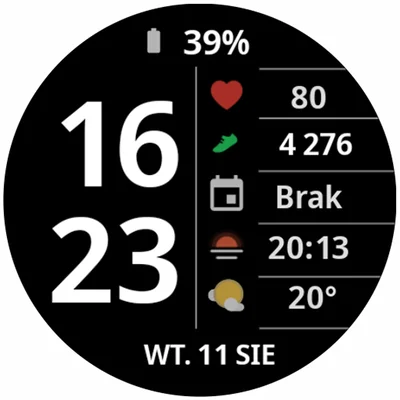
大きな時刻表示、編集可能な4つのコンプリケーション、カラーカスタマイズ機能、常時表示ディスプレイを備えた、ミニマルなWear OSウォッチフェイスです。
CV02 Split Maxは、視認性、高コントラスト、そして便利なカスタマイズ性を最大限に追求した、Wear OSスマートウォッチ向けのモダンなウォッチフェイスです。大きな時刻表示、特徴的な分割レイアウト、そして編集可能な4つのコンプリケーションにより、一日を通して重要な情報に素早くアクセスできます。
時刻、日付、バッテリー残量の色を、お好みに合わせて変更可能です。ミニマルなデザインは、仕事、運転、運動、そして日常使いなど、あらゆる場面で情報を常に鮮明に表示します。
主な機能
• 大型デジタル時計
• ミニマルな分割レイアウト
• 高コントラスト
• 日付
• バッテリー残量
• 心拍数
• 歩数
• 天気または日の入り時刻
• 編集可能なWear OSコンプリケーション4つ
• カラーカスタマイズ
• 時刻の色を変更
• 日付の色を変更
• バッテリー残量表示の色を変更
• 常時表示ディスプレイ(AOD)
• スムーズな操作性
• 最適化された電力消費
パーソナライズ
ウォッチフェイスを好みに合わせてカスタマイズできます。
以下の色を変更できます。
• 時刻
• 日付
• バッテリー残量
これにより、ウォッチフェイスを時計本体、ストラップ、または個人のスタイルに合わせて簡単に調整できます。
編集可能なコンプリケーション4つ
下部の4つのフィールドは、完全に編集可能なWear OSコンプリケーションです。
以下の主要情報を表示します。
• 天気
• 日の入り時刻
• カレンダーイベント
• 歩数
• 心拍数
• バッテリー残量
• 今後のイベント
• ワークアウト
• その他、対応するコンプリケーションプロバイダーが提供する多くのデータ。
常時表示ディスプレイ
常時表示ディスプレイは、高い視認性と低消費電力を実現するために最適化されており、画面がオフの状態でも重要な情報が常に表示されます。
Clear Visionを選ぶ理由
Clear Visionウォッチフェイスは、シンプルさ、視認性、機能性を重視するユーザーのために作られた、ミニマルなWear OSウォッチフェイスのコレクションです。
各ウォッチフェイスは、時刻と重要な情報を一目で確認できるように設計されています。
よくある質問
表示される情報を変更できますか?
はい。下部の4つのフィールドはすべて編集可能なWear OSコンプリケーションで、カスタマイズできます。
ウォッチフェイスの色を変更できますか?
はい。時刻、日付、バッテリー残量の色を変更できます。
すべてのコンプリケーションが利用できないのはなぜですか?
コンプリケーションの利用可否は、ウォッチのモデル、Wear OSのバージョン、インストールされているアプリによって異なります。
一部のコンプリケーション名が省略されているのはなぜですか?
一部のコンプリケーションプロバイダーは、テキストの長さやデータ表示に制限を設けています。これはWear OSの標準的な動作です。
トラブルシューティング
コンプリケーションにデータが表示されない場合
一部のコンプリケーションプロバイダーは追加の権限を必要とするか、サポートされている形式でデータを共有しない場合があります。
コンプリケーションフィールドが空白のままの場合
すべてのアプリがすべてのWear OSコンプリケーションタイプをサポートしているわけではありません。
天気予報が表示されない場合
天気予報の表示は、選択したプロバイダーとその権限に依存します。
重要な情報
コンプリケーションの表示、テキストの長さ、および利用可能性は、ウォッチモデル、Wear OSバージョン、インストールされているアプリ、および選択したコンプリケーションプロバイダーによって異なります。
一部のコンプリケーションでは、名前が省略されたり、フィールドが空白のままになったり、データが共有されない場合があります。これは、ウォッチフェイス自体ではなく、コンプリケーションプロバイダーまたはWear OSの制限です。
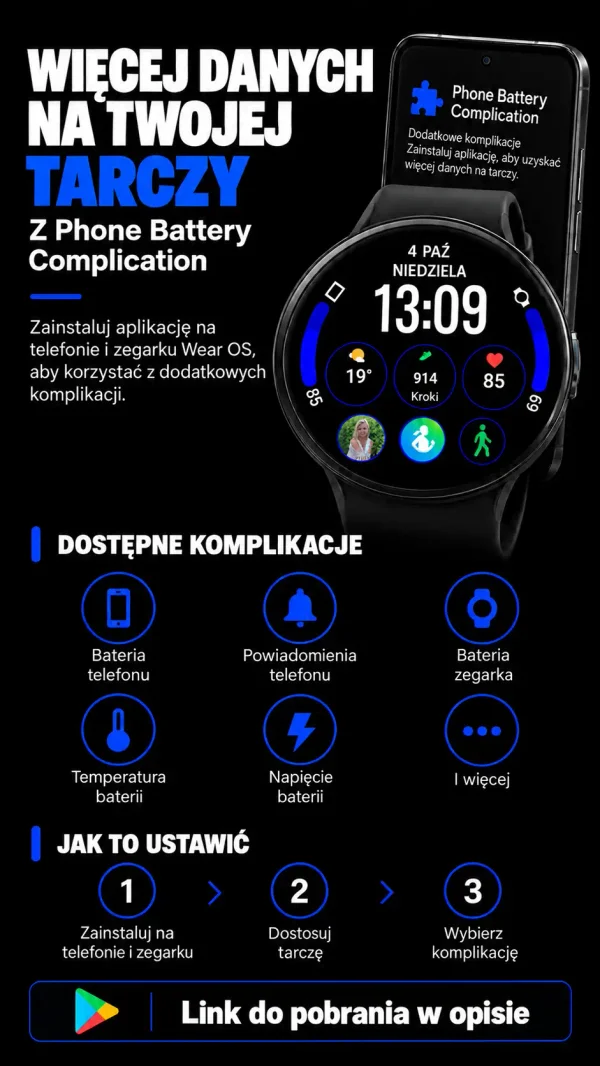
スマートフォンのバッテリー残量やその他のコンプリケーションをウォッチフェイスに追加したい場合は、スマートフォンとWear OSウォッチに「Phone Battery Complication」アプリをインストールしてください。その後、ウォッチフェイスの設定で、このアプリのコンプリケーションフィールドとデータを選択してください。
アプリをダウンロード:
https://play.google.com/store/apps/details?id=com.weartools.phonebattcomp
詳細情報、使用方法、その他のウォッチフェイスはこちら:
https://arturteam.github.io/clearvision/
原文を表示
Clear Vision CV02 Split Max
Minimalist Wear OS watch face with a large digital clock, 4 editable complications, customizable colors and Always-On Display.
CV02 Split Max is a modern Wear OS watch face designed for maximum readability, high contrast and everyday usability. The large digital clock, distinctive Split layout and four editable complications provide quick access to the information you need most throughout the day.
Personalize your watch face by changing the color of the clock, date and battery percentage to match your style. The clean and minimalist design makes information easy to read while working, driving, exercising or during everyday activities.
Key Features
• Large digital clock
• Minimalist Split layout
• High contrast design
• Date
• Battery level
• Heart rate
• Step counter
• Weather or sunset time
• 4 editable Wear OS complications
• Custom clock color
• Custom date color
• Custom battery percentage color
• Always-On Display (AOD)
• Smooth performance
• Battery-friendly design
Personalization
Customize your watch face to match your style.
Change the color of:
• Clock
• Date
• Battery percentage
Create a look that perfectly matches your watch, strap or personal preference.
Four Editable Complications
The four bottom fields are fully editable Wear OS complications.
Display the information that matters most to you, including:
• Weather
• Sunset time
• Calendar events
• Step count
• Heart rate
• Battery level
• Upcoming events
• Workouts
• and many other data provided by compatible Wear OS complication providers.
Always-On Display
Always-On Display has been optimized for excellent readability while keeping power consumption low.
Important information remains visible even when the display is dimmed.
Why Clear Vision?
Clear Vision Watch Faces are designed for users who value readability, simplicity and functionality.
Every watch face is created to provide:
• Large easy-to-read clock
• Clean minimalist design
• High contrast
• Quick access to important information
• Smooth performance
• Easy customization
• Full Wear OS compatibility
FAQ
Can I customize the displayed information?
Yes. All four bottom fields are editable Wear OS complications and can be customized according to your needs.
Can I change the watch face colors?
Yes. You can change the color of the clock, date and battery percentage.
Why are some complications unavailable?
Available complications depend on your watch model, Wear OS version and installed apps.
Why are some complication names shortened?
Some complication providers limit text length or display information differently. This is normal Wear OS behavior.
Troubleshooting
A complication is not displaying data
Some complication providers require additional permissions or do not provide data in a supported format.
A complication field is empty
Not every app supports every Wear OS complication type. Try selecting another compatible complication.
Weather information is unavailable
Weather data depends on your selected weather provider and its permissions.
Heart rate is not updating
Heart rate refresh intervals depend on Wear OS settings and the heart rate provider.
Important Information
The appearance, text length and availability of complications depend on your watch model, Wear OS version, installed apps and selected complication provider.
Some complications may display shortened text, remain empty or not provide data. This is a limitation of the complication provider or Wear OS, not the watch face itself.
Want to show your phone’s battery level and other extra complications on your watch face? Install Phone Battery Complication on both your phone and Wear OS watch. Then customize the watch face, select a complication slot, and choose data from the app.
Get the app:
https://play.google.com/store/apps/details?id=com.weartools.phonebattcomp
More information, user guides and upcoming watch faces:
https://arturteam.github.io/clearvision/
データ セーフティ
このアプリが収集・共有するデータについて、Clear Vision Watch FacesがGoogle Playで申告している内容です。
- 第三者と共有されるデータはありません詳しくは、デベロッパーが共有を申告する方法についての説明をご覧ください
- データは収集されません詳しくは、デベロッパーが収集を申告する方法についての説明をご覧ください
新機能
2026/9/23
First production release of Clear Vision CV02 Split Max.
Large, readable time, customizable complications, color options, AOD, and a layout optimized for quick reading on Wear OS.
開発元の連絡先
- ウェブサイトarturteam.github.io
- メールarturteam1@gmail.com
- プライバシーポリシーarturteam.github.io
- 住所Dmowskiego 6/42 95-070 Aleksandrów Łódzki Poland
情報
- 提供元
- Clear Vision Watch Faces
- カテゴリ
- カスタマイズ
- 更新日
- 2026/9/23
- リリース
- 2026/8/21
- 対象年齢
- 3 歳以上
- 価格
- ¥220
- パッケージ名
- com.clearvision.watchfaces.CV02SplitMax