Dark Master Digital Class IN45
Inspire Watch Face- USK ab 0 JahrenAltersfreigabe
- PersonalisierungKategorie
- 27.08.2024Aktualisiert
- 1,99 €Preis
Verlinkt auf den offiziellen Google Play-Eintrag von com.inspirewatchface.inspire45. Zuletzt geprüft am 25.11.2026.
Über diese App
Automatische Übersetzung von Google. Originalsprache: Englisch (Vereinigte Staaten).
Bark Master Digital Class & Battery Saver Digitale Punktschrift, Gesundheits- und Sportuhr
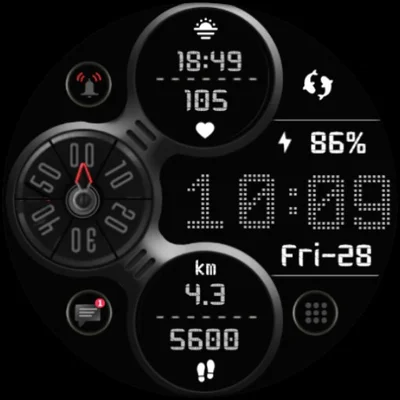
Dark Master Digital Class Inspire 45. Der klassische digitale Informer ist ein reines digitales Zifferblatt mit dunklem Hintergrund. Batteriefreundliches Zifferblatt mit Gesundheitsinformationen. Das Zifferblatt enthält digitale Zeit, einschließlich Zifferblatt-Sekundenzeiger, Datumsinformationen (Tag im Monat und Woche), Gesundheitsinformationen (digitaler Batterieprozentsatz, digitale Herzfrequenzmessung, Schrittzahl, Entfernungsmessung in km) sowie ein anpassbares Feld, das Sie aus der Google-Optionsliste auswählen können . Direkte Anwendungsstarter – Kalender, Alarm, Batteriestatus, Herzfrequenzmessung und 2 anpassbare Apps. Trägerraketen!
Mein Name ist Milos Fedak und falls Sie vor oder nach dem Kauf Fragen haben, kontaktieren Sie mich per E-Mail inspirewatch@gmail.com oder besuchen Sie https://inspirewatchface.com
Oder über Social-Media-Links, die am Ende der Produktbeschreibung eingefügt werden.
⌚︎ Telefon-App-Funktionen
Diese Telefonanwendung ist ein Tool, das die Installation des Zifferblatts auf Ihrer Wear OS 3.0 Smartwatch erleichtert.
Nur diese mobile Anwendung enthält Adds!
INSTALLATIONSHINWEISE: Wenn Sie Probleme mit der Installation haben, lesen Sie den Hinweis am Ende der Produktbeschreibung oder schreiben Sie eine unterstützende E-Mail an inspirewatch@gmail.com
==========================
⌚︎ Funktionen der Watch-Face-App
- Digitale Zeit inklusive Zifferblatt-Sekundenzeiger
- Tag im Monat
- Tag in der Woche
- Batterieprozentsatz Digital
- Schritte zählen
- Herzfrequenzmessung digital und Herzfrequenzzone (Tab auf diesem Feld, um die aktuelle Herzfrequenz zu messen)
1 Anpassbares Feld – Sie können eine Funktion aus der Wear OS-Optionsliste auswählen.
⌚︎ Direkte Anwendungsstarter
- Alarm
- Batteriestatus
- Nachricht
1 anpassbare App. Trägerraketen.
- Always-ON-Display-Unterstützung – NIEDRIGER OPR und einzigartiges Aussehen
🎨 Anpassung
1 - Berühren und halten Sie das Display
2 – Tippen Sie auf die Option „Anpassen“.
- Über 15 Farboptionen für die Anzeige von Informationen
1 anpassbares Feld
*Einige Funktionen sind bei manchen Uhren möglicherweise nicht verfügbar.
Pulsschlag:
Die Herzfrequenz wird automatisch alle 10 Minuten gemessen. Wenn Sie auf den Bereich „Herzfrequenz“ tippen, können Sie Ihre aktuelle Herzfrequenz messen
Bitte achten Sie darauf, dass der Bildschirm eingeschaltet ist und die Uhr richtig am Handgelenk getragen wird.
==========================
Ich bin seit 2019 Entwickler und verfüge über mehr als 400 Watchface-Erfahrung. My Faces finden Sie im Galaxy Store, Playstore und im Huawei Health Store!
👏 Erfolge
Huawei Store:
Best of Huawei Themes Award 2021 – 1. Platz. Platzieren Sie den besten Hybrid-Zifferblattstil (Top 10-Verkäufer)
Videolink zur Preisverleihung:
https://www.youtube.com/watch?v=4ZY5kq7vBL4
Galaxy Store: (TOP 50 Verkäufer)
SOCIAL-MEDIA-LINKS:
Webseite: https://inspirewatchface.com
TELEGRAMM:
https://t.me/WearOswatchfaces
FACEBOOK:
https://www.facebook.com/Digital.Unity.Watch/
INSTAGRAM:
https://www.instagram.com/digital.unity.watch/
===========================
Installationshinweise:
Falls Sie Probleme bei der Installation dieses Zifferblatts haben, befolgen Sie die nachstehenden Hinweise oder die Installationsanleitung von Samsung:
Link zur Installationsanleitung:
99) Installieren Sie Wear OS™ Powered by Samsung Watch Faces – YouTube https://www.youtube.com/watch?v=vMM4Q2-rqoM&t=2s
1 - Stellen Sie sicher, dass die Uhr ordnungsgemäß mit dem Telefon verbunden ist
Nach ein paar Minuten wurde das Zifferblatt auf die Uhr übertragen: Überprüfen Sie die von der Wearable-App auf dem Telefon installierten Zifferblätter.
oder
2 – Wenn Sie Synchronisierungsprobleme zwischen Ihrem Telefon und dem Play Store haben, installieren Sie die App direkt von der Uhr aus: Suchen Sie im Play Store auf der Uhr nach „Analog Neon“ und klicken Sie auf die Schaltfläche „Installieren“.
3 – Die letzte Möglichkeit besteht darin, das Zifferblatt über einen Webbrowser auf Ihrem PC zu installieren.
Bitte beachten Sie, dass alle Probleme auf dieser Seite NICHT vom Entwickler abhängig sind. Der Entwickler hat von dieser Seite aus keine Kontrolle über den Play Store.
Millionenfach Danke!
Originaltext anzeigen
Dark Master Digital Class Inspire 45. Classic Digital informer is Pure Digital Watch-Face with Dark background Battery Friendly watch face with Health information. Watch face contain Digital Time including Dial Second Hand, Date info (Day in month & Week) Health Info ( Battery percentage digital, Heart rate measure Digital, Steps count, Distance measure Km) plus 1 customizable field you can pick feature from google option list. Direct application launchers - calendar, alarm, Battery Status, HR Measure, and 2 customizable app. launchers!
My name is Milos Fedak and in case you have questions before or after purchasing contact me via email inspirewatch@gmail.com or Visit https://inspirewatchface.com
Or via social media links pasted on the bottom of product description.
⌚︎ Phone App Features
This phone application is a tool to facilitate installation the watch face on your Wear OS 3.0 Smartwatch.
Only this mobile application contains adds!
INSTALLATION NOTES: if you face issue with installation read note at the end of product description or write on supportive email inspirewatch@gmail.com
==========================
⌚︎ Watch-Face App Features
- Digital Time Including Dial second hand
- Day in Month
- Day in Week
- Battery percentage Digital
- Steps count
- Heart rate measure digital & Heart rate zone ( Tab on this field to measure current HR)
1 Customizable field - you can choose feature from wear os option list.
⌚︎ Direct application launchers
- Alarm
- Battery Status
- Message
1 Customizable app. launchers.
- Always ON Display supported - LOW OPR and unique look
🎨 Customization
1 - Touch and hold display
2 - Tap on customize option
- 15+ Display information color options
1 Customizable field
*some features may not be available on some watches.
Heart rate:
Heart rate is automatically measured every 10 minutes by tabbing on HR area you will get measure your current HR
Please make sure that the screen is turned on and that the watch is worn correctly on the wrist.
==========================
I am Developer since 2019 with with over 400 watchface experience. My Faces can be found on Galaxy Store, Playstore, and Huawei Health store!
👏 Achievements
Huawei Store:
Best of Huawei Themes Award 2021- 1st. Place Best Hybrid Watchface Style (Top 10 Seller)
Award Ceremony video link:
https://www.youtube.com/watch?v=4ZY5kq7vBL4
Galaxy Store: ( TOP 50 seller)
SOCIAL MEDIA LINKS:
Web PAGE: https://inspirewatchface.com
TELEGRAM:
https://t.me/WearOswatchfaces
FACEBOOK:
https://www.facebook.com/Digital.Unity.Watch/
INSTAGRAM:
https://www.instagram.com/digital.unity.watch/
===========================
Installation Notes:
In case you face issue with installing this watchface follow notes below or Installation guide made by Samsung:
Installation Guide link:
99) Install Wear OS™ Powered by Samsung Watch Faces - YouTube https://www.youtube.com/watch?v=vMM4Q2-rqoM&t=2s
1 - Ensure that the watch is properly connected to the phone
After a few minutes the watch face was transferred on watch : check the watch faces installed by the Wearable app on the phone.
or
2 - If you are having synchronization issues between your phone and Play Store, install the app directly from watch: search "Analog Neon" from Play Store on watch and hit on install button.
3 - The last option is to install the watch face from web browser on your PC.
Please consider that any issues on this side are NOT developer dependent. The developer has no control over the Play Store from this side.
Million times Thank you !
Datensicherheit
Was Inspire Watch Face bei Google Play zu den Daten angibt, die diese App erfasst und weitergibt.
- Keine Daten werden mit Drittunternehmen oder -organisationen geteiltWeitere Informationen dazu, wie Entwickler Angaben zur Weitergabe von Daten machen
- Diese App kann die folgenden Datentypen erhebenGenauer Standort
- Daten werden nicht verschlüsselt
- Du kannst das Löschen der Daten beantragen
Kontakt zum Entwickler
- Websiteinspirewatchface.com
- E-Mailinspirewatch@gmail.com
- Datenschutzerklärunginspirewatchface.com
- AdresseGaštanová 5 960 01 Zvolen Slovakia
Informationen
- Angeboten von
- Inspire Watch Face
- Kategorie
- Personalisierung
- Aktualisiert
- 27.08.2024
- Veröffentlicht
- 28.04.2023
- Altersfreigabe
- USK ab 0 Jahren
- Preis
- 1,99 €
- Paketname
- com.inspirewatchface.inspire45