Dark Master Digital Class IN45
Inspire Watch Face- 3 歳以上対象年齢
- カスタマイズカテゴリ
- 2024/8/27更新日
- ¥270価格
com.inspirewatchface.inspire45のGoogle Play公式ページにリンクしています。最終確認:2026/11/25。
このアプリについて
Googleによる英語 (アメリカ合衆国)からの自動翻訳です。
バーク マスター デジタル クラス & バッテリー セーバー デジタル ドット フォント、ヘルス & スポーツ ウォッチ
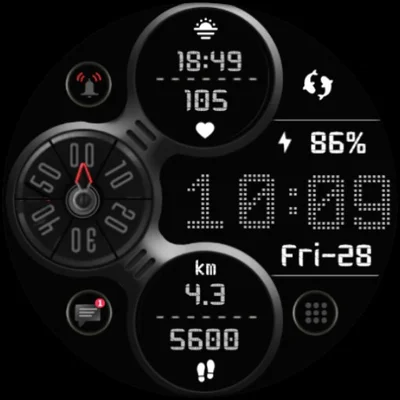
ダークマスター デジタル クラス Inspire 45。クラシック デジタル インフォーマーは、暗い背景を持つピュア デジタル ウォッチフェイスです。バッテリーに優しいウォッチフェイスで、健康情報が表示されます。時計の文字盤には、文字盤の秒針を含むデジタル時間、日付情報 (月の日と週) 健康情報 (バッテリーの割合のデジタル、心拍数の測定デジタル、歩数、距離の測定 Km) と、Google オプション リストから機能を選択できる 1 つのカスタマイズ可能なフィールドが含まれています。 。ダイレクト アプリケーション ランチャー - カレンダー、アラーム、バッテリー ステータス、HR 測定、および 2 つのカスタマイズ可能なアプリ。ランチャー!
私の名前はMilos Fedakです。購入前または購入後に質問がある場合は、メールでinspirewatch@gmail.comまでご連絡いただくか、https://inspirewatchface.comにアクセスしてください。
または、製品説明の下部に貼り付けられたソーシャルメディアリンク経由で。
⌚︎ 電話アプリの機能
この電話アプリケーションは、Wear OS 3.0 スマートウォッチへのウォッチフェイスのインストールを容易にするツールです。
追加機能が含まれるのはこのモバイル アプリケーションだけです。
インストールに関するメモ: インストールで問題が発生した場合は、製品説明の最後にあるメモを読むか、サポート用の電子メール inspirewatch@gmail.com に書き込んでください。
==========================
⌚︎ Watch-Face アプリの機能
- ダイヤル秒針を含むデジタル時間
- 月の日
- 曜日
- バッテリーの割合 デジタル
- 歩数カウント
- デジタル心拍数測定と心拍数ゾーン (現在の心拍数を測定するには、このフィールドをタブします)
1 カスタマイズ可能なフィールド - Wear OS オプション リストから機能を選択できます。
⌚︎ ダイレクト アプリケーション ランチャー
- 警報
- バッテリー状態
- メッセージ
1 カスタマイズ可能なアプリ。ランチャー。
- 常時オンディスプレイをサポート - 低いOPRとユニークな外観
🎨 カスタマイズ
1 - ディスプレイをタッチアンドホールドします
2 - カスタマイズオプションをタップします
- 15 以上の表示情報の色のオプション
1 カスタマイズ可能なフィールド
※時計によっては一部の機能が利用できない場合があります。
心拍数:
心拍数エリアをタブすると、10 分ごとに心拍数が自動的に測定され、現在の心拍数を測定できます。
画面がオンになっていること、時計が手首に正しく装着されていることを確認してください。
==========================
私は 2019 年から開発者であり、400 を超えるウォッチフェイスの経験があります。 My Faces は、Galaxy Store、Playstore、Huawei Health ストアで見つけることができます。
👏 実績
ファーウェイストア:
Best of Huawei Themes Award 2021 - 第 1 位。ベスト ハイブリッド ウォッチフェイス スタイル (トップ 10 セラー) を受賞
授賞式のビデオリンク:
https://www.youtube.com/watch?v=4ZY5kq7vBL4
Galaxy ストア: (トップ 50 の販売者)
ソーシャルメディアリンク:
ウェブページ: https://inspirewatchface.com
電報:
https://t.me/WearOswatchfaces
フェイスブック:
https://www.facebook.com/Digital.Unity.Watch/
インスタグラム:
https://www.instagram.com/digital.unity.watch/
===========================
インストールに関するメモ:
このウォッチフェイスのインストールで問題が発生した場合は、以下の注意事項または Samsung 製のインストール ガイドに従ってください。
インストールガイドのリンク:
99) Samsung Watch Faces を搭載した Wear OS™ をインストールする - YouTube https://www.youtube.com/watch?v=vMM4Q2-rqoM&t=2s
1 - 時計が電話に正しく接続されていることを確認します
数分後、時計の文字盤が時計に転送されました。携帯電話のウェアラブル アプリによってインストールされた文字盤を確認してください。
または
2 - 携帯電話と Play ストアの間で同期の問題が発生している場合は、時計からアプリを直接インストールします。時計の Play ストアから「Analog Neon」を検索し、インストール ボタンを押します。
3 - 最後のオプションは、PC の Web ブラウザからウォッチフェイスをインストールすることです。
この側の問題は開発者に依存しないことを考慮してください。開発者は、こちら側から Play ストアを制御することはできません。
100万回ありがとう!
原文を表示
Dark Master Digital Class Inspire 45. Classic Digital informer is Pure Digital Watch-Face with Dark background Battery Friendly watch face with Health information. Watch face contain Digital Time including Dial Second Hand, Date info (Day in month & Week) Health Info ( Battery percentage digital, Heart rate measure Digital, Steps count, Distance measure Km) plus 1 customizable field you can pick feature from google option list. Direct application launchers - calendar, alarm, Battery Status, HR Measure, and 2 customizable app. launchers!
My name is Milos Fedak and in case you have questions before or after purchasing contact me via email inspirewatch@gmail.com or Visit https://inspirewatchface.com
Or via social media links pasted on the bottom of product description.
⌚︎ Phone App Features
This phone application is a tool to facilitate installation the watch face on your Wear OS 3.0 Smartwatch.
Only this mobile application contains adds!
INSTALLATION NOTES: if you face issue with installation read note at the end of product description or write on supportive email inspirewatch@gmail.com
==========================
⌚︎ Watch-Face App Features
- Digital Time Including Dial second hand
- Day in Month
- Day in Week
- Battery percentage Digital
- Steps count
- Heart rate measure digital & Heart rate zone ( Tab on this field to measure current HR)
1 Customizable field - you can choose feature from wear os option list.
⌚︎ Direct application launchers
- Alarm
- Battery Status
- Message
1 Customizable app. launchers.
- Always ON Display supported - LOW OPR and unique look
🎨 Customization
1 - Touch and hold display
2 - Tap on customize option
- 15+ Display information color options
1 Customizable field
*some features may not be available on some watches.
Heart rate:
Heart rate is automatically measured every 10 minutes by tabbing on HR area you will get measure your current HR
Please make sure that the screen is turned on and that the watch is worn correctly on the wrist.
==========================
I am Developer since 2019 with with over 400 watchface experience. My Faces can be found on Galaxy Store, Playstore, and Huawei Health store!
👏 Achievements
Huawei Store:
Best of Huawei Themes Award 2021- 1st. Place Best Hybrid Watchface Style (Top 10 Seller)
Award Ceremony video link:
https://www.youtube.com/watch?v=4ZY5kq7vBL4
Galaxy Store: ( TOP 50 seller)
SOCIAL MEDIA LINKS:
Web PAGE: https://inspirewatchface.com
TELEGRAM:
https://t.me/WearOswatchfaces
FACEBOOK:
https://www.facebook.com/Digital.Unity.Watch/
INSTAGRAM:
https://www.instagram.com/digital.unity.watch/
===========================
Installation Notes:
In case you face issue with installing this watchface follow notes below or Installation guide made by Samsung:
Installation Guide link:
99) Install Wear OS™ Powered by Samsung Watch Faces - YouTube https://www.youtube.com/watch?v=vMM4Q2-rqoM&t=2s
1 - Ensure that the watch is properly connected to the phone
After a few minutes the watch face was transferred on watch : check the watch faces installed by the Wearable app on the phone.
or
2 - If you are having synchronization issues between your phone and Play Store, install the app directly from watch: search "Analog Neon" from Play Store on watch and hit on install button.
3 - The last option is to install the watch face from web browser on your PC.
Please consider that any issues on this side are NOT developer dependent. The developer has no control over the Play Store from this side.
Million times Thank you !
データ セーフティ
このアプリが収集・共有するデータについて、Inspire Watch FaceがGoogle Playで申告している内容です。
- 第三者と共有されるデータはありません詳しくは、デベロッパーが共有を申告する方法についての説明をご覧ください
- このアプリは以下の種類のデータを収集することがあります購入履歴
- データは暗号化されません
- データを削除するようリクエストできます
開発元の連絡先
- ウェブサイトinspirewatchface.com
- メールinspirewatch@gmail.com
- プライバシーポリシーinspirewatchface.com
- 住所Gaštanová 5 960 01 Zvolen Slovakia
情報
- 提供元
- Inspire Watch Face
- カテゴリ
- カスタマイズ
- 更新日
- 2024/8/27
- リリース
- 2023/4/28
- 対象年齢
- 3 歳以上
- 価格
- ¥270
- パッケージ名
- com.inspirewatchface.inspire45