Digital Basic 7 Wear OS 5+
OQ Watchfaces- USK ab 0 JahrenAltersfreigabe
- PersonalisierungKategorie
- 28.07.2026Aktualisiert
- 1,29 €Preis
Verlinkt auf den offiziellen Google Play-Eintrag von com.watchfacestudio.digitalbasic7. Zuletzt geprüft am 13.11.2026.
Über diese App
Automatische Übersetzung von Google. Originalsprache: Englisch (Vereinigte Staaten).
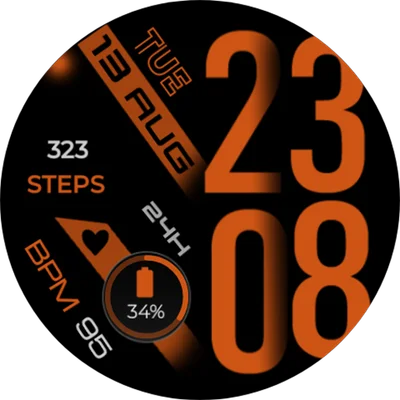
Ein digitales Zifferblatt für Wear OS 5+ Geräte mit vielen Farbanpassungsmöglichkeiten.
=======================================================
HINWEIS: LESEN SIE DIES VOR UND NACH DEM HERUNTERLADEN UNSERES ZIFFERBLATTS, UM UNANGEMESSENE SITUATIONEN ZU VERMEIDEN.
=========================================================
Dieses Zifferblatt für Wear OS wurde mit der neuesten Version 1.9.5 des Samsung Galaxy Watch Face Studio erstellt, das sich noch in der Entwicklung befindet. Es wurde auf der Samsung Watch 8 Classic, der Samsung Watch Ultra und der Watch 5 Pro getestet und unterstützt alle anderen Wear OS 5+ Geräte. Die Darstellung einiger Funktionen kann auf anderen Smartwatches leicht abweichen.
a. Es wurde auch eine kurze Installationsanleitung erstellt (mit Bildschirmvorschau). Diese ist das letzte Bild in der Vorschau des Zifferblatts und richtet sich an Android Wear OS-Neulinge oder Nutzer, die nicht wissen, wie sie das Zifferblatt auf ihrem verbundenen Gerät installieren. Bitte lesen Sie diese Anleitung, bevor Sie Probleme bei der Installation melden.
b. Zahlen Sie NICHT doppelt im Play Store Ihrer Smartwatch. Warten Sie, bis Ihre Käufe synchronisiert sind. Alternativ können Sie die direkte Installation auf der Smartwatch ohne zusätzliche App wählen. Wählen Sie dazu einfach Ihre verbundene Smartwatch im Dropdown-Menü der Installationsschaltfläche aus. Ihr Wearable wird dort angezeigt. Stellen Sie dies sicher, wenn Sie die Installation über die Play Store-App auf Ihrem Smartphone durchführen.
Dieses Zifferblatt für Wear OS 5+ unterstützt sowohl den 12- als auch den 24-Stunden-Modus. Die führende Null im 12-Stunden-Modus ist aus Designgründen abgedunkelt, aber nicht entfernt. Es unterstützt beide Modi. Das Zifferblatt synchronisiert sich im 12- oder 24-Stunden-Modus, je nachdem, was der Nutzer auf der Uhr oder dem verbundenen Smartphone auswählt.
Dieses Zifferblatt für Wear OS 5+ bietet folgende Funktionen:
1. 30 Farbstile zur individuellen Anpassung über das Menü.
2. Option zur Anpassung der Hintergrundhelligkeit des Always-On-Displays.
3. 1 anpassbare Komplikation auf dem Hauptdisplay.
4. 2 anpassbare, unsichtbare Komplikations-Schnellzugriffe.
5. Tippen Sie auf den Wochentag, um die Alarmeinstellungen zu öffnen.
6. Tippen Sie auf Datum oder Monat, um die Kalender-App zu öffnen.
7. Ein rotierender Leuchteffekt zeigt die Sekunden der Minute an.
8. Tippen Sie auf das Herzsymbol, um den Herzfrequenzmesser auf der Uhr zu öffnen.
Originaltext anzeigen
=======================================================
NOTICE: READ THIS ALWAYS BEFORE AND AFTER DOWNLOADING OUR WATCH FACE TO AVOID ANY SITUATION YOU DON'T LIKE.
=======================================================
This watch face for WEAR OS has been made in latest released Samsung Galaxy Watch face studio V 1.9.5 which is still evolving and has been tested on Samsung Watch 8 Classic , Samsung Watch ultra, and Watch 5 Pro. It also supports all other wear OS 5+ devices. Some feature experience can be slightly different on other watches.
a. An effort also has been made to make a brief install guide as well (an image added with screen previews) .It is the last image in previews of this watch face for newbie android Wear OS users or those who do not know how to install the watch face to your connected device. So it is requested to also make an effort and read it before posting cannot install statements.
b. DO NOT PAY TWICE FROM WATCH PLAY STORE . Wait for your purchases to be synced or if you do not want to wait you can always select direct install to watch method without even helper app.Just ensure that you select your connected watch in install button drop down menu where your wearable device will be shown.Just simply ensure that when you install from phone play store app.
This watch face for Wear OS 5+ supports both 12/24H Modes.The leading Zero of 12H Mode has been shaded dark but not removed due to nature of design. It supports both 12/24H. The watch face will sync to 12 or 24H mode whatever is selected by user on watch or on connected phone.
This Watch face for Wear OS 5+ has following has following features:-
1. 30 x color styles customization via customization menu.
2. AoD Background dim customization option added to dim the Always On Display.
3. 1 x Customizable Complication on Main Display.
4. 2 x Customizable Complication Invisible shortcuts.
5. Tap on day text to Open Alarm settings.
6. Tap on date or month to open Calendar App.
7. Rotating Glow denotes the exact seconds in the minute.
8. Tap on the heart icon and it will open Heart Rate Counter on watch.
Datensicherheit
Was OQ Watchfaces bei Google Play zu den Daten angibt, die diese App erfasst und weitergibt.
- Keine Daten werden mit Drittunternehmen oder -organisationen geteiltWeitere Informationen dazu, wie Entwickler Angaben zur Weitergabe von Daten machen
- Keine Daten erhobenWeitere Informationen dazu, wie Entwickler Angaben zur Datenerhebung machen
Neue Funktionen
28.07.2026
V1.1.1 Change Log:-
1.Watch face bundle updated to Target min SDK 34 as required by Google with latest Samsung Watch face Studio Version 1.9.5 Sep 2025 Release.
2.Watch face Companion App updated with latest Google Android Studio Otter 2025.2.2 release
Kontakt zum Entwickler
- E-Mailosmanqadir78@gmail.com
- Datenschutzerklärungsites.google.com
- AdresseHouse no 307 Sector C Street 12 Askari X Lahore Cantt, 54810 Pakistan
Informationen
- Angeboten von
- OQ Watchfaces
- Kategorie
- Personalisierung
- Aktualisiert
- 28.07.2026
- Veröffentlicht
- 07.12.2021
- Altersfreigabe
- USK ab 0 Jahren
- Preis
- 1,29 €
- Paketname
- com.watchfacestudio.digitalbasic7