Digital Basic 7 Wear OS 5+
OQ Watchfaces- 3 歳以上対象年齢
- カスタマイズカテゴリ
- 2026/7/28更新日
- ¥210価格
com.watchfacestudio.digitalbasic7のGoogle Play公式ページにリンクしています。最終確認:2026/11/13。
このアプリについて
Googleによる英語 (アメリカ合衆国)からの自動翻訳です。
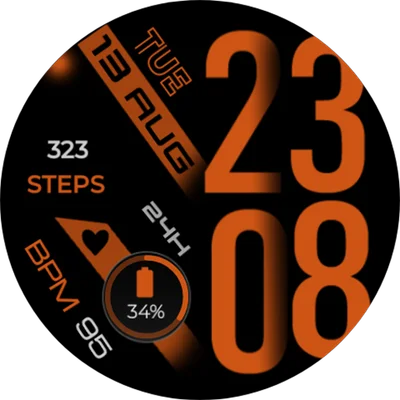
さまざまな色のカスタマイズが可能な Wear OS 5+ デバイス用のデジタル ウォッチ フェイス。
===========================================================
お知らせ:ウォッチフェイスをダウンロードする前後に必ずお読みください。そうしないと、望ましくない状況が発生する可能性があります。
=================================================================
このWEAR OS用ウォッチフェイスは、現在も進化を続ける最新のSamsung Galaxy Watch Face Studio V 1.9.5で作成されており、Samsung Watch 8 Classic、Samsung Watch Ultra、Watch 5 Proでテストされています。また、他のすべてのWear OS 5以降のデバイスにも対応しています。一部の機能は、他のウォッチでは若干異なる場合があります。
a. 簡単なインストールガイド(画面プレビュー付きの画像)も作成しました。これは、Android Wear OSを初めてお使いになる方や、接続されたデバイスにウォッチフェイスをインストールする方法がわからない方のために、このウォッチフェイスのプレビューの最後に掲載されている画像です。インストールできないというメッセージが表示される前に、必ずお読みください。
b. Watch Playストアで二重支払いをしないでください。購入内容が同期されるまでお待ちください。同期が完了するまでお待ちいただけない場合は、ヘルパーアプリを使わずにウォッチに直接インストールする方法も選択できます。インストールボタンのドロップダウンメニューで、接続されたウォッチを選択してください。ウェアラブルデバイスが表示されます。スマートフォンのPlayストアアプリからインストールする際は、必ずこのことを確認してください。
このWear OS 5以降用ウォッチフェイスは、12時間制と24時間制の両方に対応しています。12時間制の先頭のゼロは暗く表示されていますが、デザインの性質上、削除されていません。12時間制と24時間制の両方に対応しています。ウォッチフェイスは、ユーザーがウォッチまたは接続されたスマートフォンで選択した12時間モードまたは24時間モードに同期します。
このWear OS 5以降用ウォッチフェイスには、以下の機能があります。
1. カスタマイズメニューから30種類のカラースタイルをカスタマイズできます。
2. 常時表示ディスプレイの背景を暗くするカスタマイズオプションが追加されました。
3. メインディスプレイにカスタマイズ可能なコンプリケーションが1つあります。
4. カスタマイズ可能なコンプリケーションの非表示ショートカットが2つあります。
5. 日付をタップしてアラーム設定を開きます。
6. 日付または月をタップしてカレンダーアプリを開きます。
7. 回転するグローは、分内の正確な秒数を示します。
8. ハートアイコンをタップすると、ウォッチの心拍数カウンターが開きます。
原文を表示
=======================================================
NOTICE: READ THIS ALWAYS BEFORE AND AFTER DOWNLOADING OUR WATCH FACE TO AVOID ANY SITUATION YOU DON'T LIKE.
=======================================================
This watch face for WEAR OS has been made in latest released Samsung Galaxy Watch face studio V 1.9.5 which is still evolving and has been tested on Samsung Watch 8 Classic , Samsung Watch ultra, and Watch 5 Pro. It also supports all other wear OS 5+ devices. Some feature experience can be slightly different on other watches.
a. An effort also has been made to make a brief install guide as well (an image added with screen previews) .It is the last image in previews of this watch face for newbie android Wear OS users or those who do not know how to install the watch face to your connected device. So it is requested to also make an effort and read it before posting cannot install statements.
b. DO NOT PAY TWICE FROM WATCH PLAY STORE . Wait for your purchases to be synced or if you do not want to wait you can always select direct install to watch method without even helper app.Just ensure that you select your connected watch in install button drop down menu where your wearable device will be shown.Just simply ensure that when you install from phone play store app.
This watch face for Wear OS 5+ supports both 12/24H Modes.The leading Zero of 12H Mode has been shaded dark but not removed due to nature of design. It supports both 12/24H. The watch face will sync to 12 or 24H mode whatever is selected by user on watch or on connected phone.
This Watch face for Wear OS 5+ has following has following features:-
1. 30 x color styles customization via customization menu.
2. AoD Background dim customization option added to dim the Always On Display.
3. 1 x Customizable Complication on Main Display.
4. 2 x Customizable Complication Invisible shortcuts.
5. Tap on day text to Open Alarm settings.
6. Tap on date or month to open Calendar App.
7. Rotating Glow denotes the exact seconds in the minute.
8. Tap on the heart icon and it will open Heart Rate Counter on watch.
データ セーフティ
このアプリが収集・共有するデータについて、OQ WatchfacesがGoogle Playで申告している内容です。
- 第三者と共有されるデータはありません詳しくは、デベロッパーが共有を申告する方法についての説明をご覧ください
- データは収集されません詳しくは、デベロッパーが収集を申告する方法についての説明をご覧ください
新機能
2026/7/28
V1.1.1 Change Log:-
1.Watch face bundle updated to Target min SDK 34 as required by Google with latest Samsung Watch face Studio Version 1.9.5 Sep 2025 Release.
2.Watch face Companion App updated with latest Google Android Studio Otter 2025.2.2 release
開発元の連絡先
- メールosmanqadir78@gmail.com
- プライバシーポリシーsites.google.com
- 住所House no 307 Sector C Street 12 Askari X Lahore Cantt, 54810 Pakistan
情報
- 提供元
- OQ Watchfaces
- カテゴリ
- カスタマイズ
- 更新日
- 2026/7/28
- リリース
- 2021/12/7
- 対象年齢
- 3 歳以上
- 価格
- ¥210
- パッケージ名
- com.watchfacestudio.digitalbasic7