Digital Dot Watch Face
RADU GHEORGHE TURCU- USK ab 0 JahrenAltersfreigabe
- PersonalisierungKategorie
- 21.03.2025Aktualisiert
- 1,19 €Preis
Verlinkt auf den offiziellen Google Play-Eintrag von com.turcuradu.digitaldotwatchface. Zuletzt geprüft am 25.11.2026.
Über diese App
Automatische Übersetzung von Google. Originalsprache: Englisch (Vereinigte Staaten).
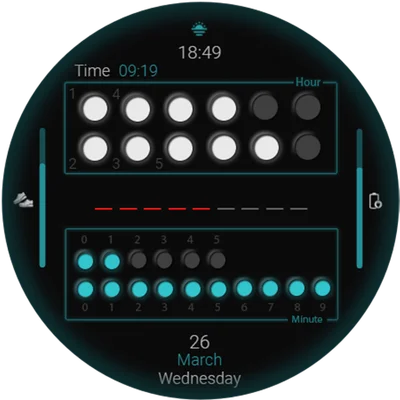
Futuristisches Punktmatrix-Zifferblatt mit Farben, Widgets und Fitness-Tracking!
🔵 Digital Dot Watch Face – Eine futuristische und einzigartige Zeitanzeige! ⌚✨
🚀 Betreten Sie die Zukunft mit diesem einzigartigen Punktmatrix-Zifferblatt! Dieses Zifferblatt wurde für diejenigen entwickelt, die ein modernes, minimalistisches und ultracooles digitales Erlebnis lieben und bietet eine stilvolle Möglichkeit, die Zeit wie nie zuvor anzuzeigen. 💡
🕰 Exklusive Funktionen:
✔ Einzigartige Punktmatrix-Zeitanzeige ⏳ – Eine futuristische Art, die Zeit abzulesen!
✔ Mehrere Farben 🎨 – Passen Sie den Look an Ihren Stil an.
✔ 1 benutzerdefiniertes Widget ⚙️ – Personalisieren Sie es mit Ihrer Lieblingskomplikation!
✔ Batterieanzeige 🔋 – Behalten Sie ganz einfach den Überblick über Ihre Leistung.
✔ Schrittzähler 👟 – Behalten Sie Ihre Fitnessziele im Auge.
✔ Datumsanzeige 📅 – Bleiben Sie immer organisiert.
✔ Cooler AoD-Modus (Always-On Display) 🌙 – Einfacher, aber eleganter Energiesparmodus.
💥 Für Technikbegeisterte und Digitalliebhaber! 💥
----------------------------------------------------------------------------------------------
Hinweise zur Installation des Zifferblatts auf der Smartwatch:
Die Telefon-App dient nur als Platzhalter, um die Installation und das Auffinden des Zifferblatts auf Ihrer Wear OS-Uhr zu erleichtern. Sie müssen Ihr Uhrengerät aus dem Installations-Dropdown-Menü auswählen.
Wenn Sie den Helfer direkt mit dem Telefon herunterladen, müssen Sie die Anwendung öffnen und auf dem Display oder der Download-Schaltfläche berühren. -> beginnt mit der Installation auf der Uhr.
Eine Wear-OS-Uhr muss angeschlossen werden.
Wenn dies nicht funktioniert, können Sie diesen Link in den Chrome-Browser Ihres Telefons kopieren, auf den Abwärtspfeil von rechts klicken und das zu installierende Zifferblatt auswählen.
.................................................
Nach der Installation müssen Sie das Zifferblatt auf Ihren Bildschirm einstellen. Gehen Sie in der Wear OS-App zu den heruntergeladenen Zifferblättern und Sie werden es finden.
Wenn Sie Probleme haben, kontaktieren Sie mich bitte unter raduturcu03@gmail.com
xxxxxxxxxxxxxxxxxxxxxxxxxxxxxxxxxxxxxxxxxxxxxxxxxxx
FOLGEN SIE UNS AUF TELEGRAM: https://t.me/TRWatchfaces
FOLGEN SIE UNSER WEBSITE, UM KOSTENLOSE GUTSCHEINE ZU ERHALTEN: https://trwatches9.wordpress.com/
xxxxxxxxxxxxxxxxxxxxxxxxxxxxxxxxxxxxxxxxxxxxxxxxxxx
Versuchen Sie, andere Designs in meinem Google-Profil zu sehen.
Originaltext anzeigen
🔵 Digital Dot Watch Face – A Futuristic & Unique Time Display! ⌚✨
🚀 Step into the future with this one-of-a-kind dot matrix watch face! Designed for those who love a modern, minimalist, and ultra-cool digital experience, this watch face offers a stylish way to tell time like never before. 💡
🕰 Exclusive Features:
✔ Unique Dot Matrix Time Display ⏳ – A futuristic way to read time!
✔ Multiple Colors 🎨 – Customize the look to match your style.
✔ 1 Custom Widget ⚙️ – Personalize with your favorite complication!
✔ Battery Indicator 🔋 – Keep track of your power with ease.
✔ Step Counter 👟 – Stay on top of your fitness goals.
✔ Date Display 📅 – Always stay organized.
✔ Cool AoD (Always-On Display) Mode 🌙 – Simple yet stylish power-saving mode.
💥 For Tech Enthusiasts & Digital Lovers! 💥
--------------------------------------------------------------------------------------------------------
Watch face installation notes on smart watch:
Phone app serves only as a placeholder to make it easier to install & find the watch face on your Wear OS watch. You have to select your watch device from the install dropdown menu.
If you download the helper directly with the phone , you need to open application and touch on the display or the download button. -> will start to install on the watch.
A wear os watch need to be connected.
If not working in that way , you can copy that link into your phone chrome browser and click on arrow down from right , and you choose the watch face to install.
..............................................
After installation you need to set that watch face to your screen , from wear OS app , go down at downloaded watch faces and you will find it.
If you have problems , please contact me on raduturcu03@gmail.com
xxxxxxxxxxxxxxxxxxxxxxxxxxxxxxxxxxxxxxxxxxxxxxxx
FOLLOW US AT TELEGRAM : https://t.me/TRWatchfaces
FOLLOW US WEBSITE TO GET FREE COUPONS : https://trwatches9.wordpress.com/
xxxxxxxxxxxxxxxxxxxxxxxxxxxxxxxxxxxxxxxxxxxxxxxxx
Try to see others designs in my google profile.
Datensicherheit
Was RADU GHEORGHE TURCU bei Google Play zu den Daten angibt, die diese App erfasst und weitergibt.
- Keine Daten werden mit Drittunternehmen oder -organisationen geteiltWeitere Informationen dazu, wie Entwickler Angaben zur Weitergabe von Daten machen
- Keine Daten erhobenWeitere Informationen dazu, wie Entwickler Angaben zur Datenerhebung machen
Kontakt zum Entwickler
- Websitetrwatches.odoo.com
- E-Mailraduturcu03@gmail.com
- Datenschutzerklärungtrwatches.odoo.com
- AdresseStr. Eduard Albert Bielz, Nr. 89d, Bl. b1, Sc. f, et.1, Ap. 60 550031 Sibiu Romania
Informationen
- Angeboten von
- RADU GHEORGHE TURCU
- Kategorie
- Personalisierung
- Aktualisiert
- 21.03.2025
- Veröffentlicht
- 21.03.2025
- Altersfreigabe
- USK ab 0 Jahren
- Preis
- 1,19 €
- Paketname
- com.turcuradu.digitaldotwatchface