Digital Dot Watch Face
RADU GHEORGHE TURCU- Classificação LivreClassificação etária
- PersonalizaçãoCategoria
- 21/03/2025Atualizado
- R$ 7,49Preço
Leva à página oficial de com.turcuradu.digitaldotwatchface na Google Play. Última verificação em 25/11/2026.
Sobre este app
Tradução automática do Google. Idioma original: Inglês (Estados Unidos).
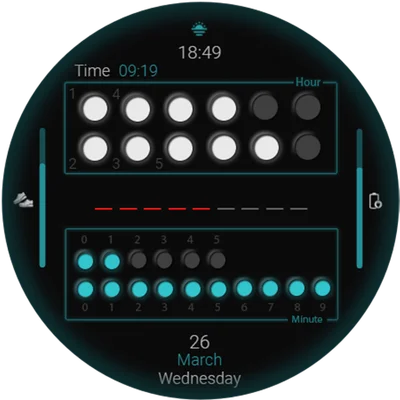
Mostrador futurista de matriz de pontos com cores, widgets e rastreamento de condicionamento físico!
🔵 Mostrador de relógio digital com pontos – uma exibição de hora futurista e única! ⌚✨
🚀 Entre no futuro com este mostrador de relógio de matriz de pontos único! Projetado para aqueles que amam uma experiência digital moderna, minimalista e ultralegal, este mostrador de relógio oferece uma maneira elegante de contar as horas como nunca antes. 💡
🕰 Recursos exclusivos:
✔ Exibição de tempo em matriz de pontos exclusiva ⏳ – Uma maneira futurista de ler o tempo!
✔ Múltiplas Cores 🎨 – Personalize o visual para combinar com seu estilo.
✔ 1 widget personalizado ⚙️ – Personalize com sua complicação favorita!
✔ Indicador de bateria 🔋 – Acompanhe sua energia com facilidade.
✔ Contador de passos 👟 – Fique por dentro de suas metas de condicionamento físico.
✔ Exibição de data 📅 – Mantenha-se sempre organizado.
✔ Modo Cool AoD (Always-On Display) 🌙 – Modo de economia de energia simples, mas elegante.
💥 Para entusiastas de tecnologia e amantes digitais! 💥
-------------------------------------------------------------------------------------------------------------------
Assista às notas de instalação do rosto no relógio inteligente:
O aplicativo de telefone serve apenas como um espaço reservado para facilitar a instalação e a localização do mostrador do relógio no seu relógio Wear OS. Você deve selecionar seu dispositivo de relógio no menu suspenso de instalação.
Se você baixar o auxiliar diretamente com o telefone, será necessário abrir o aplicativo e tocar no display ou no botão de download. -> começará a instalação no relógio.
Um relógio wear os precisa estar conectado.
Se não estiver funcionando dessa forma, você pode copiar esse link para o navegador Chrome do seu telefone e clicar na seta para baixo da direita e escolher o mostrador do relógio para instalar.
...............................................
Após a instalação, você precisa definir o mostrador do relógio para sua tela, no aplicativo Wear OS, vá até os mostradores do relógio baixados e você o encontrará.
Se você tiver problemas, entre em contato comigo em raduturcu03@gmail.com
xxxxxxxxxxxxxxxxxxxxxxxxxxxxxxxxxxxxxxxxxxxxxxxx
SIGA-NOS NO TELEGRAM: https://t.me/TRWatchfaces
SIGA-NOS O SITE PARA OBTER CUPONS GRATUITOS: https://trwatches9.wordpress.com/
xxxxxxxxxxxxxxxxxxxxxxxxxxxxxxxxxxxxxxxxxxxxxxxx
Tente ver outros designs no meu perfil do Google.
Mostrar o texto original
🔵 Digital Dot Watch Face – A Futuristic & Unique Time Display! ⌚✨
🚀 Step into the future with this one-of-a-kind dot matrix watch face! Designed for those who love a modern, minimalist, and ultra-cool digital experience, this watch face offers a stylish way to tell time like never before. 💡
🕰 Exclusive Features:
✔ Unique Dot Matrix Time Display ⏳ – A futuristic way to read time!
✔ Multiple Colors 🎨 – Customize the look to match your style.
✔ 1 Custom Widget ⚙️ – Personalize with your favorite complication!
✔ Battery Indicator 🔋 – Keep track of your power with ease.
✔ Step Counter 👟 – Stay on top of your fitness goals.
✔ Date Display 📅 – Always stay organized.
✔ Cool AoD (Always-On Display) Mode 🌙 – Simple yet stylish power-saving mode.
💥 For Tech Enthusiasts & Digital Lovers! 💥
--------------------------------------------------------------------------------------------------------
Watch face installation notes on smart watch:
Phone app serves only as a placeholder to make it easier to install & find the watch face on your Wear OS watch. You have to select your watch device from the install dropdown menu.
If you download the helper directly with the phone , you need to open application and touch on the display or the download button. -> will start to install on the watch.
A wear os watch need to be connected.
If not working in that way , you can copy that link into your phone chrome browser and click on arrow down from right , and you choose the watch face to install.
..............................................
After installation you need to set that watch face to your screen , from wear OS app , go down at downloaded watch faces and you will find it.
If you have problems , please contact me on raduturcu03@gmail.com
xxxxxxxxxxxxxxxxxxxxxxxxxxxxxxxxxxxxxxxxxxxxxxxx
FOLLOW US AT TELEGRAM : https://t.me/TRWatchfaces
FOLLOW US WEBSITE TO GET FREE COUPONS : https://trwatches9.wordpress.com/
xxxxxxxxxxxxxxxxxxxxxxxxxxxxxxxxxxxxxxxxxxxxxxxxx
Try to see others designs in my google profile.
Segurança dos dados
O que RADU GHEORGHE TURCU declara na Google Play sobre os dados que este app coleta e compartilha.
- Os dados não são compartilhados com terceirosSaiba mais sobre como os desenvolvedores declaram o compartilhamento
- Nenhum dado foi coletadoSaiba mais sobre como os desenvolvedores declaram a coleta
Contato do desenvolvedor
- Sitetrwatches.odoo.com
- E-mailraduturcu03@gmail.com
- Política de privacidadetrwatches.odoo.com
- EndereçoStr. Eduard Albert Bielz, Nr. 89d, Bl. b1, Sc. f, et.1, Ap. 60 550031 Sibiu Romania
Informações
- Oferecido por
- RADU GHEORGHE TURCU
- Categoria
- Personalização
- Atualizado
- 21/03/2025
- Lançamento
- 21/03/2025
- Classificação etária
- Classificação Livre
- Preço
- R$ 7,49
- Nome do pacote
- com.turcuradu.digitaldotwatchface