Dots Watch Face
NeoPlayLabs- USK ab 0 JahrenAltersfreigabe
- PersonalisierungKategorie
- 19.10.2026Aktualisiert
- 0,69 €Preis
Verlinkt auf den offiziellen Google Play-Eintrag von com.neolabs.dots. Zuletzt geprüft am 26.11.2026.
Über diese App
Automatische Übersetzung von Google. Originalsprache: Englisch (Vereinigtes Königreich).
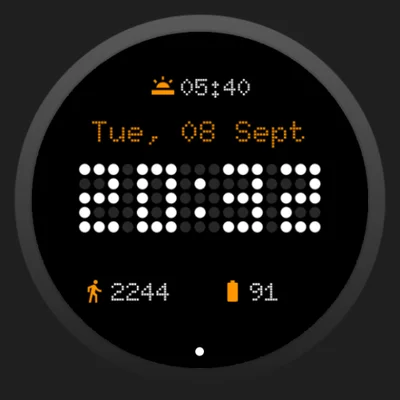
Punktmatrix-Zifferblatt mit Farboptionen, minimalistischem Always-on-Display und 3 Komplikationen
Hol dir den ikonischen Retro-Futurismus klassischer LED- und VFD-Punktmatrix-Displays ans Handgelenk! Das Dots Watch Face kombiniert eine gestochen scharfe 17×5-Punktmatrix-Digitaluhr mit modernen Wear OS-Funktionen, zweifarbiger Anpassung und 3 individuell gestaltbaren Komplikationen.
Das Dots Watch Face wurde im offiziellen Watch Face Format (WFF) für Wear OS entwickelt und bietet Energieeffizienz, flüssige Performance und kontrastreiche Always-On-Display-Modi (AOD).
✨ HAUPTMERKMALE
•📟 Authentisches 17×5-Punktmatrix-Display: Verfügt über ein 17-spaltiges und 5-zeiliges Punktraster mit deutlichen Spaltenabständen für optimale Lesbarkeit der Ziffern und klassische Retro-Ästhetik.
•💡 Sichtbares, unbeleuchtetes LED-Raster: Simuliert ein physisches LED-Panel mit dezenten, schwach beleuchteten Hintergrundpunkten, die unter den aktiven Ziffern leuchten.
•🎨 Zwei unabhängige Farbanpassungsmöglichkeiten:
◦ Uhr- und Textfarbe: Passen Sie die Farbe der Hauptuhr und der Komplikationsdaten individuell an.
◦ Akzent- und Symbolfarbe: Färben Sie die Komplikationssymbole und die Datums- und Wochentagsanzeige oben separat ein!
◦ 6 ikonische Retro-Farbpaletten: Matrixgrün, Cybercyan, Retro-Bernstein, Neonrot, Elektrisches Violett und Klassisches Weiß.
•🔤 Doto Bold-Schriftart: Die markante Doto Bold-Schriftart sorgt für klare und gut lesbare Datums- und Komplikationsdaten.
•🧩 3 anpassbare Komplikationen:
◦ Oben: Standardmäßig Sonnenaufgang/Sonnenuntergang.
◦ Unten links: Standardmäßig Schrittzähler/Wochentag.
◦ Unten rechts: Standardmäßig Akkuanzeige.
◦ Vollständig anpassbar an jeden Wear OS-Anbieter (Herzfrequenz, Wetter, Weltzeituhr, Nächster Alarm, Benachrichtigungen und mehr).
• 🌙 Minimales Always-On-Display (AOD):
◦ Minimales AOD (Umschalter): Aktivieren Sie diese Option im Anpassungsmenü, um Komplikationen und Datum im AOD-Modus auszublenden. So bleibt NUR die Hauptanzeige der Uhrzeit in kontrastreichem, gebrochenem Weiß sichtbar – für maximale Akkuersparnis und ohne Einbrennen.
⚙️ ANPASSUNGSOPTIONEN
Halten Sie das Zifferblatt gedrückt und tippen Sie anschließend auf „Anpassen“ (oder bearbeiten Sie die Einstellungen über die zugehörige App auf Ihrem Smartphone):
1. Uhrzeit- und Textfarbe: Wählen Sie aus 6 lebendigen Farbthemen.
2. Akzent- und Symbolfarbe: Wählen Sie eine Akzentfarbe für Symbole und Datum.
3. Minimales AOD: Aktivieren/Deaktivieren Sie diese Option, um zwischen einem besonders übersichtlichen minimalen AOD-Modus und dem vollständigen AOD-Modus zu wechseln.
4. Komplikationen: Tippen Sie auf einen der 3 Plätze, um Ihre bevorzugten Wear OS-Komplikationsdaten zuzuweisen.
⌚ KOMPATIBILITÄT
Kompatibel mit allen Smartwatches mit Wear OS 4 (API 33+) und Wear OS 5+, einschließlich:
• Samsung Galaxy Watch: Galaxy Watch 7 / Ultra, Galaxy Watch 6 / 6 Classic, Galaxy Watch 5 / 5 Pro, Galaxy Watch 4 / 4 Classic
• Google Pixel Watch: Pixel Watch 3, Pixel Watch 2, Pixel Watch 1
• OnePlus Watch: OnePlus Watch 2 / 2R
• TicWatch: Pro 5 / Pro 5 Enduro
• Fossil, Xiaomi und andere Smartwatches mit Wear OS 4+
💡 INSTALLATION & FEHLERBEHEBUNG
1. Stellen Sie sicher, dass Ihre Uhr per Bluetooth mit Ihrem Smartphone verbunden ist.
2. Installieren Sie das Zifferblatt aus dem Google Play Store.
3. Halten Sie das aktive Zifferblatt auf Ihrer Uhr gedrückt, wischen Sie nach rechts und wählen Sie „Zifferblatt hinzufügen“ → „Dots Watch Face“.
4. Tippen Sie auf „Anpassen“, um Farben, Always-on-Display-Modi und Komplikationen anzupassen.
Originaltext anzeigen
Bring the iconic retro-futuristic aesthetic of classic LED and VFD dot-matrix displays to your wrist! Dots Watch Face combines a sharp 17×5 dot matrix digital clock with modern Wear OS features, dual-color customization, and 3 customizable complications.
Designed using the official Watch Face Format (WFF) for Wear OS, Dots Watch Face offers battery efficiency, smooth performance, and high-contrast Always-On Display (AOD) modes.
✨ KEY FEATURES
•📟 Authentic 17×5 Dot Matrix Display: Features a 17-column by 5-row dot grid with distinct 1-column spacing gaps for maximum digit readability and classic retro aesthetics.
•💡 Visible Unlit LED Grid: Simulates a physical LED panel with subtle, dim unlit background dots that glow underneath active digits.
•🎨 Dual Independent Color Customization:
◦ Clock & Text Color: Customize the main matrix clock and complication data text.
◦ Accent & Icon Color: Independently color the complication icons and the top Day & Date display!
◦ 6 Iconic Retro Palette Options: Matrix Green, Cyber Cyan, Retro Amber, Neon Red, Electric Violet, and Classic White.
•🔤 Doto Bold Typography: Uses the distinctive Doto Bold font for crisp, glanceable dates and complication data.
•🧩 3 Customizable Complications:
◦ Top Slot: Defaulted to Sunrise/Sunset.
◦ Bottom-Left Slot: Defaulted to Daily Step Count / Day of Week.
◦ Bottom-Right Slot: Defaulted to Watch Battery.
◦ Fully customizable to any Wear OS provider (Heart Rate, Weather, World Clock, Next Alarm, Notifications, and more).
• 🌙 Minimal Always-On Display (AOD):
◦ Minimal AOD Toggle: Enable in the customization menu to hide complications and date in AOD mode, leaving ONLY the main dot matrix time display in high-contrast off-white for maximum battery savings and zero burn-in risk.
⚙️ CUSTOMIZATION OPTIONS
Press and hold the watch face, then tap Customize (or edit via your phone's companion app):
1. Clock & Text Color: Choose from 6 vibrant color themes.
2. Accent & Icon Color: Choose an accent color for icons and date.
3. Minimal AOD: Toggle ON/OFF to switch between a ultra-clean Minimal AOD or Full AOD mode.
4. Complications: Tap any of the 3 slots to assign your favorite Wear OS complication data.
⌚ COMPATIBILITY
Compatible with all smartwatch devices running Wear OS 4 (API 33+) and Wear OS 5+, including:
• Samsung Galaxy Watch: Galaxy Watch 7 / Ultra, Galaxy Watch 6 / 6 Classic, Galaxy Watch 5 / 5 Pro, Galaxy Watch 4 / 4 Classic
• Google Pixel Watch: Pixel Watch 3, Pixel Watch 2, Pixel Watch 1
• OnePlus Watch: OnePlus Watch 2 / 2R
• TicWatch: Pro 5 / Pro 5 Enduro
• Fossil, Xiaomi, and other Wear OS 4+ smartwatches
💡 INSTALLATION & TROUBLESHOOTING
1. Ensure your watch is connected to your phone via Bluetooth.
2. Install the watch face from the Google Play Store.
3. On your watch, press and hold the active watch face, scroll right, and select Add watch face -> Dots Watch Face.
4. Tap Customize to adjust colors, AOD modes, and complications.
Datensicherheit
Was NeoPlayLabs bei Google Play zu den Daten angibt, die diese App erfasst und weitergibt.
- Keine Daten werden mit Drittunternehmen oder -organisationen geteiltWeitere Informationen dazu, wie Entwickler Angaben zur Weitergabe von Daten machen
- Keine Daten erhobenWeitere Informationen dazu, wie Entwickler Angaben zur Datenerhebung machen
- Hat sich verpflichtet, den Google Play-Richtlinien für familienfreundliche Inhalte zu folgen
Neue Funktionen
Version 1.7 · 19.10.2026
Initial public release.
Kontakt zum Entwickler
- Websiteneohome.casa
- E-Mailnishantkumar713@gmail.com
- Datenschutzerklärungfreeprivacypolicy.com
- Adresse116/3 OFFICERS MESS, AIR FORCE 1, AIR FORCE STN JAMNAGAR Jamnagar, Gujarat 361003 India
Informationen
- Angeboten von
- NeoPlayLabs
- Kategorie
- Personalisierung
- Version
- 1.7
- Aktualisiert
- 19.10.2026
- Veröffentlicht
- 26.09.2026
- Altersfreigabe
- USK ab 0 Jahren
- Preis
- 0,69 €
- Paketname
- com.neolabs.dots