Dots Watch Face
NeoPlayLabs- Rating 3+Batasan usia
- PersonalisasiKategori
- 19/10/2026Diperbarui
- Rp 11.000Harga
Tertaut ke halaman resmi com.neolabs.dots di Google Play. Terakhir diperiksa pada 26/11/2026.
Tentang aplikasi ini
Terjemahan otomatis oleh Google. Bahasa asli: Inggris (Inggris Raya).
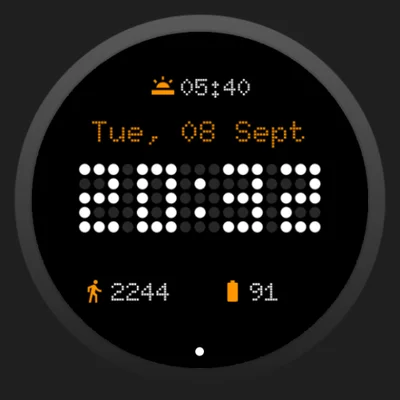
Tampilan jam bergaya dot matrix dengan pilihan warna, AOD minimal, dan 3 komplikasi.
Hadirkan estetika retro-futuristik ikonik dari tampilan matriks titik LED dan VFD klasik ke pergelangan tangan Anda! Dots Watch Face menggabungkan jam digital matriks titik 17×5 yang tajam dengan fitur Wear OS modern, kustomisasi dua warna, dan 3 komplikasi yang dapat dikustomisasi.
Dirancang menggunakan Format Tampilan Jam (WFF) resmi untuk Wear OS, Dots Watch Face menawarkan efisiensi baterai, kinerja yang lancar, dan mode Always-On Display (AOD) dengan kontras tinggi.
✨ FITUR UTAMA
•📟 Tampilan Matriks Titik 17×5 Otentik: Menampilkan kisi titik 17 kolom x 5 baris dengan jarak 1 kolom yang berbeda untuk keterbacaan angka maksimal dan estetika retro klasik.
•💡 Kisi LED Tak Bercahaya yang Terlihat: Mensimulasikan panel LED fisik dengan titik latar belakang redup yang bersinar di bawah angka aktif.
•🎨 Kustomisasi Warna Ganda Independen:
◦ Warna Jam & Teks: Kustomisasi jam matriks utama dan teks data komplikasi.
◦ Warna Aksen & Ikon: Warnai ikon komplikasi dan tampilan Hari & Tanggal di bagian atas secara independen!
◦ 6 Pilihan Palet Retro Ikonik: Hijau Matriks, Sian Siber, Amber Retro, Merah Neon, Ungu Elektrik, dan Putih Klasik.
•🔤 Tipografi Doto Bold: Menggunakan font Doto Bold yang khas untuk tanggal dan data komplikasi yang jelas dan mudah dilihat.
•🧩 3 Komplikasi yang Dapat Dikustomisasi:
◦ Slot Atas: Secara default menampilkan Matahari Terbit/Terbenam.
◦ Slot Kiri Bawah: Secara default menampilkan Jumlah Langkah Harian / Hari dalam Seminggu.
◦ Slot Kanan Bawah: Secara default menampilkan Baterai Jam Tangan.
◦ Dapat dikustomisasi sepenuhnya untuk penyedia Wear OS apa pun (Detak Jantung, Cuaca, Jam Dunia, Alarm Berikutnya, Notifikasi, dan banyak lagi).
• 🌙 Tampilan Selalu Aktif Minimal (AOD):
◦ Tombol AOD Minimal: Aktifkan di menu kustomisasi untuk menyembunyikan komplikasi dan tanggal dalam mode AOD, hanya menyisakan tampilan waktu matriks titik utama dalam warna putih pucat kontras tinggi untuk penghematan baterai maksimal dan risiko burn-in nol.
⚙️ OPSI KUSTOMISASI
Tekan dan tahan tampilan jam, lalu ketuk Kustomisasi (atau edit melalui aplikasi pendamping ponsel Anda):
1. Warna Jam & Teks: Pilih dari 6 tema warna yang cerah.
2. Warna Aksen & Ikon: Pilih warna aksen untuk ikon dan tanggal.
3. AOD Minimal: Aktifkan/Nonaktifkan untuk beralih antara mode AOD Minimal yang sangat bersih atau mode AOD Penuh.
4. Komplikasi: Ketuk salah satu dari 3 slot untuk menetapkan data komplikasi Wear OS favorit Anda.
⌚ KOMPATIBILITAS
Kompatibel dengan semua perangkat smartwatch yang menjalankan Wear OS 4 (API 33+) dan Wear OS 5+, termasuk:
• Samsung Galaxy Watch: Galaxy Watch 7 / Ultra, Galaxy Watch 6 / 6 Classic, Galaxy Watch 5 / 5 Pro, Galaxy Watch 4 / 4 Classic
• Google Pixel Watch: Pixel Watch 3, Pixel Watch 2, Pixel Watch 1
• OnePlus Watch: OnePlus Watch 2 / 2R
• TicWatch: Pro 5 / Pro 5 Enduro
• Fossil, Xiaomi, dan smartwatch Wear OS 4+ lainnya
💡 INSTALASI & PEMECAHAN MASALAH
1. Pastikan jam tangan Anda terhubung ke ponsel Anda melalui Bluetooth.
2. Instal tampilan jam dari Google Play Store.
3. Pada jam tangan Anda, tekan dan tahan tampilan jam yang aktif, gulir ke kanan, dan pilih Tambah tampilan jam -> Tampilan Jam Dots.
4. Ketuk Sesuaikan untuk mengubah warna, mode AOD, dan komplikasi.
Tampilkan teks asli
Bring the iconic retro-futuristic aesthetic of classic LED and VFD dot-matrix displays to your wrist! Dots Watch Face combines a sharp 17×5 dot matrix digital clock with modern Wear OS features, dual-color customization, and 3 customizable complications.
Designed using the official Watch Face Format (WFF) for Wear OS, Dots Watch Face offers battery efficiency, smooth performance, and high-contrast Always-On Display (AOD) modes.
✨ KEY FEATURES
•📟 Authentic 17×5 Dot Matrix Display: Features a 17-column by 5-row dot grid with distinct 1-column spacing gaps for maximum digit readability and classic retro aesthetics.
•💡 Visible Unlit LED Grid: Simulates a physical LED panel with subtle, dim unlit background dots that glow underneath active digits.
•🎨 Dual Independent Color Customization:
◦ Clock & Text Color: Customize the main matrix clock and complication data text.
◦ Accent & Icon Color: Independently color the complication icons and the top Day & Date display!
◦ 6 Iconic Retro Palette Options: Matrix Green, Cyber Cyan, Retro Amber, Neon Red, Electric Violet, and Classic White.
•🔤 Doto Bold Typography: Uses the distinctive Doto Bold font for crisp, glanceable dates and complication data.
•🧩 3 Customizable Complications:
◦ Top Slot: Defaulted to Sunrise/Sunset.
◦ Bottom-Left Slot: Defaulted to Daily Step Count / Day of Week.
◦ Bottom-Right Slot: Defaulted to Watch Battery.
◦ Fully customizable to any Wear OS provider (Heart Rate, Weather, World Clock, Next Alarm, Notifications, and more).
• 🌙 Minimal Always-On Display (AOD):
◦ Minimal AOD Toggle: Enable in the customization menu to hide complications and date in AOD mode, leaving ONLY the main dot matrix time display in high-contrast off-white for maximum battery savings and zero burn-in risk.
⚙️ CUSTOMIZATION OPTIONS
Press and hold the watch face, then tap Customize (or edit via your phone's companion app):
1. Clock & Text Color: Choose from 6 vibrant color themes.
2. Accent & Icon Color: Choose an accent color for icons and date.
3. Minimal AOD: Toggle ON/OFF to switch between a ultra-clean Minimal AOD or Full AOD mode.
4. Complications: Tap any of the 3 slots to assign your favorite Wear OS complication data.
⌚ COMPATIBILITY
Compatible with all smartwatch devices running Wear OS 4 (API 33+) and Wear OS 5+, including:
• Samsung Galaxy Watch: Galaxy Watch 7 / Ultra, Galaxy Watch 6 / 6 Classic, Galaxy Watch 5 / 5 Pro, Galaxy Watch 4 / 4 Classic
• Google Pixel Watch: Pixel Watch 3, Pixel Watch 2, Pixel Watch 1
• OnePlus Watch: OnePlus Watch 2 / 2R
• TicWatch: Pro 5 / Pro 5 Enduro
• Fossil, Xiaomi, and other Wear OS 4+ smartwatches
💡 INSTALLATION & TROUBLESHOOTING
1. Ensure your watch is connected to your phone via Bluetooth.
2. Install the watch face from the Google Play Store.
3. On your watch, press and hold the active watch face, scroll right, and select Add watch face -> Dots Watch Face.
4. Tap Customize to adjust colors, AOD modes, and complications.
Keamanan data
Yang dinyatakan NeoPlayLabs di Google Play tentang data yang dikumpulkan dan dibagikan aplikasi ini.
- Tidak ada data yang dibagikan kepada pihak ketigaPelajari lebih lanjut cara developer menyatakan pembagian data
- Tidak ada data yang dikumpulkanPelajari lebih lanjut cara developer menyatakan pengumpulan data
- Berkomitmen untuk mematuhi Kebijakan Keluarga Play
Yang baru
Versi 1.7 · 19/10/2026
Initial public release.
Kontak pengembang
- Situs webneohome.casa
- Emailnishantkumar713@gmail.com
- Kebijakan Privasifreeprivacypolicy.com
- Alamat116/3 OFFICERS MESS, AIR FORCE 1, AIR FORCE STN JAMNAGAR Jamnagar, Gujarat 361003 India
Informasi
- Ditawarkan oleh
- NeoPlayLabs
- Kategori
- Personalisasi
- Versi
- 1.7
- Diperbarui
- 19/10/2026
- Dirilis
- 26/9/2026
- Batasan usia
- Rating 3+
- Harga
- Rp 11.000
- Nama paket
- com.neolabs.dots