KTrs2
KocaTurk Watch Faces- USK ab 0 JahrenAltersfreigabe
- PersonalisierungKategorie
- 09.08.2026Aktualisiert
- 0,99 €Preis
Verlinkt auf den offiziellen Google Play-Eintrag von com.kocaturk.ktrs2. Zuletzt geprüft am 26.11.2026.
Über diese App
Automatische Übersetzung von Google. Originalsprache: Englisch (Vereinigte Staaten).
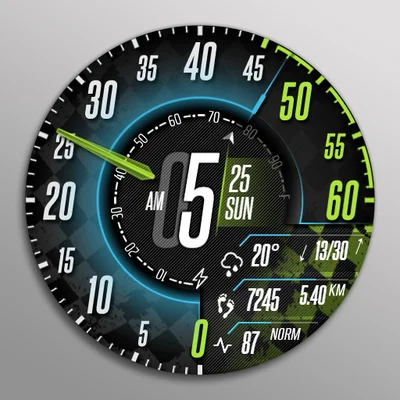
KTrs2 ist ein sportliches Zifferblatt für Wear OS.
KTrs2 ist ein sportliches Zifferblatt für Wear OS.
* Angezeigte Daten:
- Uhrzeit (AM, PM)
- Datum
- Akku (Fortschrittsanzeige)
- Wetter und Temperatur (Tiefst-/Höchsttemperatur, Niederschlagswahrscheinlichkeit, UV-Index)
- Schritte, Ziel und Fortschrittsanzeige
- Distanz (km/mi)
- Herzfrequenz, Zone und Fortschrittsanzeige
* Voreingestellte Tastenkombinationen:
- Schritte
- Herzfrequenz
- Akku
* Komplikationen und Tastenkombinationen:
- 3 Tastenkombinationen (ohne Symbol)
- 2 Komplikationen (Symbol/Text/Titel)**
** Um Komplikationen zu verwenden, wählen Sie zunächst im Bereich „Komplikationen“ die Option mit dem entsprechenden leeren Feld aus und anschließend die gewünschte Komplikation.
* Anpassungsoptionen:
- 25 Farben
- 3 Farboptionen für Sekunden und Fortschrittsanzeige (die erste, zweite und dritte Farbe der Farbpalette)
- 4 Farboptionen für die Akkuanzeige (Weiß und die erste, zweite und dritte Farbe der Farbpalette)
- 2 Indexoptionen für die letzte Viertelminute (weiß und farbig)
- 2 Optionen für den Datenhintergrund (ein/aus)
- 3 Optionen für die Datenanzeige rechts neben den Schritten (km/mi/Ziel)
- Optionen für die Always-on-Display-Dimmung (30/50/70/100 %)
* Hinweis zur Anpassung:
Bei der Anpassung mit der Wearable-App können Verzögerungen und Fehler auftreten.
Konfigurieren Sie daher die Personalisierungseinstellungen Ihrer Uhr.
1. Halten Sie die Mitte des Uhrenbildschirms gedrückt.
2. Tippen Sie auf die Schaltfläche „Anpassen“.
3. Wischen Sie nach links oder rechts, um die anpassbaren Elemente anzuzeigen.
4. Wischen Sie nach oben oder unten, um die Farben oder Optionen für jedes Element zu ändern.
HINWEIS: QUADRATISCHE UHRMODELLE WERDEN DERZEIT NICHT UNTERSTÜTZT! Außerdem sind möglicherweise nicht alle Funktionen auf allen Uhrenmodellen verfügbar.
INSTALLATIONSHINWEISE:
1. Klicken Sie auf den Pfeil rechts neben dem Kaufen-Button und stellen Sie sicher, dass Ihre Smartwatch in der Dropdown-Liste ausgewählt ist.
Nach Abschluss des Downloads:
2. Falls Sie Ihre Smartwatch während der Installation nicht ausgewählt haben, wird die „Begleit-App“ als zweite Installationsoption auf Ihrem Smartphone installiert. Öffnen Sie diese App und tippen Sie auf das Bild. Anschließend wird der Download-Bildschirm des Play Stores auf Ihrer Smartwatch angezeigt. Prüfen Sie, ob der Download gestartet wurde.
Nach Abschluss des Downloads:
Kehren Sie zum Startbildschirm Ihrer Smartwatch zurück und halten Sie den Bildschirm gedrückt. Tippen Sie auf dem Bildschirm zur Zifferblattauswahl ganz rechts auf „Hinzufügen“ und wählen Sie das gekaufte Zifferblatt aus. Aktivieren Sie es.
Hinweis: Keine Sorge, falls Sie in einer Zahlungsschleife hängen bleiben. Auch wenn Sie zur Zahlung aufgefordert werden, wird nur eine Zahlung verarbeitet. Warten Sie 5 Minuten oder starten Sie Ihre Smartwatch neu und versuchen Sie es erneut. Es kann ein Synchronisierungsproblem zwischen Ihrem Gerät und den Google-Servern vorliegen.
Bitte beachten Sie, dass diese Probleme nicht vom Entwickler verursacht werden. Der Entwickler hat hier keinen Einfluss auf den Play Store.
Vielen Dank!
Folgen Sie uns in den sozialen Medien, um Rabatte und Aktionen zu erhalten.
Facebook: https://www.facebook.com/koca.turk.940
Instagram: https://www.instagram.com/kocaturk.wf/
Telegram: https://t.me/kocaturk_wf
Originaltext anzeigen
KTrs2 is a sporty watch face for Wear OS.
* Displayed data:
- Time (AM, PM)
- Date
- Battery (progress bar)
- Weather and temperature (low/ high temp., chance of precipitation, uv index)
- Steps, goal and progress bar
- Distance (km/mi)
- Heart rate, zone and progress bar
* Preset shortcuts:
- Steps
- Heart rate
- Battery
* Complications and shortcuts:
- 3 shortcuts (no icon)
- 2 complications (icon/text/title)**
** To use complications, first select the option where the relevant field is empty from the "comp. area" and then select the complication you want from the complications section.
* Customization options:
- 25 color palette
- 3 color options for the seconds and progress bars. (the 1st, 2nd and 3rd colors in the color palette)
- 4 color options for the battery progress. (white and the 1st, 2nd, and 3rd colors in the color palette)
- 2 index options for the last quarter of the minute (white and colored)
- 2 options for the data background (on/off)
- 3 options for the data shown to the right of the steps (km/mi/goal)
- AOD dimming options (30/50/70/100%)
* Customization note:
Delays and glitches may occur during customization with the wearable app.
Therefore, configure your watch's personalization settings.
1. Press and hold the center of the watch screen.
2. Tap the Customize button.
3. Swipe left or right to browse customizable items.
4. Swipe up or down to change the colors or options for each item.
NOTE:
SQUARE WATCH MODELS ARE NOT CURRENTLY SUPPORTED! Also, some features may not be available on all watch models.
INSTALLATION NOTES:
1. Click the arrow to the right of the Buy button and make sure your watch is selected from the devices listed in the drop-down menu.
After the download is complete:
2. If you didn't select your watch during the installation, a second installation option, the "Companion App," will be installed on your phone. Open this app and tap the image. Then, you'll see the Play Store download screen on your watch. Check that the download has started.
After the download is complete:
Return to your watch's home screen and long-press the screen. On the watch face selection screen, click "Add" on the far right and find and activate the watch face you purchased.
Note: Don't worry if you get stuck in the payment loop; even if you're asked for a second payment, only one payment will be processed. Wait 5 minutes or restart your watch and try again.
There may be a synchronization issue between your device and Google servers.
Please note that these issues are not caused by the developer. The developer has no control over the Play Store on this side.
Thank you!
Follow us on social media for discounts and promotions.
Facebook: https://www.facebook.com/koca.turk.940
Instagram: https://www.instagram.com/kocaturk.wf/
Telegram: https://t.me/kocaturk_wf
Datensicherheit
Was KocaTurk Watch Faces bei Google Play zu den Daten angibt, die diese App erfasst und weitergibt.
- Keine Daten werden mit Drittunternehmen oder -organisationen geteiltWeitere Informationen dazu, wie Entwickler Angaben zur Weitergabe von Daten machen
- Keine Daten erhobenWeitere Informationen dazu, wie Entwickler Angaben zur Datenerhebung machen
Neue Funktionen
09.08.2026
The target has been updated to SDK 36.
Kontakt zum Entwickler
- E-Mailkocaturk.wf@gmail.com
- Datenschutzerklärungsites.google.com
- AdresseBÜYÜKKARIŞTIRAN BELDESİ FATİH MAH. GÜNDOĞU SK. NO: 11 İÇ KAPI NO: 2 39780 Lüleburgaz/Kırklareli Türkiye
Informationen
- Angeboten von
- KocaTurk Watch Faces
- Kategorie
- Personalisierung
- Aktualisiert
- 09.08.2026
- Veröffentlicht
- 15.01.2026
- Altersfreigabe
- USK ab 0 Jahren
- Preis
- 0,99 €
- Paketname
- com.kocaturk.ktrs2