Math Chalkboard Watch Face
Weetkit- USK ab 0 JahrenAltersfreigabe
- PersonalisierungKategorie
- 06.11.2026Aktualisiert
- 1,09 €Preis
Verlinkt auf den offiziellen Google Play-Eintrag von com.weetkit.mathchalkboard. Zuletzt geprüft am 27.11.2026.
Über diese App
Automatische Übersetzung von Google. Originalsprache: Englisch (Vereinigte Staaten).
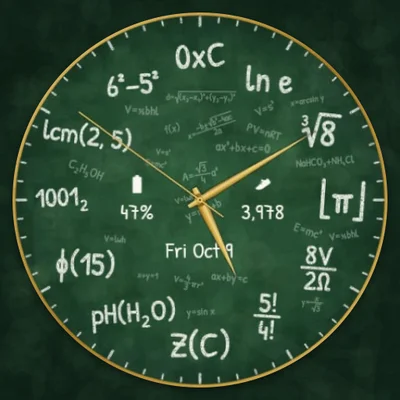
Ein Zifferblatt in Tafelform, bei dem jede Stunde ein mathematisches Rätsel darstellt, von denen 36 zur Auswahl stehen.
Die Uhrzeit so ablesen, wie es sich Ihr Mathelehrer gewünscht hätte.
Math Chalkboard ist ein analoges Zifferblatt für Wear OS, das einer Schultafel nachempfunden ist: grüne Schiefertafel, ein Messingrand, goldene Zeiger und handgeschriebene Aufgaben anstelle der Zahlen. Lösen Sie die Aufgabe, und Sie erhalten die Uhrzeit.
JEDE STUNDE IST EIN RÄTSEL
Jede Position auf dem Zifferblatt steht für eine andere mathematische Aufgabe, angereichert mit etwas Physik und Chemie:
- Hexadezimal und Binär: 0xC, 1001₂
- Differentialrechnung: d/dx (8x) und das Integral von 0 bis 2 von 2x dx
- Fakultäten und Permutationen: 5!/4!, 4!!, ⁴P₂
- Logarithmen und Eulersche Identität: log(10¹⁰), ln e, −e^(iπ)
- Abrunden, Aufrunden und Beträge: ⌊π⌋, ⌈e⌉, |−11|
- Zahlentheorie: kgV(2, 5), φ(15)
- Komplexe Zahlen: |3+4i|
- Naturwissenschaften: pH-Wert von reinem Wasser, Ohmsches Gesetz, Ordnungszahl von Kohlenstoff
Plus Potenzen, Wurzeln und eine Gleichung zum Lösen
WÄHLE DEINE AUFGABEN
Jede Stunde bietet drei Aufgaben zur Auswahl, insgesamt 36. Öffne den Zifferblatt-Editor, wische zu einer Stunde und drehe die Krone, um deine Wunschaufgabe auszuwählen. Kombiniere einfache und schwierige Aufgaben oder gestalte das gesamte Zifferblatt als Analysis-Aufgabe.
Hinter dem Zifferblatt sind schwach verblasste Formeln zu sehen: die quadratische Formel, die Abstandsformel, E=mc², PV=nRT und mehr.
NÜTZLICH AUF EINEN BLICK
- Akkuprozentanzeige und Schrittzähler, links und rechts neben der Mitte in Kreideform.
Beide sind als Komplikationsfelder nutzbar, sodass Sie sie im Zifferblatt-Editor mit beliebigen Daten austauschen können.
- Wochentag und Datum, z. B. „Di., 26. Sep.“
- 60-Sekunden-Markierungen und ein Sekundenzeiger, der einmal pro Sekunde tickt.
AKKUSCHONEND
- Gedimmtes Always-on-Display auf schwarzem Hintergrund.
Entwickelt mit dem Watch Face Format, daher effizient und ohne eigenen Code.
BEGLEITENDE SMARTPHONE-APP
Die Smartphone-App ist optional und muss für die Nutzung des Zifferblatts nicht installiert sein. Sie bietet:
- Die Lösung für jedes Problem: Tippen Sie auf eine der 36 Zahlen, um zu sehen, warum sie der entsprechenden Stunde entspricht.
- Ein Quiz: Welche Stunde steht dafür?
Schritt-für-Schritt-Anleitung zur Installation des Zifferblatts und zur individuellen Gestaltung
VORAUSSETZUNGEN
Eine Wear OS-Smartwatch mit Wear OS 4 oder höher
Installieren Sie die App über den Play Store auf Ihrem Smartphone, indem Sie Ihre Smartwatch in der Geräteliste unter der Schaltfläche „Installieren“ auswählen, oder suchen Sie im Play Store auf Ihrer Smartwatch nach „Math Chalkboard“. Tippen und halten Sie anschließend Ihr aktuelles Zifferblatt und wählen Sie „Math Chalkboard“ aus.
Math Chalkboard sammelt keine Daten und benötigt weder auf der Smartwatch noch auf dem Smartphone Berechtigungen.
Originaltext anzeigen
Tell the time the way your math teacher would have wanted.
Math Chalkboard is an analog watch face for Wear OS drawn like a classroom chalkboard: green slate, a brass rim, gold hands, and hand-written problems where the numbers should be. Solve the problem and you have the hour.
EVERY HOUR IS A PUZZLE
Each position on the dial is a different kind of math, with a little physics and chemistry thrown in:
- Hexadecimal and binary: 0xC, 1001₂
- Calculus: d/dx (8x) and the integral from 0 to 2 of 2x dx
- Factorials and permutations: 5!/4!, 4!!, ⁴P₂
- Logarithms and Euler's identity: log(10¹⁰), ln e, −e^(iπ)
- Floors, ceilings and absolute values: ⌊π⌋, ⌈e⌉, |−11|
- Number theory: lcm(2, 5), φ(15)
- Complex numbers: |3+4i|
- Science: the pH of pure water, Ohm's law, the atomic number of carbon
- Plus powers, roots and an equation to solve
CHOOSE YOUR PROBLEMS
Every hour has three problems to choose from, 36 in all. Open the watch face editor, swipe to an hour and turn the crown to pick the one you like. Mix easy and hard, or make the whole dial calculus.
Behind the dial, faint half-erased formulas fill the board: the quadratic formula, the distance formula, E=mc², PV=nRT and more.
USEFUL AT A GLANCE
- Battery percentage and step count, shown in chalk either side of the center
- Both are complication slots, so you can swap them for any data you prefer in the watch face editor
- Day and date, for example "Tue Sep 26"
- Sixty second markers and a second hand that ticks once a second
EASY ON THE BATTERY
- A dimmed always-on display on a black background
- Built with the Watch Face Format, so it runs efficiently and contains no code of its own
PHONE COMPANION APP
The phone app is optional and does not need to be installed for the watch face to work. It has:
- The working for every problem: tap any of the 36 to see why it equals its hour
- A quiz: which hour does it stand for?
- A step-by-step guide to installing the face and customizing the dial
REQUIREMENTS
- A Wear OS watch running Wear OS 4 or later
- Install from the Play Store on your phone by choosing your watch from the device list under the Install button, or search for Math Chalkboard in the Play Store on the watch. Then touch and hold your current watch face and choose Math Chalkboard.
Math Chalkboard collects no data and needs no permissions, on the watch or the phone.
Datensicherheit
Was Weetkit bei Google Play zu den Daten angibt, die diese App erfasst und weitergibt.
- Keine Daten werden mit Drittunternehmen oder -organisationen geteiltWeitere Informationen dazu, wie Entwickler Angaben zur Weitergabe von Daten machen
- Keine Daten erhobenWeitere Informationen dazu, wie Entwickler Angaben zur Datenerhebung machen
Neue Funktionen
Version 1.0.8 · 06.11.2026
Introducing the Math Chalkboard companion app:
- The working for all 36 problems on the watch face: tap any to see why it equals its hour
- A quiz: which hour does it stand for?
- A step-by-step guide to installing the face on your watch and choosing your problems
The watch face works without it.
Kontakt zum Entwickler
- Websiteweetkit.com
- E-Mailweetkit@gmail.com
- Datenschutzerklärungjet-risk-919.notion.site
- AdresseSiaya Kenya
Informationen
- Angeboten von
- Weetkit
- Kategorie
- Personalisierung
- Version
- 1.0.8
- Aktualisiert
- 06.11.2026
- Veröffentlicht
- 05.11.2026
- Altersfreigabe
- USK ab 0 Jahren
- Preis
- 1,09 €
- Paketname
- com.weetkit.mathchalkboard