Math Chalkboard Watch Face
Weetkit- PEGI 3Classification d’âge
- PersonnalisationCatégorie
- 06/11/2026Mis à jour
- 1,09 €Prix
Renvoie vers la fiche Google Play officielle de com.weetkit.mathchalkboard. Dernière vérification le 27/11/2026.
À propos de cette application
Traduction automatique par Google. Langue d’origine : Anglais (États-Unis).
Un cadran de montre tableau noir où chaque heure est un casse-tête mathématique, avec 36 énigmes au choix.
Affichez l'heure comme votre professeur de maths l'aurait souhaité.
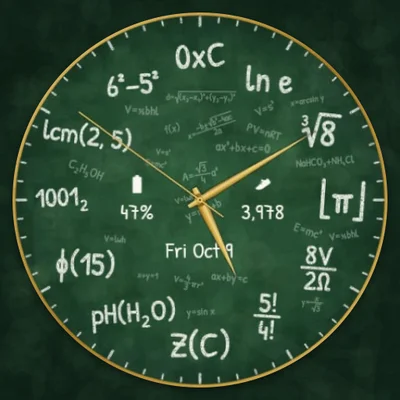
Math Chalkboard est un cadran analogique pour Wear OS inspiré d'un tableau noir d'école : ardoise verte, contour en laiton, aiguilles dorées et problèmes écrits à la main à la place des chiffres. Résolvez le problème et vous obtiendrez l'heure.
CHAQUE HEURE EST UN CASSE-TÊTE
Chaque position sur le cadran correspond à un type de calcul différent, avec une touche de physique et de chimie :
- Hexadécimal et binaire : 0xC, 1001₂
- Calcul différentiel : d/dx (8x) et l’intégrale de 0 à 2 de 2x dx
- Factorielles et permutations : 5!/4!, 4!!, ⁴P₂
- Logarithmes et identité d’Euler : log(10¹⁰), ln e, −e^(iπ)
- Explorateurs entiers, entiers supérieurs et valeurs absolues : ⌊π⌋, ⌈e⌉, |−11|
- Théorie des nombres : ppcm(2, 5), φ(15)
- Nombres complexes : |3+4i| - Sciences : le pH de l'eau pure, la loi d'Ohm, le numéro atomique du carbone
- Et aussi des puissances, des racines et une équation à résoudre
CHOISISSEZ VOS PROBLÈMES
Chaque heure propose trois problèmes, soit 36 au total. Ouvrez l'éditeur de cadran, faites glisser votre doigt jusqu'à une heure et tournez la couronne pour choisir celui qui vous plaît. Mélangez les niveaux faciles et difficiles, ou remplissez tout le cadran de calculs.
Derrière le cadran, des formules à moitié effacées recouvrent le tableau : la formule du second degré, la formule de la distance, E=mc², PV=nRT et bien d'autres.
UTILE EN UN COUP D'ŒIL
- Pourcentage de batterie et nombre de pas, affichés en gras de part et d'autre du centre
- Ces deux informations peuvent être personnalisées : remplacez-les par les données de votre choix dans l'éditeur de cadran
- Jour et date, par exemple « Mar 26 sept. »
- Marqueurs de 60 secondes et trotteuse (une seconde par minute)
ÉCONOMIE D'ÉNERGIE
- Affichage permanent discret sur fond noir
- Conçu au format Watch Face, ce cadran est performant et ne contient aucun code propriétaire
APPLICATION COMPAGNON POUR TÉLÉPHONE
L'application mobile est optionnelle et ne nécessite pas l'installation du cadran pour fonctionner. Elle propose :
- L'explication de chaque problème : touchez l'un des 36 cadrans pour découvrir pourquoi il correspond à l'heure correspondante
- Un quiz : à quelle heure correspond chaque cadran ? - Guide pas à pas pour installer le cadran et le personnaliser
CONDITIONS REQUISES
- Montre Wear OS (version 4 ou ultérieure)
- Installez l'application depuis le Play Store sur votre téléphone en sélectionnant votre montre dans la liste des appareils sous le bouton « Installer », ou recherchez « Math Chalkboard » dans le Play Store sur votre montre. Appuyez ensuite longuement sur votre cadran actuel et choisissez « Math Chalkboard ».
Math Chalkboard ne collecte aucune donnée et ne nécessite aucune autorisation, ni sur la montre ni sur le téléphone.
Afficher le texte d’origine
Tell the time the way your math teacher would have wanted.
Math Chalkboard is an analog watch face for Wear OS drawn like a classroom chalkboard: green slate, a brass rim, gold hands, and hand-written problems where the numbers should be. Solve the problem and you have the hour.
EVERY HOUR IS A PUZZLE
Each position on the dial is a different kind of math, with a little physics and chemistry thrown in:
- Hexadecimal and binary: 0xC, 1001₂
- Calculus: d/dx (8x) and the integral from 0 to 2 of 2x dx
- Factorials and permutations: 5!/4!, 4!!, ⁴P₂
- Logarithms and Euler's identity: log(10¹⁰), ln e, −e^(iπ)
- Floors, ceilings and absolute values: ⌊π⌋, ⌈e⌉, |−11|
- Number theory: lcm(2, 5), φ(15)
- Complex numbers: |3+4i|
- Science: the pH of pure water, Ohm's law, the atomic number of carbon
- Plus powers, roots and an equation to solve
CHOOSE YOUR PROBLEMS
Every hour has three problems to choose from, 36 in all. Open the watch face editor, swipe to an hour and turn the crown to pick the one you like. Mix easy and hard, or make the whole dial calculus.
Behind the dial, faint half-erased formulas fill the board: the quadratic formula, the distance formula, E=mc², PV=nRT and more.
USEFUL AT A GLANCE
- Battery percentage and step count, shown in chalk either side of the center
- Both are complication slots, so you can swap them for any data you prefer in the watch face editor
- Day and date, for example "Tue Sep 26"
- Sixty second markers and a second hand that ticks once a second
EASY ON THE BATTERY
- A dimmed always-on display on a black background
- Built with the Watch Face Format, so it runs efficiently and contains no code of its own
PHONE COMPANION APP
The phone app is optional and does not need to be installed for the watch face to work. It has:
- The working for every problem: tap any of the 36 to see why it equals its hour
- A quiz: which hour does it stand for?
- A step-by-step guide to installing the face and customizing the dial
REQUIREMENTS
- A Wear OS watch running Wear OS 4 or later
- Install from the Play Store on your phone by choosing your watch from the device list under the Install button, or search for Math Chalkboard in the Play Store on the watch. Then touch and hold your current watch face and choose Math Chalkboard.
Math Chalkboard collects no data and needs no permissions, on the watch or the phone.
Sécurité des données
Ce que Weetkit déclare sur Google Play au sujet des données que cette application collecte et partage.
- Aucune donnée partagée avec des tiersEn savoir plus sur la manière dont les développeurs déclarent le partage
- Aucune donnée collectéeEn savoir plus sur la manière dont les développeurs déclarent la collecte
Nouveautés
Version 1.0.8 · 06/11/2026
Introducing the Math Chalkboard companion app:
- The working for all 36 problems on the watch face: tap any to see why it equals its hour
- A quiz: which hour does it stand for?
- A step-by-step guide to installing the face on your watch and choosing your problems
The watch face works without it.
Coordonnées du développeur
- Site webweetkit.com
- E-mailweetkit@gmail.com
- Politique de confidentialitéjet-risk-919.notion.site
- AdresseSiaya Kenya
Informations
- Proposée par
- Weetkit
- Catégorie
- Personnalisation
- Version
- 1.0.8
- Mis à jour
- 06/11/2026
- Publié
- 05/11/2026
- Classification d’âge
- PEGI 3
- Prix
- 1,09 €
- Nom du package
- com.weetkit.mathchalkboard