Omarchy AI Usage Watchface
Dmytro Gladkyi- USK ab 0 JahrenAltersfreigabe
- PersonalisierungKategorie
- 13.09.2026Aktualisiert
- KostenlosPreis
Verlinkt auf den offiziellen Google Play-Eintrag von com.gladimdim.omarchy.ai.watch.watchface. Zuletzt geprüft am 19.11.2026.
Über diese App
Automatische Übersetzung von Google. Originalsprache: Englisch (Vereinigte Staaten).
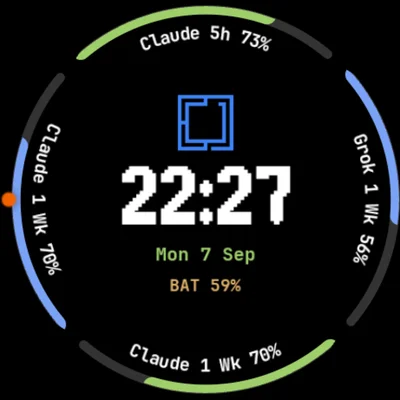
Vier KI-Kontingentanzeigen um eine Pixeluhr. Benötigt die Omarchy AI Usage App.
Ein Wear OS-Zifferblatt, das anzeigt, wie viel von Ihrem KI-Programmierbudget noch übrig ist.
Vier Bögen, einer auf jeder Seite des Zifferblatts. Jeder Bogen füllt sich, sobald ein Kontingent verbraucht wird, und
hat seine eigene Beschriftung. So sehen Sie auf einen Blick, was gerade erfasst wird und wie viel noch übrig ist: „Claude 5 Std. 73 %“, „Grok 1 Woche 56 %“. Eine Uhr mit Pixelschrift, das Datum und
Ihr Akkustand befinden sich in der Mitte.
WAS DIE BÖGEN ANZEIGEN
Standardmäßig: ein Claude-Code-Sitzungsfenster, ein wöchentliches Grok-Kontingent, ein Antigravity-Denkkontingent und der heutige Tokenverbrauch. Jeder Bogen kann auf ein beliebiges Limit zeigen, das Ihr System meldet – entweder über die Omarchy AI Usage App auf der Uhr oder über das Desktop-Widget.
Das Zifferblatt basiert auf dem Watch Face Format, dem deklarativen Format, das die Plattform selbst rendert. Es wird kein Rendering-Code auf Ihrer Uhr ausgeführt, daher wird nur sehr wenig Akku verbraucht.
ANPASSUNG
Drücken Sie das Zifferblatt lange und tippen Sie auf „Anpassen“:
• 13 Hintergrundfarben, von Tiefschwarz über Dunkelblau, Karmesinrot und Limette bis Violett.
Jede Farbe hat ihre eigene Farbpalette, die so gewählt wurde, dass benachbarte Bögen nie die gleiche Farbe haben.
Jeder Bogen bleibt vor dem jeweiligen Hintergrund gut lesbar.
• 9 Logofarben.
Das Always-on-Display schaltet unabhängig vom gewählten Hintergrund auf Tiefschwarz um und blendet die Bögen, das Datum und den Akkustand aus. Auf einem OLED-Panel, das im Dauerbetrieb fast keine Energie verbraucht.
VORAUSSETZUNGEN
• Wear OS 5 oder höher. Das Zifferblatt nutzt Funktionen des Watch Face Format v2, die von älteren Versionen nicht unterstützt werden.
• Die kostenlose Begleit-App „Omarchy AI Usage“, die die Datenvolumenangaben liefert, und die Omarchy AI Watch Bridge auf einem Linux-Desktop. Ohne diese Apps zeigen die Bögen keine Informationen an.
Beide sind Open Source und unter der MIT-Lizenz veröffentlicht.
Die vier Bögen werden automatisch mit den Komplikationen der Begleit-App verknüpft, sobald Sie das Zifferblatt auswählen. Eine manuelle Zuweisung ist nicht erforderlich.
DATENSCHUTZ
Die Benutzeroberfläche sammelt keine Daten und enthält keinen Code. Vollständige Datenschutzrichtlinie:
https://gladimdim.github.io/omarchy-ai-companion/privacy.html
Originaltext anzeigen
A Wear OS watch face that shows how much of your AI coding budget is left.
Four arcs, one on each side of the dial. Each fills as a quota is consumed and
carries its own label, so a glance tells you both what is being tracked and how
much is left: "Claude 5h 73%", "Grok 1 Wk 56%". A pixel-font clock, the date and
your watch battery sit in the middle.
WHAT THE ARCS SHOW
By default: a Claude Code session window, a weekly Grok allowance, an Antigravity
thinking quota, and today's total token burn. Any arc can be pointed at any limit
your machine reports, from the Omarchy AI Usage app on the watch or from the desktop
widget.
The face is built with Watch Face Format, the declarative format the platform
renders itself. No rendering code runs on your watch, so it costs very little
battery.
CUSTOMISATION
Long-press the face and tap Customize:
• 13 background colours, from true black to deep blue, crimson, lime and violet.
Each carries its own gauge palette, chosen so neighbouring arcs never share a
colour and every arc stays legible against that background.
• 9 logo colours.
Always-on display drops back to true black whatever background you chose, and
hides the arcs, date and battery. On an OLED panel that costs almost nothing to
leave on all day.
REQUIRES
• Wear OS 5 or later. The face uses Watch Face Format v2 features that older
versions cannot render.
• The free "Omarchy AI Usage" companion app, which supplies the quota figures, and the
Omarchy AI Watch Bridge on a Linux desktop. Without them the arcs have nothing
to show. Both are open source and MIT licensed.
The four arcs bind to the companion app's complications automatically the moment
you select the face. There is nothing to assign by hand.
PRIVACY
The face collects nothing and contains no code. Full policy:
https://gladimdim.github.io/omarchy-ai-companion/privacy.html
Datensicherheit
Was Dmytro Gladkyi bei Google Play zu den Daten angibt, die diese App erfasst und weitergibt.
- Keine Daten werden mit Drittunternehmen oder -organisationen geteiltWeitere Informationen dazu, wie Entwickler Angaben zur Weitergabe von Daten machen
- Keine Daten erhobenWeitere Informationen dazu, wie Entwickler Angaben zur Datenerhebung machen
- Hat sich verpflichtet, den Google Play-Richtlinien für familienfreundliche Inhalte zu folgen
Neue Funktionen
Version 1.0.4 · 13.09.2026
First release.
• Four AI quota arcs that bind to the Omarchy AI Usage complications automatically
• Pixel-font clock, date and watch battery
• 13 background themes, each with its own legible gauge palette
• 9 logo colours
• True-black always-on display whatever theme you pick
Kontakt zum Entwickler
- Websitegladimdim.github.io
- E-Mailgladimdim@gmail.com
- Datenschutzerklärunggladimdim.github.io
- AdresseVishnyakivska 9, apt. 176 Kyiv місто Київ Ukraine 02140
Informationen
- Angeboten von
- Dmytro Gladkyi
- Kategorie
- Personalisierung
- Version
- 1.0.4
- Aktualisiert
- 13.09.2026
- Veröffentlicht
- 13.09.2026
- Altersfreigabe
- USK ab 0 Jahren
- Preis
- Kostenlos
- Paketname
- com.gladimdim.omarchy.ai.watch.watchface