Omarchy AI Usage Watchface
Dmytro Gladkyi- 3 歳以上対象年齢
- カスタマイズカテゴリ
- 2026/9/13更新日
- 無料価格
com.gladimdim.omarchy.ai.watch.watchfaceのGoogle Play公式ページにリンクしています。最終確認:2026/11/19。
このアプリについて
Googleによる英語 (アメリカ合衆国)からの自動翻訳です。
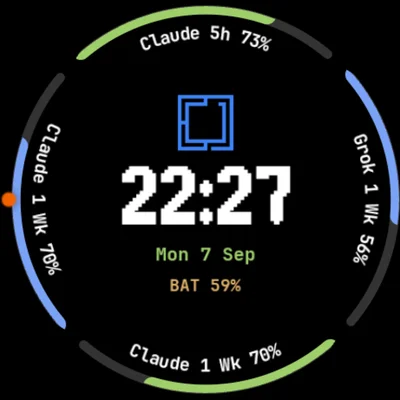
ピクセル時計の周りに4つのAI使用率ゲージが表示されます。Omarchy AI使用状況アプリが必要です。
AIコーディング予算の残量を表示するWear OSウォッチフェイス。
文字盤の両側に4つの弧が配置されています。それぞれの弧は割り当て量が消費されるにつれて塗りつぶされ、
それぞれにラベルが表示されるため、一目で何が追跡されているか、そして
どれだけ残っているかがわかります。「Claude 5時間 73%」、「Grok 1週間 56%」。中央にはピクセルフォントの時計、日付、
バッテリー残量が表示されます。
弧の表示内容
デフォルトでは、Claudeコードセッションウィンドウ、Grokの週間割り当て量、Antigravityの
思考割り当て量、そして本日のトークン消費量の合計が表示されます。どの弧も、
ウォッチ上のOmarchy AI使用状況アプリまたはデスクトップウィジェットからマシンが報告する任意の制限値に
向けることができます。
このウォッチフェイスは、プラットフォームが
レンダリングする宣言型フォーマットであるWatch Face Formatで構築されています。
ウォッチ上でレンダリングコードは実行されないため、
バッテリー消費量は非常に少ないです。
カスタマイズ
文字盤を長押しして「カスタマイズ」をタップします。
• 背景色は、真の黒からディープブルー、クリムゾン、ライム、バイオレットまで、13色から選択できます。
それぞれの色には専用のゲージパレットが用意されており、隣接するアークが同じ色にならないように選ばれているため、どのアークも背景色に対して視認性が保たれます。
• ロゴカラーは9色から選択できます。
常時表示ディスプレイは、選択した背景に関わらず、真の黒に戻り、アーク、日付、バッテリー残量表示を非表示にします。OLEDパネルを採用しているため、一日中点灯していてもほとんど電力消費がありません。
必要条件
• Wear OS 5以降。この文字盤は、旧バージョンではレンダリングできないWatch Face Format v2の機能を使用しています。
• クォータ値を提供する無料のコンパニオンアプリ「Omarchy AI Usage」と、Linuxデスクトップ上のOmarchy AI Watch Bridgeが必要です。
これらがないと、アークは表示されません。
どちらもオープンソースで、MITライセンスです。
4つのアークは、フェイスを選択した瞬間にコンパニオンアプリのコンプリケーションに自動的にバインドされます。手動で設定する必要はありません。
プライバシー
フェイスはデータを収集せず、コードも一切含まれていません。プライバシーポリシー全文はこちら:
https://gladimdim.github.io/omarchy-ai-companion/privacy.html
原文を表示
A Wear OS watch face that shows how much of your AI coding budget is left.
Four arcs, one on each side of the dial. Each fills as a quota is consumed and
carries its own label, so a glance tells you both what is being tracked and how
much is left: "Claude 5h 73%", "Grok 1 Wk 56%". A pixel-font clock, the date and
your watch battery sit in the middle.
WHAT THE ARCS SHOW
By default: a Claude Code session window, a weekly Grok allowance, an Antigravity
thinking quota, and today's total token burn. Any arc can be pointed at any limit
your machine reports, from the Omarchy AI Usage app on the watch or from the desktop
widget.
The face is built with Watch Face Format, the declarative format the platform
renders itself. No rendering code runs on your watch, so it costs very little
battery.
CUSTOMISATION
Long-press the face and tap Customize:
• 13 background colours, from true black to deep blue, crimson, lime and violet.
Each carries its own gauge palette, chosen so neighbouring arcs never share a
colour and every arc stays legible against that background.
• 9 logo colours.
Always-on display drops back to true black whatever background you chose, and
hides the arcs, date and battery. On an OLED panel that costs almost nothing to
leave on all day.
REQUIRES
• Wear OS 5 or later. The face uses Watch Face Format v2 features that older
versions cannot render.
• The free "Omarchy AI Usage" companion app, which supplies the quota figures, and the
Omarchy AI Watch Bridge on a Linux desktop. Without them the arcs have nothing
to show. Both are open source and MIT licensed.
The four arcs bind to the companion app's complications automatically the moment
you select the face. There is nothing to assign by hand.
PRIVACY
The face collects nothing and contains no code. Full policy:
https://gladimdim.github.io/omarchy-ai-companion/privacy.html
データ セーフティ
このアプリが収集・共有するデータについて、Dmytro GladkyiがGoogle Playで申告している内容です。
- 第三者と共有されるデータはありません詳しくは、デベロッパーが共有を申告する方法についての説明をご覧ください
- データは収集されません詳しくは、デベロッパーが収集を申告する方法についての説明をご覧ください
- Play ファミリー ポリシーの遵守に努めています
新機能
バージョン 1.0.4 · 2026/9/13
First release.
• Four AI quota arcs that bind to the Omarchy AI Usage complications automatically
• Pixel-font clock, date and watch battery
• 13 background themes, each with its own legible gauge palette
• 9 logo colours
• True-black always-on display whatever theme you pick
開発元の連絡先
- ウェブサイトgladimdim.github.io
- メールgladimdim@gmail.com
- プライバシーポリシーgladimdim.github.io
- 住所Vishnyakivska 9, apt. 176 Kyiv місто Київ Ukraine 02140
情報
- 提供元
- Dmytro Gladkyi
- カテゴリ
- カスタマイズ
- バージョン
- 1.0.4
- 更新日
- 2026/9/13
- リリース
- 2026/9/13
- 対象年齢
- 3 歳以上
- 価格
- 無料
- パッケージ名
- com.gladimdim.omarchy.ai.watch.watchface