Orbit Digital Watch Face
WL Digital- USK ab 0 JahrenAltersfreigabe
- PersonalisierungKategorie
- 04.10.2026Aktualisiert
- 1,09 €Preis
Verlinkt auf den offiziellen Google Play-Eintrag von com.wldigital.watchface.orbit. Zuletzt geprüft am 13.11.2026.
Über diese App
Automatische Übersetzung von Google. Originalsprache: Englisch (Vereinigte Staaten).
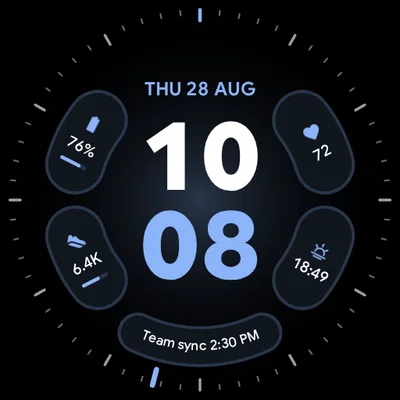
Markantes digitales Zifferblatt mit geschwungenen Komplikationen, 12 Farben und 4 Zeitformaten.
Orbit Digital stellt die Uhrzeit groß und deutlich im Zentrum Ihrer Uhr dar, während Ihre Tagesaktivitäten in geschwungenen Komplikationen entlang des Bildschirmrandes angezeigt werden. Entwickelt für die großen, runden Displays der neuesten Galaxy Watches.
... ⏱ GROSSE, GROSSE ZEITANZEIGE
• Stunden statt Minuten – auf einen Blick gut lesbar
• 12- oder 24-Stunden-Anzeige, je nach Einstellung Ihrer Uhr
• Sanft gleitende Sekundenanzeige: als Markierung über dem Zifferblatt, als Strich am Rand oder ohne
🟣 GEBOGENE KOMPLIKATIONEN
• Vier Anzeigen links und rechts der Uhrzeit und eine breite Anzeige am unteren Rand, die sich der Bildschirmform anpasst
• Standardmäßig werden Akku, Herzfrequenz, Schritte, Sonnenaufgang/Sonnenuntergang und Ihr nächstes Ereignis angezeigt
• Akku, Schritte und andere Ziele werden mit einem Fortschrittsbalken unter dem jeweiligen Wert dargestellt
• Platzieren Sie jede von Ihrer Uhr angebotene Komplikation in einer der Anzeigen oder lassen Sie diese leer
• Text wird nie mit „…“ abgeschnitten: Wenn der Text nicht in die Anzeige passt, wird stattdessen das App-Symbol angezeigt
🎨 12 FARBEN, 4 STILE
• Eisblau, Aquamarin, Mintgrün, Limette, Gold, Bernstein, Koralle, Rubinrot, Rosé, Lavendel, Schneeweiß und Graphit
• Kräftig, Abgerundet, Klassisch oder Schmal Ziffern
• Minutenstriche, Zahlen oder ein übersichtliches Zifferblatt
• Ein sanftes Leuchten in Ihrer Farbe hinter der Zeitanzeige oder kein Leuchten
🌙 IMMER AN, AKKUSCHONEND
Eine ruhige Always-on-Ansicht mit Datum und Uhrzeit in dünnen Ziffern, die nur wenige Pixel beleuchten und sich nur einmal pro Minute ändern. Oder, falls gewünscht, mit kräftigen, abgedunkelten Ziffern.
Erstellt mit Googles Watch Face Format, der modernen und energiesparenden Methode zur Erstellung von Zifferblättern. Erfordert Wear OS 5 oder höher, einschließlich Samsung Galaxy Watch und Google Pixel Watch Modelle mit Wear OS 5.
🔒 IHRE DATEN BLEIBEN AUF IHRER UHR
Dieses Zifferblatt sammelt oder teilt keine Daten. Alles, was angezeigt wird, bleibt auf Ihrer Uhr.
SO RICHTEN SIE ES EIN
Nach der Installation tippen und halten Sie Ihr aktuelles Zifferblatt, wischen Sie bis zum Ende, tippen Sie auf „Hinzufügen“ und wählen Sie „Orbit Digital“. Um die Farbe, den Zeitstil, das Zifferblatt, die Sekunden oder die Komplikationen zu ändern, tippen und halten Sie das Zifferblatt und tippen Sie auf „Anpassen“. Sie können die Einstellungen auch in der Galaxy Wearable- oder Pixel Watch-App auf Ihrem Smartphone vornehmen.
Fragen oder Anregungen? Schreiben Sie eine E-Mail an minimalisticwatchfaces@gmail.com.
Originaltext anzeigen
Orbit Digital puts a big, bold time at the center of your watch, with your day in curved complications that follow the edge of the screen. Designed for the large round screens of the newest Galaxy Watches.
⏱ BIG, BOLD TIME
• Hours over minutes, easy to read at a glance
• 12 or 24 hour, following your watch's setting
• Seconds that glide smoothly: a marker over the dial or a sweep around the rim, or none
🟣 CURVED COMPLICATIONS
• Four pods either side of the time and a wide one along the bottom, shaped to follow your screen
• Battery, heart rate, steps, sunrise/sunset and your next event by default
• Battery, steps and other goals show a progress bar under the value
• Put any complication your watch offers in any pod, or leave it empty
• Text is never cut off with "…": when it doesn't fit, the pod shows the app's icon instead
🎨 12 COLORS, 4 STYLES
• Ice, Aqua, Mint, Lime, Gold, Amber, Coral, Ruby, Rose, Lavender, Snow and Graphite
• Bold, Rounded, Classic or Thin digits
• Minute ticks, numbers or a clean dial
• A soft glow of your color behind the time, or none
🌙 ALWAYS ON, EASY ON BATTERY
A calm always-on view with just the date and the time, in thin digits that light few pixels and change only once a minute. Or bold, dimmed digits if you prefer.
Made with Google's Watch Face Format, the modern, battery-efficient way to build watch faces. Requires Wear OS 5 or later, including Samsung Galaxy Watch and Google Pixel Watch models that run Wear OS 5.
🔒 YOUR DATA STAYS ON YOUR WATCH
This watch face doesn't collect or share any data. Everything it shows stays on your watch.
HOW TO SET IT
After installing, touch and hold your current watch face, swipe to the end, tap Add and choose Orbit Digital. To change the color, the time style, the dial, the seconds or the complications, touch and hold the face and tap Customize. You can also set it up in the Galaxy Wearable or Pixel Watch app on your phone.
Questions or ideas? Email minimalisticwatchfaces@gmail.com.
Datensicherheit
Was WL Digital bei Google Play zu den Daten angibt, die diese App erfasst und weitergibt.
- Keine Daten werden mit Drittunternehmen oder -organisationen geteiltWeitere Informationen dazu, wie Entwickler Angaben zur Weitergabe von Daten machen
- Keine Daten erhobenWeitere Informationen dazu, wie Entwickler Angaben zur Datenerhebung machen
Neue Funktionen
Version 1.0.0 · 04.10.2026
Welcome to Orbit Digital: a bold digital watch face with curved complications, 12 colors and 4 time styles.
Kontakt zum Entwickler
- Websiteparkerloney.github.io
- E-Mailminimalisticwatchfaces@gmail.com
- Datenschutzerklärungparkerloney.github.io
- Adresse204 Wilson Hall Dr Madison, AL 35757 United States
Informationen
- Angeboten von
- WL Digital
- Kategorie
- Personalisierung
- Version
- 1.0.0
- Aktualisiert
- 04.10.2026
- Veröffentlicht
- 04.10.2026
- Altersfreigabe
- USK ab 0 Jahren
- Preis
- 1,09 €
- Paketname
- com.wldigital.watchface.orbit