Orbit Digital Watch Face
WL Digital- 3 歳以上対象年齢
- カスタマイズカテゴリ
- 2026/10/4更新日
- ¥170価格
com.wldigital.watchface.orbitのGoogle Play公式ページにリンクしています。最終確認:2026/11/13。
このアプリについて
Googleによる英語 (アメリカ合衆国)からの自動翻訳です。
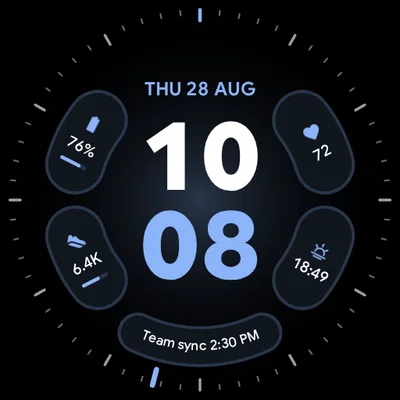
曲線的な複雑機構を備えた大胆なデジタルウォッチフェイス。12色のカラーバリエーションと4種類の時刻表示スタイルをご用意。
Orbit Digitalは、時計の中央に大きく大胆な時刻表示を配置し、画面の縁に沿って曲線を描くコンプリケーションで日付を表示します。最新のGalaxy Watchの大型円形スクリーン向けに設計されています。
⏱ 大きくて見やすい時刻表示
• 時を分の上に表示し、一目で読みやすい
• 時計の設定に合わせて12時間表示または24時間表示を選択可能
• 秒表示は滑らかに流れる:文字盤上のマーカー、ベゼルを一周するスイープ表示、または秒表示なしを選択可能
🟣 曲線的なコンプリケーション
• 時刻表示の両側に4つのポッド、下部に幅広のポッドを配置。画面に沿うようにデザインされています
• バッテリー残量、心拍数、歩数、日の出/日の入り時刻、次のイベントをデフォルトで表示
• バッテリー残量、歩数、その他の目標には、値の下にプログレスバーが表示されます
• 時計が提供するコンプリケーションを任意のポッドに追加したり、空のままにしておくことも可能
• テキストが「…」で途切れることはありません。文字が収まらない場合は、代わりにアプリのアイコンが表示されます
🎨 12色、4つのスタイル
• アイス、アクア、ミント、ライム、ゴールド、アンバー、コーラル、ルビー、ローズ、ラベンダー、スノー、グラファイト
• 太字、丸みを帯びたクラシックな数字、または細身の数字
• 分目盛り、数字、またはシンプルな文字盤
• 時刻の背景にお好みの色の柔らかな光、または光なし
🌙 常時表示、バッテリーに優しい
日付と時刻のみを表示する、落ち着いた常時表示。細身の数字はピクセル数が少なく、1分ごとにしか変化しません。お好みで、太字で控えめな数字も選択可能です。
Googleのウォッチフェイスフォーマットで作成。最新のバッテリー効率の良いウォッチフェイス作成方法です。Wear OS 5以降が必要です。Samsung Galaxy WatchやGoogle Pixel Watchなど、Wear OS 5を搭載したモデルに対応しています。
🔒 データはウォッチに保存されます
このウォッチフェイスはデータを収集したり共有したりしません。表示されるすべてのデータはウォッチに保存されます。
設定方法
インストール後、現在のウォッチフェイスを長押しし、右端までスワイプして「追加」をタップし、「Orbit Digital」を選択してください。文字盤の色、時刻表示スタイル、文字盤、秒表示、コンプリケーションを変更するには、文字盤を長押しして「カスタマイズ」をタップしてください。また、スマートフォンのGalaxy WearableアプリまたはPixel Watchアプリからも設定できます。
ご質問やご意見がありましたら、minimalisticwatchfaces@gmail.comまでメールでお問い合わせください。
原文を表示
Orbit Digital puts a big, bold time at the center of your watch, with your day in curved complications that follow the edge of the screen. Designed for the large round screens of the newest Galaxy Watches.
⏱ BIG, BOLD TIME
• Hours over minutes, easy to read at a glance
• 12 or 24 hour, following your watch's setting
• Seconds that glide smoothly: a marker over the dial or a sweep around the rim, or none
🟣 CURVED COMPLICATIONS
• Four pods either side of the time and a wide one along the bottom, shaped to follow your screen
• Battery, heart rate, steps, sunrise/sunset and your next event by default
• Battery, steps and other goals show a progress bar under the value
• Put any complication your watch offers in any pod, or leave it empty
• Text is never cut off with "…": when it doesn't fit, the pod shows the app's icon instead
🎨 12 COLORS, 4 STYLES
• Ice, Aqua, Mint, Lime, Gold, Amber, Coral, Ruby, Rose, Lavender, Snow and Graphite
• Bold, Rounded, Classic or Thin digits
• Minute ticks, numbers or a clean dial
• A soft glow of your color behind the time, or none
🌙 ALWAYS ON, EASY ON BATTERY
A calm always-on view with just the date and the time, in thin digits that light few pixels and change only once a minute. Or bold, dimmed digits if you prefer.
Made with Google's Watch Face Format, the modern, battery-efficient way to build watch faces. Requires Wear OS 5 or later, including Samsung Galaxy Watch and Google Pixel Watch models that run Wear OS 5.
🔒 YOUR DATA STAYS ON YOUR WATCH
This watch face doesn't collect or share any data. Everything it shows stays on your watch.
HOW TO SET IT
After installing, touch and hold your current watch face, swipe to the end, tap Add and choose Orbit Digital. To change the color, the time style, the dial, the seconds or the complications, touch and hold the face and tap Customize. You can also set it up in the Galaxy Wearable or Pixel Watch app on your phone.
Questions or ideas? Email minimalisticwatchfaces@gmail.com.
データ セーフティ
このアプリが収集・共有するデータについて、WL DigitalがGoogle Playで申告している内容です。
- 第三者と共有されるデータはありません詳しくは、デベロッパーが共有を申告する方法についての説明をご覧ください
- データは収集されません詳しくは、デベロッパーが収集を申告する方法についての説明をご覧ください
新機能
バージョン 1.0.0 · 2026/10/4
Welcome to Orbit Digital: a bold digital watch face with curved complications, 12 colors and 4 time styles.
開発元の連絡先
- ウェブサイトparkerloney.github.io
- メールminimalisticwatchfaces@gmail.com
- プライバシーポリシーparkerloney.github.io
- 住所204 Wilson Hall Dr Madison, AL 35757 United States
情報
- 提供元
- WL Digital
- カテゴリ
- カスタマイズ
- バージョン
- 1.0.0
- 更新日
- 2026/10/4
- リリース
- 2026/10/4
- 対象年齢
- 3 歳以上
- 価格
- ¥170
- パッケージ名
- com.wldigital.watchface.orbit