Animated Pizza Watch Face
MURADIUM SMART WATCH FACES- USK ab 0 JahrenAltersfreigabe
- PersonalisierungKategorie
- 05.11.2026Aktualisiert
- 3,09 €Preis
Verlinkt auf den offiziellen Google Play-Eintrag von com.watchfacestudio.deliciouspizzawatchface. Zuletzt geprüft am 23.11.2026.
Über diese App
Automatische Übersetzung von Google. Originalsprache: Englisch (Vereinigte Staaten).
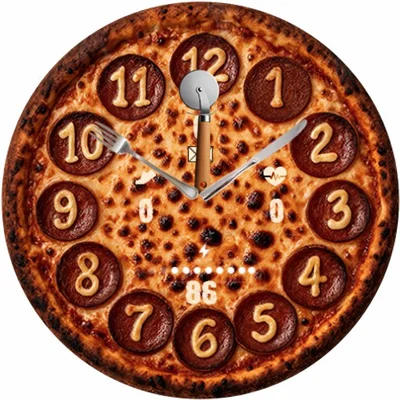
Animiertes Pizza-Zifferblatt für Wear OS
Entdecken Sie das Analog Pizza Watch Face für Wear OS – eine gelungene und funktionale Kombination aus Gourmet-Charme und Alltagstauglichkeit. Dieses einzigartige Zifferblatt ist ideal für Feinschmecker und Uhrensammler und bietet mit jedem Blick einen frischen Look.
Design und Ästhetik
Mit vier verschiedenen, appetitanregenden Pizza-Motiven lässt sich der Hintergrund ganz einfach per Fingertipp in der Displaymitte an Ihre Stimmung oder Ihr Outfit anpassen. Das klassische Pizza-Thema findet sich auch in den Zeitanzeigen wieder: Eine Gabel dient als Stundenzeiger, ein Messer als Minutenzeiger und ein Pizzaschneider als Sekundenzeiger. Für optimale Funktionalität den ganzen Tag über wechselt das Always-On-Display (AOD) in eine rustikale, energieeffiziente und optisch ansprechende Pizza-Optik.
Gesundheits- und Fitness-Tracking
Behalten Sie Ihre Fitnessziele im Blick – mit integrierten Messwerten, die direkt auf Ihrem Handgelenk angezeigt werden. Überwachen Sie Ihre körperliche Aktivität mit dem Schrittzähler, behalten Sie Ihren Herzfrequenzrhythmus mit der Herzfrequenzanzeige im Auge und verpassen Sie dank Benachrichtigungen und Akkuanzeige keine Neuigkeiten mehr.
Verknüpfungen und Anpassungsmöglichkeiten
Erleichtern Sie sich Ihren Alltag dank eines übersichtlichen Layouts mit sechs festen Systemverknüpfungen und acht individuell anpassbaren Verknüpfungen:
Herzfrequenz-App: Tippen Sie auf die Zahl 3, die Herzfrequenzanzeige oder das Herzsymbol.
Musikplayer-App: Tippen Sie auf die Zahl 12.
Telefon-App: Tippen Sie auf die Zahl 6.
Einstellungen-App: Tippen Sie auf die Zahl 7.
Nachrichten-App: Tippen Sie auf das Briefumschlagsymbol oder die Benachrichtigungsanzeige.
Akku-App: Tippen Sie auf die Akkupunkte oder die Prozentanzeige.
Benutzerdefinierte App-Verknüpfungen: Tippen Sie auf die Zahl 9, das Schuhsymbol, den Schrittzähler oder eine der übrigen Zahlen (1, 2, 4, 5, 8, 10 und 11), um Ihre bevorzugten Apps direkt zu starten.
Originaltext anzeigen
Discover the Analog Pizza Watch Face for Wear OS, a delightful and functional fusion of gourmet charm and everyday utility. Designed for food enthusiasts and watch face collectors alike, this unique timepiece serves up a fresh look with every glance.
Design and Aesthetics
Featuring four distinct, mouth-watering pizza styles, the background can be effortlessly customized with a simple tap in the center of the display to match your mood or outfit. The classic culinary theme is cleverly integrated into the timekeeping elements, utilizing a fork as the hour hand, a knife as the minute hand, and a pizza wheel for the second hand. To ensure seamless functionality throughout the day, the Always-On Display (AOD) transitions into a rustic, burnt-pizza aesthetic that is both power-efficient and visually engaging.
Health and Fitness Tracking
Stay on top of your wellness goals with integrated metrics seamlessly displayed on your wrist. Monitor your physical activity using the dedicated steps counter, keep track of your cardiovascular rhythm with the heart rate indicator, and never miss an update with the built-in notifications counter and clean battery level dots.
Shortcuts and Customization
Navigate your daily life with ease thanks to a robust layout featuring six fixed system shortcuts and eight customizable shortcuts tailored to your preferences:
Heart Rate App: Tap index number 3, the heart rate indicator, or the heart icon.
Music Player App: Tap index number 12.
Phone App: Tap index number 6.
Settings App: Tap index number 7.
Messages App: Tap the envelope image or the notifications counter.
Battery App: Tap the battery dots or percentage indicator.
Custom App Shortcuts: Tap index number 9, the shoe picture, the steps counter, or any of the remaining index numbers (1, 2, 4, 5, 8, 10, and 11) to instantly launch your preferred applications.
Datensicherheit
Was MURADIUM SMART WATCH FACES bei Google Play zu den Daten angibt, die diese App erfasst und weitergibt.
- Keine Daten werden mit Drittunternehmen oder -organisationen geteiltWeitere Informationen dazu, wie Entwickler Angaben zur Weitergabe von Daten machen
- Keine Daten erhobenWeitere Informationen dazu, wie Entwickler Angaben zur Datenerhebung machen
Neue Funktionen
Version 4.0.0 · 05.11.2026
What's new in version 4.0.0:
• Added 4 new pizza background styles with smooth animations (tap middle of display to change).
• Refined clock hand sizes for improved proportions and readability.
• Added Steps Counter, Heart Rate Indicator, Notifications Counter, and Battery status dots.
• Added 8 customizable shortcuts and 6 fixed app shortcuts.
Kontakt zum Entwickler
- E-Mailmuradsahinoglu@gmail.com
- Datenschutzerklärungprivacypolicies.com
- AdresseEmek Mh. Yorum Sk. No: 2/2A 60300 TURHAL/Tokat Türkiye
Informationen
- Angeboten von
- MURADIUM SMART WATCH FACES
- Kategorie
- Personalisierung
- Version
- 4.0.0
- Aktualisiert
- 05.11.2026
- Veröffentlicht
- 22.09.2025
- Altersfreigabe
- USK ab 0 Jahren
- Preis
- 3,09 €
- Paketname
- com.watchfacestudio.deliciouspizzawatchface