Animated Pizza Watch Face
MURADIUM SMART WATCH FACES- 3 歳以上対象年齢
- カスタマイズカテゴリ
- 2026/11/5更新日
- ¥520価格
com.watchfacestudio.deliciouspizzawatchfaceのGoogle Play公式ページにリンクしています。最終確認:2026/11/23。
このアプリについて
Googleによる英語 (アメリカ合衆国)からの自動翻訳です。
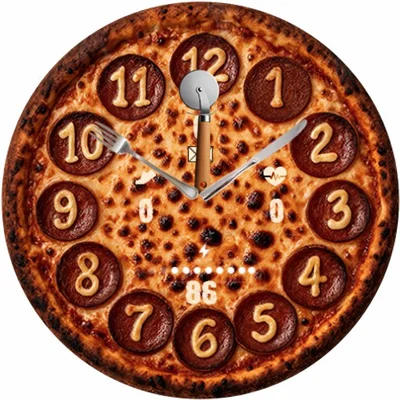
Wear OS用のアニメーションピザウォッチフェイス
Wear OS向けアナログピザウォッチフェイスをご紹介します。グルメな魅力と日常使いの利便性を融合させた、楽しく機能的なデザインです。食通の方にも、ウォッチフェイスコレクターの方にもぴったりのこのユニークなウォッチフェイスは、見るたびに新鮮な印象を与えます。
デザインと美しさ
食欲をそそる4種類のピザをモチーフにしたデザインが特徴で、ディスプレイ中央をタップするだけで、気分や服装に合わせて簡単にカスタマイズできます。クラシックなピザのテーマは、時針にフォーク、分針にナイフ、秒針にピザの輪切りを採用するなど、時刻表示にも巧みに取り入れられています。一日中快適に使えるよう、常時表示ディスプレイ(AOD)は、電力効率に優れ、視覚的にも魅力的な、素朴な焦げ目のついたピザをイメージしたデザインに切り替わります。
健康とフィットネスのトラッキング
統合された指標が手首にシームレスに表示されるので、健康目標を常に把握できます。専用の歩数計で身体活動をモニタリングし、心拍数インジケーターで心拍リズムを把握し、内蔵の通知カウンターと見やすいバッテリー残量表示で最新情報を見逃しません。
ショートカットとカスタマイズ
6つの固定システムショートカットと、好みに合わせてカスタマイズできる8つのショートカットを備えた堅牢なレイアウトで、日々の生活をスムーズに操作できます。
心拍数アプリ:インデックス番号3、心拍数インジケーター、またはハートアイコンをタップします。
音楽プレーヤーアプリ:インデックス番号12をタップします。
電話アプリ:インデックス番号6をタップします。
設定アプリ:インデックス番号7をタップします。
メッセージアプリ:封筒のアイコンまたは通知カウンターをタップします。
バッテリーアプリ:バッテリー残量を示すドットまたはパーセント表示をタップします。
カスタムアプリショートカット:インデックス番号9、靴のアイコン、歩数計、または残りのインデックス番号(1、2、4、5、8、10、11)のいずれかをタップすると、お気に入りのアプリをすぐに起動できます。
原文を表示
Discover the Analog Pizza Watch Face for Wear OS, a delightful and functional fusion of gourmet charm and everyday utility. Designed for food enthusiasts and watch face collectors alike, this unique timepiece serves up a fresh look with every glance.
Design and Aesthetics
Featuring four distinct, mouth-watering pizza styles, the background can be effortlessly customized with a simple tap in the center of the display to match your mood or outfit. The classic culinary theme is cleverly integrated into the timekeeping elements, utilizing a fork as the hour hand, a knife as the minute hand, and a pizza wheel for the second hand. To ensure seamless functionality throughout the day, the Always-On Display (AOD) transitions into a rustic, burnt-pizza aesthetic that is both power-efficient and visually engaging.
Health and Fitness Tracking
Stay on top of your wellness goals with integrated metrics seamlessly displayed on your wrist. Monitor your physical activity using the dedicated steps counter, keep track of your cardiovascular rhythm with the heart rate indicator, and never miss an update with the built-in notifications counter and clean battery level dots.
Shortcuts and Customization
Navigate your daily life with ease thanks to a robust layout featuring six fixed system shortcuts and eight customizable shortcuts tailored to your preferences:
Heart Rate App: Tap index number 3, the heart rate indicator, or the heart icon.
Music Player App: Tap index number 12.
Phone App: Tap index number 6.
Settings App: Tap index number 7.
Messages App: Tap the envelope image or the notifications counter.
Battery App: Tap the battery dots or percentage indicator.
Custom App Shortcuts: Tap index number 9, the shoe picture, the steps counter, or any of the remaining index numbers (1, 2, 4, 5, 8, 10, and 11) to instantly launch your preferred applications.
データ セーフティ
このアプリが収集・共有するデータについて、MURADIUM SMART WATCH FACESがGoogle Playで申告している内容です。
- 第三者と共有されるデータはありません詳しくは、デベロッパーが共有を申告する方法についての説明をご覧ください
- データは収集されません詳しくは、デベロッパーが収集を申告する方法についての説明をご覧ください
新機能
バージョン 4.0.0 · 2026/11/5
What's new in version 4.0.0:
• Added 4 new pizza background styles with smooth animations (tap middle of display to change).
• Refined clock hand sizes for improved proportions and readability.
• Added Steps Counter, Heart Rate Indicator, Notifications Counter, and Battery status dots.
• Added 8 customizable shortcuts and 6 fixed app shortcuts.
開発元の連絡先
- メールmuradsahinoglu@gmail.com
- プライバシーポリシーprivacypolicies.com
- 住所Emek Mh. Yorum Sk. No: 2/2A 60300 TURHAL/Tokat Türkiye
情報
- 提供元
- MURADIUM SMART WATCH FACES
- カテゴリ
- カスタマイズ
- バージョン
- 4.0.0
- 更新日
- 2026/11/5
- リリース
- 2025/9/22
- 対象年齢
- 3 歳以上
- 価格
- ¥520
- パッケージ名
- com.watchfacestudio.deliciouspizzawatchface