Programmer Watch Face
RazorSharp Design Studio- USK ab 0 JahrenAltersfreigabe
- PersonalisierungKategorie
- 26.10.2026Aktualisiert
- 2,59 €Preis
Verlinkt auf den offiziellen Google Play-Eintrag von com.rzrdesign.programmer. Zuletzt geprüft am 21.11.2026.
Über diese App
Automatische Übersetzung von Google. Originalsprache: Englisch (Vereinigte Staaten).
Wenn Sie Programmierer sind oder Zifferblätter im Code-Stil mögen, werden Sie dieses lieben!
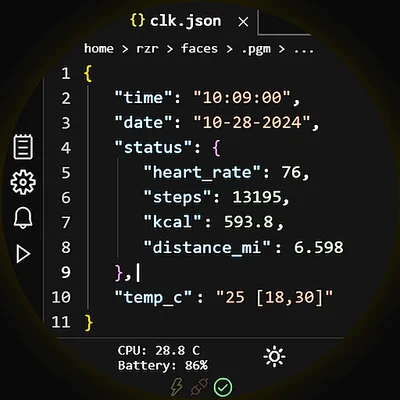
Ein Zifferblatt, das ein VSC-Fenster darstellt, für Programmierer und Code-Enthusiasten, voller Informationen und hochgradig anpassbar (Amoled-Design inklusive!)!
Dies ist ein natives, eigenständiges Wear OS-Zifferblatt. Das bedeutet, dass es auf vielen Smartwatches mit diesem Betriebssystem installiert werden kann (wie Samsung, Mobvoi Ticwatch, Fossil, Oppo, das neueste Xiaomi und mehr).
Es ist komplett handgefertigt, um einzigartig zu sein.
Das Zifferblatt umfasst:
◉ 30 Farbschemata
◉ Anzeigezeit mit größerer Schriftgröße
◉ Viele verschiedene Anpassungen
◉ 12/24-Stunden-Formatunterstützung
◉ Automatisches Datumsformat und Einheiten
◉ Viele Informationen auf einen Blick: Kalorien, Distanz, Schritte, Herzfrequenz, Schrittziel, Benachrichtigungen, Datum, Wetter, Batteriestatus und Temperatur
◉ Anpassbares AOD, Overlay und Hintergrund
◉ 4 schnelle Verknüpfungen (Einstellungen, Alarm, Musik, Kalender)
◉ Reagiert auf niedrigen Akkustand, Benachrichtigungen und Aufladen
◉ 4 verschiedene Komplikationen!
◉ Einfach zu verwendende (und deinstallierbare) Begleit-App
Die Installation ist unkompliziert, keine Sorge!
Hier ist der Ablauf und eine kurze Frage-und-Antwort-Runde:
◉ Installieren Sie diese App auf Ihrem Smartphone
◉ Öffnen Sie es und verbinden Sie Ihre Wear OS-Smartwatch mit Ihrem Gerät
◉ Wenn die Uhr verbunden ist, können Sie auf die Schaltfläche „Auf Smartwatch anzeigen und installieren“ tippen. (Wenn nicht, lesen Sie die Fragen und Antworten unten)
◉ Überprüfen Sie Ihre Uhr. Sie sollten mein Zifferblatt und die Schaltfläche „Installieren“ sehen (wenn Sie stattdessen den Preis sehen, lesen Sie die Fragen und Antworten unten).
◉ Installieren Sie es in Ihrer Smartwatch
◉ Drücken Sie lange auf Ihr aktuelles Zifferblatt
◉ Wischen Sie nach links, bis Sie die Schaltfläche „+“ sehen, und tippen Sie darauf
◉ Suchen Sie nach dem neuen Zifferblatt und tippen Sie darauf
◉ Fertig. Wenn Sie möchten, können Sie die Begleit-App jetzt deinstallieren!
Fragen und Antworten
F – Mir werden zwei Gebühren berechnet! / Die Uhr verlangt von mir noch einmal zu zahlen / Du bist ein [abfälliges Adjektiv]
A – Bleiben Sie ruhig. Dies geschieht, wenn das Konto, das Sie auf dem Smartphone verwenden, sich von dem Konto unterscheidet, das auf der Smartwatch verwendet wird. Sie müssen dasselbe Konto verwenden (andernfalls kann Google nicht erkennen, dass Sie das Zifferblatt bereits gekauft haben).
F – Ich kann die Taste in der Begleit-App nicht drücken, aber meine Smartwatch ist verbunden, warum?
A – Höchstwahrscheinlich verwenden Sie ein inkompatibles Gerät, z. B. eine alte Samsung-Smartwatch oder eine andere Smartwatch/ein anderes Smartwatch/Smartband ohne Wear OS. Sie können ganz einfach bei Google überprüfen, ob auf Ihrem Gerät Wear OS läuft, bevor Sie ein Zifferblatt installieren. Wenn Sie sicher sind, dass Sie ein Wear OS-Gerät haben und die Taste immer noch nicht drücken können, öffnen Sie den Play Store auf Ihrer Uhr und suchen Sie manuell nach meinem Zifferblatt!
F – Ich habe ein Wear OS-Gerät, aber es funktioniert nicht! Ich werde eine Ein-Stern-Bewertung hinterlassen 😏
A – Stoppen Sie genau dort! Es liegt auf jeden Fall ein Problem auf Ihrer Seite vor, während Sie den Vorgang befolgen. Bitte senden Sie mir also einfach eine E-Mail (ich antworte normalerweise am Wochenende) und schaden Sie mir nicht mit einer schlechten und irreführenden Bewertung!
F – Der [Name einer Funktion] funktioniert nicht!
A – Versuchen Sie, ein anderes Zifferblatt festzulegen, und stellen Sie dann meins erneut ein, oder versuchen Sie, die Berechtigungen manuell zu erteilen (natürlich auf der Uhr). Wenn es immer noch nicht funktioniert, gibt es in der Begleit-App einen praktischen „E-Mail-Button“!
Wenn Sie Hilfe benötigen oder einen Vorschlag haben, senden Sie mir gerne eine E-Mail. Ich werde mein Bestes tun, um Ihnen zu helfen.
Normalerweise antworte ich am Wochenende, da ich nur eine Person bin (kein Unternehmen) und einen Job habe. Seien Sie also geduldig!
Diese App wird unterstützt und aktualisiert, um Fehler zu beheben und neue Funktionen hinzuzufügen. Das Gesamtdesign wird sich nicht ändern, aber mit der Zeit wird es sicherlich verbessert!
Ich weiß, dass der Preis nicht der niedrigste ist, aber ich habe viele Stunden an jedem Zifferblatt gearbeitet und im Preis sind auch der Support und die Updates enthalten, wenn man darüber nachdenkt. Und ich versichere Ihnen, dass ich jeden Verdienst in nützliche Dinge investieren werde und um meiner Familie zu helfen. Oh, und Danke, dass Sie die vollständige Beschreibung gelesen haben! Niemand macht es!
Einführung
Dies ist ein natives, eigenständiges Wear OS-Zifferblatt. Das bedeutet, dass es auf vielen Smartwatches mit diesem Betriebssystem installiert werden kann (wie Samsung, Mobvoi Ticwatch, Fossil, Oppo, das neueste Xiaomi und mehr).
Es ist komplett handgefertigt, um einzigartig zu sein.
Funktionen
Das Zifferblatt umfasst:
◉ 30 Farbschemata
◉ Anzeigezeit mit größerer Schriftgröße
◉ Viele verschiedene Anpassungen
◉ 12/24-Stunden-Formatunterstützung
◉ Automatisches Datumsformat und Einheiten
◉ Viele Informationen auf einen Blick: Kalorien, Distanz, Schritte, Herzfrequenz, Schrittziel, Benachrichtigungen, Datum, Wetter, Batteriestatus und Temperatur
◉ Anpassbares AOD, Overlay und Hintergrund
◉ 4 schnelle Verknüpfungen (Einstellungen, Alarm, Musik, Kalender)
◉ Reagiert auf niedrigen Akkustand, Benachrichtigungen und Aufladen
◉ 4 verschiedene Komplikationen!
◉ Einfach zu verwendende (und deinstallierbare) Begleit-App
Installation
Die Installation ist unkompliziert, keine Sorge!
Hier ist der Ablauf und eine kurze Frage-und-Antwort-Runde:
◉ Installieren Sie diese App auf Ihrem Smartphone
◉ Öffnen Sie es und verbinden Sie Ihre Wear OS-Smartwatch mit Ihrem Gerät
◉ Wenn die Uhr verbunden ist, können Sie auf die Schaltfläche „Auf Smartwatch anzeigen und installieren“ tippen. (Wenn nicht, lesen Sie die Fragen und Antworten unten)
◉ Überprüfen Sie Ihre Uhr. Sie sollten mein Zifferblatt und die Schaltfläche „Installieren“ sehen (wenn Sie stattdessen den Preis sehen, lesen Sie die Fragen und Antworten unten).
◉ Installieren Sie es in Ihrer Smartwatch
◉ Drücken Sie lange auf Ihr aktuelles Zifferblatt
◉ Wischen Sie nach links, bis Sie die Schaltfläche „+“ sehen, und tippen Sie darauf
◉ Suchen Sie nach dem neuen Zifferblatt und tippen Sie darauf
◉ Fertig. Wenn Sie möchten, können Sie die Begleit-App jetzt deinstallieren!
Fragen und Antworten
F – Mir werden zwei Gebühren berechnet! / Die Uhr verlangt von mir noch einmal zu zahlen / Du bist ein [abfälliges Adjektiv]
A – Bleiben Sie ruhig. Dies geschieht, wenn das Konto, das Sie auf dem Smartphone verwenden, sich von dem Konto unterscheidet, das auf der Smartwatch verwendet wird. Sie müssen dasselbe Konto verwenden (andernfalls kann Google nicht erkennen, dass Sie das Zifferblatt bereits gekauft haben).
F – Ich kann die Taste in der Begleit-App nicht drücken, aber meine Smartwatch ist verbunden, warum?
A – Höchstwahrscheinlich verwenden Sie ein inkompatibles Gerät, z. B. eine alte Samsung-Smartwatch oder eine andere Smartwatch/ein anderes Smartwatch/Smartband ohne Wear OS. Sie können ganz einfach bei Google überprüfen, ob auf Ihrem Gerät Wear OS läuft, bevor Sie ein Zifferblatt installieren. Wenn Sie sicher sind, dass Sie ein Wear OS-Gerät haben und die Taste immer noch nicht drücken können, öffnen Sie den Play Store auf Ihrer Uhr und suchen Sie manuell nach meinem Zifferblatt!
F – Ich habe ein Wear OS-Gerät, aber es funktioniert nicht! Ich werde eine Ein-Stern-Bewertung hinterlassen 😏
A – Stoppen Sie genau dort! Es liegt auf jeden Fall ein Problem auf Ihrer Seite vor, während Sie den Vorgang befolgen. Bitte senden Sie mir also einfach eine E-Mail (ich antworte normalerweise am Wochenende) und schaden Sie mir nicht mit einer schlechten und irreführenden Bewertung!
F – Der [Name einer Funktion] funktioniert nicht!
A – Versuchen Sie, ein anderes Zifferblatt festzulegen, und stellen Sie dann meins erneut ein, oder versuchen Sie, die Berechtigungen manuell zu erteilen (natürlich auf der Uhr). Wenn es immer noch nicht funktioniert, gibt es in der Begleit-App einen praktischen „E-Mail-Button“!
Unterstützung
Wenn Sie Hilfe benötigen oder einen Vorschlag haben, senden Sie mir gerne eine E-Mail. Ich werde mein Bestes tun, um Ihnen zu helfen.
Normalerweise antworte ich am Wochenende, da ich nur eine Person bin (kein Unternehmen) und einen Job habe. Seien Sie also geduldig!
Diese App wird unterstützt und aktualisiert, um Fehler zu beheben und neue Funktionen hinzuzufügen. Das Gesamtdesign wird sich nicht ändern, aber mit der Zeit wird es sicherlich verbessert!
Ich weiß, dass der Preis nicht der niedrigste ist, aber ich habe viele Stunden an jedem Zifferblatt gearbeitet und im Preis sind auch der Support und die Updates enthalten, wenn man darüber nachdenkt. Und ich versichere Ihnen, dass ich jeden Verdienst in nützliche Dinge investieren werde und um meiner Familie zu helfen. Oh, und Danke, dass Sie die vollständige Beschreibung gelesen haben! Niemand macht es!
Originaltext anzeigen
A watch face representing a VSC window, for programmers and code passionates, full of information and highly customizable (amoled theme included!)!
This is a native, standalone Wear OS watch face. This means that it can be installed on many smartwatches running this OS (like Samsung, Mobvoi Ticwatch, Fossil, Oppo, the latest Xiaomi and more).
It is completely handcrafted, to be unique.
The watch face includes:
◉ 30 color schemes
◉ Display time with bigger font size option
◉ Many different customizations
◉ 12/24 hours format support
◉ Auto date format and units
◉ A lot of information at a glance: calories, distance, steps, heart rate, steps goal, notifications, date, weather, battery status and temperature
◉ Customizable AOD, Overlay and background
◉ 4 rapid shortcuts (settings, alarm, music, calendar)
◉ Reacts to low battery, notifications and charging
◉ 4 different complications!
◉ Easy to use (and uninstallable) companion app
The installation is straightforward, don't worry!
Here's the procedure and a quick Q&A:
◉ Install this app in your smartphone
◉ Open it, and connect your Wear OS smartwatch to your device
◉ If the watch is connected, you will be able to tap the "view and install on smartwatch" button. (if not, refer to the Q&A below)
◉ Check your watch, you should see my watch face and the install button (if you see the price instead, refer to the Q&A below)
◉ Install it in your smartwatch
◉ Long press on your current watch face
◉ Swipe left until you see a "+" button, tap on it
◉ Look for the new watch face, tap on it
◉ Done. If you want, you can uninstall the companion app now!
Q&A
Q - I'm being charged twice! / The watch is asking me to pay again / you're a [derogatory adjective]
A - Keep calm. This happens when the account you’re using on the smartphone is different from the account used on the smartwatch. You have to use the same account (else, Google has no way to know that you already bought the watch face).
Q - I can't press the button in the companion app but my smartwatch is connected, why?
A - Most probably, you're using an incompatible device, like an old Samsung smartwatch or any other non-Wear OS smartwatch/smartband. You can easily check on Google if your device runs Wear OS before installling any watch face. If you're sure you have a Wear OS device and still you can't press the button, open the Play Store on your watch and search for my watch face manually!
Q - I have a Wear OS device, but it's not working! I'm gonna leave a one star review 😏
A - Stop right there! Most definitely there's an issue on your side while following the procedure, so please just send me an email (i usually reply during the weekends) and don't damage me with a bad and misleading review!
Q - The [name of a feature] is not working!
A - Try setting another watch face and then set mine again, or try allowing the permissions manually (on the watch obviously). If it still doesn't work, there's an handy "email button" in the companion app!
If you need help or you have a suggestion, feel free to send me an email, I'll do my best to help.
I usually reply during the weekend because I'm just one person (not a company) and I have a job, so be patient!
This app is supported and updated to fix bugs and add new features. The overall design won't change, but it will surely be improved over time!
I know that the price isn't the lowest, but I worked a lot of hours on each watch face and the price also includes the support and the updates, if you think about it. And i assure you, I'll invest any earning on useful things and to help my family. Oh, and thanks for reading the full description! Nobody does it!
Introduction
This is a native, standalone Wear OS watch face. This means that it can be installed on many smartwatches running this OS (like Samsung, Mobvoi Ticwatch, Fossil, Oppo, the latest Xiaomi and more).
It is completely handcrafted, to be unique.
Features
The watch face includes:
◉ 30 color schemes
◉ Display time with bigger font size option
◉ Many different customizations
◉ 12/24 hours format support
◉ Auto date format and units
◉ A lot of information at a glance: calories, distance, steps, heart rate, steps goal, notifications, date, weather, battery status and temperature
◉ Customizable AOD, Overlay and background
◉ 4 rapid shortcuts (settings, alarm, music, calendar)
◉ Reacts to low battery, notifications and charging
◉ 4 different complications!
◉ Easy to use (and uninstallable) companion app
Installation
The installation is straightforward, don't worry!
Here's the procedure and a quick Q&A:
◉ Install this app in your smartphone
◉ Open it, and connect your Wear OS smartwatch to your device
◉ If the watch is connected, you will be able to tap the "view and install on smartwatch" button. (if not, refer to the Q&A below)
◉ Check your watch, you should see my watch face and the install button (if you see the price instead, refer to the Q&A below)
◉ Install it in your smartwatch
◉ Long press on your current watch face
◉ Swipe left until you see a "+" button, tap on it
◉ Look for the new watch face, tap on it
◉ Done. If you want, you can uninstall the companion app now!
Q&A
Q - I'm being charged twice! / The watch is asking me to pay again / you're a [derogatory adjective]
A - Keep calm. This happens when the account you’re using on the smartphone is different from the account used on the smartwatch. You have to use the same account (else, Google has no way to know that you already bought the watch face).
Q - I can't press the button in the companion app but my smartwatch is connected, why?
A - Most probably, you're using an incompatible device, like an old Samsung smartwatch or any other non-Wear OS smartwatch/smartband. You can easily check on Google if your device runs Wear OS before installling any watch face. If you're sure you have a Wear OS device and still you can't press the button, open the Play Store on your watch and search for my watch face manually!
Q - I have a Wear OS device, but it's not working! I'm gonna leave a one star review 😏
A - Stop right there! Most definitely there's an issue on your side while following the procedure, so please just send me an email (i usually reply during the weekends) and don't damage me with a bad and misleading review!
Q - The [name of a feature] is not working!
A - Try setting another watch face and then set mine again, or try allowing the permissions manually (on the watch obviously). If it still doesn't work, there's an handy "email button" in the companion app!
Support
If you need help or you have a suggestion, feel free to send me an email, I'll do my best to help.
I usually reply during the weekend because I'm just one person (not a company) and I have a job, so be patient!
This app is supported and updated to fix bugs and add new features. The overall design won't change, but it will surely be improved over time!
I know that the price isn't the lowest, but I worked a lot of hours on each watch face and the price also includes the support and the updates, if you think about it. And i assure you, I'll invest any earning on useful things and to help my family. Oh, and thanks for reading the full description! Nobody does it!
Datensicherheit
Was RazorSharp Design Studio bei Google Play zu den Daten angibt, die diese App erfasst und weitergibt.
- Keine Daten werden mit Drittunternehmen oder -organisationen geteiltWeitere Informationen dazu, wie Entwickler Angaben zur Weitergabe von Daten machen
- Keine Daten erhobenWeitere Informationen dazu, wie Entwickler Angaben zur Datenerhebung machen
- Hat sich verpflichtet, den Google Play-Richtlinien für familienfreundliche Inhalte zu folgen
Kontakt zum Entwickler
- E-Mailrzrshrpstudio@gmail.com
- Datenschutzerklärungdoc-hosting.flycricket.io
- AdresseVia Tommaso Albinoni, 114 00052 Valcanneto Italy
Informationen
- Angeboten von
- RazorSharp Design Studio
- Kategorie
- Personalisierung
- Aktualisiert
- 26.10.2026
- Veröffentlicht
- 20.01.2024
- Altersfreigabe
- USK ab 0 Jahren
- Preis
- 2,59 €
- Paketname
- com.rzrdesign.programmer