Programmer Watch Face
RazorSharp Design Studio- PEGI 3Clasificación por edad
- PersonalizaciónCategoría
- 26/10/2026Actualizado
- 2,59 €Precio
Enlaza a la ficha oficial de com.rzrdesign.programmer en Google Play. Última comprobación el 21/11/2026.
Acerca de esta aplicación
Traducción automática de Google. Idioma original: Inglés (Estados Unidos).
Si eres programador o te gustan las esferas de reloj con estilo de código, ¡este te encantará!
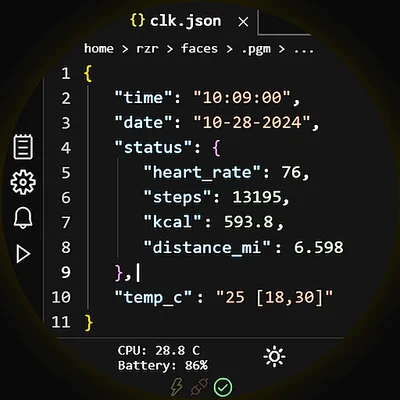
¡Una esfera de reloj que representa una ventana VSC, para programadores y apasionados del código, llena de información y altamente personalizable (¡tema amoled incluido!).
Esta es una esfera de reloj Wear OS nativa e independiente. Esto significa que se puede instalar en muchos relojes inteligentes que ejecutan este sistema operativo (como Samsung, Mobvoi Ticwatch, Fossil, Oppo, el último Xiaomi y más).
Está totalmente hecho a mano, para ser único.
La esfera del reloj incluye:
◉ 30 combinaciones de color
◉ Mostrar la hora con la opción de tamaño de fuente más grande
◉ Muchas personalizaciones diferentes
◉ Soporte de formato de 12/24 horas
◉ Unidades y formato de fecha automática
◉ Mucha información de un vistazo: calorías, distancia, pasos, frecuencia cardíaca, objetivo de pasos, notificaciones, fecha, clima, estado de la batería y temperatura.
◉ AOD, superposición y fondo personalizables
◉ 4 atajos rápidos (configuración, alarma, música, calendario)
◉ Reacciona a batería baja, notificaciones y carga
◉ ¡4 complicaciones diferentes!
◉ Aplicación complementaria fácil de usar (y desinstalable)
La instalación es sencilla, ¡no te preocupes!
Aquí está el procedimiento y una breve sesión de preguntas y respuestas:
◉ Instale esta aplicación en su teléfono inteligente
◉ Ábrelo y conecta tu reloj inteligente Wear OS a tu dispositivo
◉ Si el reloj está conectado, podrá tocar el botón "ver e instalar en el reloj inteligente". (si no, consulte las preguntas y respuestas a continuación)
◉ Revisa tu reloj, deberías ver mi esfera de reloj y el botón de instalación (si ves el precio, consulta las preguntas y respuestas a continuación)
◉ Instálalo en tu reloj inteligente
◉ Mantenga presionada la esfera de su reloj actual
◉ Deslízate hacia la izquierda hasta que veas un botón "+", tócalo
◉ Busque la nueva esfera del reloj, tóquela
◉ Hecho. Si lo deseas, ¡puedes desinstalar la aplicación complementaria ahora!
Preguntas y respuestas
P - ¡Me están cobrando dos veces! / El reloj me pide que pague otra vez / eres un [adjetivo despectivo]
A - Mantén la calma. Esto sucede cuando la cuenta que estás usando en el teléfono inteligente es diferente de la cuenta utilizada en el reloj inteligente. Tienes que usar la misma cuenta (de lo contrario, Google no tiene forma de saber que ya compraste la esfera del reloj).
P: No puedo presionar el botón en la aplicación complementaria pero mi reloj inteligente está conectado, ¿por qué?
A: Lo más probable es que estés utilizando un dispositivo incompatible, como un reloj inteligente Samsung antiguo o cualquier otro reloj inteligente o banda inteligente que no sea Wear OS. Puede verificar fácilmente en Google si su dispositivo ejecuta Wear OS antes de instalar cualquier esfera de reloj. Si estás seguro de que tienes un dispositivo Wear OS y aún no puedes presionar el botón, abre Play Store en tu reloj y busca mi esfera de reloj manualmente.
P: Tengo un dispositivo Wear OS, ¡pero no funciona! Voy a dejar una reseña de una estrella 😏
A - ¡Detente ahí mismo! Definitivamente hay un problema de su parte al seguir el procedimiento, así que envíeme un correo electrónico (normalmente respondo durante los fines de semana) y no me haga daño con una crítica mala y engañosa.
P - ¡[nombre de una característica] no funciona!
A - Intente configurar otra esfera del reloj y luego configure la mía nuevamente, o intente permitir los permisos manualmente (en el reloj, obviamente). Si aún no funciona, ¡hay un útil "botón de correo electrónico" en la aplicación complementaria!
Si necesita ayuda o tiene una sugerencia, no dude en enviarme un correo electrónico, haré todo lo posible para ayudarle.
Normalmente respondo durante el fin de semana porque soy solo una persona (no una empresa) y tengo trabajo, ¡así que ten paciencia!
Esta aplicación es compatible y actualizada para corregir errores y agregar nuevas funciones. El diseño general no cambiará, ¡pero seguramente mejorará con el tiempo!
Sé que el precio no es el más bajo, pero trabajé muchas horas en cada esfera de reloj y el precio también incluye el soporte y las actualizaciones, si lo piensas bien. Y te aseguro que invertiré mis ganancias en cosas útiles y para ayudar a mi familia. ¡Ah, y gracias por leer la descripción completa! ¡Nadie lo hace!
Introducción
Esta es una esfera de reloj Wear OS nativa e independiente. Esto significa que se puede instalar en muchos relojes inteligentes que ejecutan este sistema operativo (como Samsung, Mobvoi Ticwatch, Fossil, Oppo, el último Xiaomi y más).
Está totalmente hecho a mano, para ser único.
Características
La esfera del reloj incluye:
◉ 30 combinaciones de color
◉ Mostrar la hora con la opción de tamaño de fuente más grande
◉ Muchas personalizaciones diferentes
◉ Soporte de formato de 12/24 horas
◉ Unidades y formato de fecha automática
◉ Mucha información de un vistazo: calorías, distancia, pasos, frecuencia cardíaca, objetivo de pasos, notificaciones, fecha, clima, estado de la batería y temperatura.
◉ AOD, superposición y fondo personalizables
◉ 4 atajos rápidos (configuración, alarma, música, calendario)
◉ Reacciona a batería baja, notificaciones y carga
◉ ¡4 complicaciones diferentes!
◉ Aplicación complementaria fácil de usar (y desinstalable)
Instalación
La instalación es sencilla, ¡no te preocupes!
Aquí está el procedimiento y una breve sesión de preguntas y respuestas:
◉ Instale esta aplicación en su teléfono inteligente
◉ Ábrelo y conecta tu reloj inteligente Wear OS a tu dispositivo
◉ Si el reloj está conectado, podrá tocar el botón "ver e instalar en el reloj inteligente". (si no, consulte las preguntas y respuestas a continuación)
◉ Revisa tu reloj, deberías ver mi esfera de reloj y el botón de instalación (si ves el precio, consulta las preguntas y respuestas a continuación)
◉ Instálalo en tu reloj inteligente
◉ Mantenga presionada la esfera de su reloj actual
◉ Deslízate hacia la izquierda hasta que veas un botón "+", tócalo
◉ Busque la nueva esfera del reloj, tóquela
◉ Hecho. Si lo deseas, ¡puedes desinstalar la aplicación complementaria ahora!
Preguntas y respuestas
P - ¡Me están cobrando dos veces! / El reloj me pide que pague otra vez / eres un [adjetivo despectivo]
A - Mantén la calma. Esto sucede cuando la cuenta que estás usando en el teléfono inteligente es diferente de la cuenta utilizada en el reloj inteligente. Tienes que usar la misma cuenta (de lo contrario, Google no tiene forma de saber que ya compraste la esfera del reloj).
P: No puedo presionar el botón en la aplicación complementaria pero mi reloj inteligente está conectado, ¿por qué?
A: Lo más probable es que estés utilizando un dispositivo incompatible, como un reloj inteligente Samsung antiguo o cualquier otro reloj inteligente o banda inteligente que no sea Wear OS. Puede verificar fácilmente en Google si su dispositivo ejecuta Wear OS antes de instalar cualquier esfera de reloj. Si estás seguro de que tienes un dispositivo Wear OS y aún no puedes presionar el botón, abre Play Store en tu reloj y busca mi esfera de reloj manualmente.
P: Tengo un dispositivo Wear OS, ¡pero no funciona! Voy a dejar una reseña de una estrella 😏
A - ¡Detente ahí mismo! Definitivamente hay un problema de su parte al seguir el procedimiento, así que envíeme un correo electrónico (normalmente respondo durante los fines de semana) y no me haga daño con una crítica mala y engañosa.
P - ¡[nombre de una característica] no funciona!
A - Intente configurar otra esfera del reloj y luego configure la mía nuevamente, o intente permitir los permisos manualmente (en el reloj, obviamente). Si aún no funciona, ¡hay un útil "botón de correo electrónico" en la aplicación complementaria!
Soporte
Si necesita ayuda o tiene una sugerencia, no dude en enviarme un correo electrónico, haré todo lo posible para ayudarle.
Normalmente respondo durante el fin de semana porque soy solo una persona (no una empresa) y tengo trabajo, ¡así que ten paciencia!
Esta aplicación es compatible y actualizada para corregir errores y agregar nuevas funciones. El diseño general no cambiará, ¡pero seguramente mejorará con el tiempo!
Sé que el precio no es el más bajo, pero trabajé muchas horas en cada esfera de reloj y el precio también incluye el soporte y las actualizaciones, si lo piensas bien. Y te aseguro que invertiré mis ganancias en cosas útiles y para ayudar a mi familia. ¡Ah, y gracias por leer la descripción completa! ¡Nadie lo hace!
Mostrar el texto original
A watch face representing a VSC window, for programmers and code passionates, full of information and highly customizable (amoled theme included!)!
This is a native, standalone Wear OS watch face. This means that it can be installed on many smartwatches running this OS (like Samsung, Mobvoi Ticwatch, Fossil, Oppo, the latest Xiaomi and more).
It is completely handcrafted, to be unique.
The watch face includes:
◉ 30 color schemes
◉ Display time with bigger font size option
◉ Many different customizations
◉ 12/24 hours format support
◉ Auto date format and units
◉ A lot of information at a glance: calories, distance, steps, heart rate, steps goal, notifications, date, weather, battery status and temperature
◉ Customizable AOD, Overlay and background
◉ 4 rapid shortcuts (settings, alarm, music, calendar)
◉ Reacts to low battery, notifications and charging
◉ 4 different complications!
◉ Easy to use (and uninstallable) companion app
The installation is straightforward, don't worry!
Here's the procedure and a quick Q&A:
◉ Install this app in your smartphone
◉ Open it, and connect your Wear OS smartwatch to your device
◉ If the watch is connected, you will be able to tap the "view and install on smartwatch" button. (if not, refer to the Q&A below)
◉ Check your watch, you should see my watch face and the install button (if you see the price instead, refer to the Q&A below)
◉ Install it in your smartwatch
◉ Long press on your current watch face
◉ Swipe left until you see a "+" button, tap on it
◉ Look for the new watch face, tap on it
◉ Done. If you want, you can uninstall the companion app now!
Q&A
Q - I'm being charged twice! / The watch is asking me to pay again / you're a [derogatory adjective]
A - Keep calm. This happens when the account you’re using on the smartphone is different from the account used on the smartwatch. You have to use the same account (else, Google has no way to know that you already bought the watch face).
Q - I can't press the button in the companion app but my smartwatch is connected, why?
A - Most probably, you're using an incompatible device, like an old Samsung smartwatch or any other non-Wear OS smartwatch/smartband. You can easily check on Google if your device runs Wear OS before installling any watch face. If you're sure you have a Wear OS device and still you can't press the button, open the Play Store on your watch and search for my watch face manually!
Q - I have a Wear OS device, but it's not working! I'm gonna leave a one star review 😏
A - Stop right there! Most definitely there's an issue on your side while following the procedure, so please just send me an email (i usually reply during the weekends) and don't damage me with a bad and misleading review!
Q - The [name of a feature] is not working!
A - Try setting another watch face and then set mine again, or try allowing the permissions manually (on the watch obviously). If it still doesn't work, there's an handy "email button" in the companion app!
If you need help or you have a suggestion, feel free to send me an email, I'll do my best to help.
I usually reply during the weekend because I'm just one person (not a company) and I have a job, so be patient!
This app is supported and updated to fix bugs and add new features. The overall design won't change, but it will surely be improved over time!
I know that the price isn't the lowest, but I worked a lot of hours on each watch face and the price also includes the support and the updates, if you think about it. And i assure you, I'll invest any earning on useful things and to help my family. Oh, and thanks for reading the full description! Nobody does it!
Introduction
This is a native, standalone Wear OS watch face. This means that it can be installed on many smartwatches running this OS (like Samsung, Mobvoi Ticwatch, Fossil, Oppo, the latest Xiaomi and more).
It is completely handcrafted, to be unique.
Features
The watch face includes:
◉ 30 color schemes
◉ Display time with bigger font size option
◉ Many different customizations
◉ 12/24 hours format support
◉ Auto date format and units
◉ A lot of information at a glance: calories, distance, steps, heart rate, steps goal, notifications, date, weather, battery status and temperature
◉ Customizable AOD, Overlay and background
◉ 4 rapid shortcuts (settings, alarm, music, calendar)
◉ Reacts to low battery, notifications and charging
◉ 4 different complications!
◉ Easy to use (and uninstallable) companion app
Installation
The installation is straightforward, don't worry!
Here's the procedure and a quick Q&A:
◉ Install this app in your smartphone
◉ Open it, and connect your Wear OS smartwatch to your device
◉ If the watch is connected, you will be able to tap the "view and install on smartwatch" button. (if not, refer to the Q&A below)
◉ Check your watch, you should see my watch face and the install button (if you see the price instead, refer to the Q&A below)
◉ Install it in your smartwatch
◉ Long press on your current watch face
◉ Swipe left until you see a "+" button, tap on it
◉ Look for the new watch face, tap on it
◉ Done. If you want, you can uninstall the companion app now!
Q&A
Q - I'm being charged twice! / The watch is asking me to pay again / you're a [derogatory adjective]
A - Keep calm. This happens when the account you’re using on the smartphone is different from the account used on the smartwatch. You have to use the same account (else, Google has no way to know that you already bought the watch face).
Q - I can't press the button in the companion app but my smartwatch is connected, why?
A - Most probably, you're using an incompatible device, like an old Samsung smartwatch or any other non-Wear OS smartwatch/smartband. You can easily check on Google if your device runs Wear OS before installling any watch face. If you're sure you have a Wear OS device and still you can't press the button, open the Play Store on your watch and search for my watch face manually!
Q - I have a Wear OS device, but it's not working! I'm gonna leave a one star review 😏
A - Stop right there! Most definitely there's an issue on your side while following the procedure, so please just send me an email (i usually reply during the weekends) and don't damage me with a bad and misleading review!
Q - The [name of a feature] is not working!
A - Try setting another watch face and then set mine again, or try allowing the permissions manually (on the watch obviously). If it still doesn't work, there's an handy "email button" in the companion app!
Support
If you need help or you have a suggestion, feel free to send me an email, I'll do my best to help.
I usually reply during the weekend because I'm just one person (not a company) and I have a job, so be patient!
This app is supported and updated to fix bugs and add new features. The overall design won't change, but it will surely be improved over time!
I know that the price isn't the lowest, but I worked a lot of hours on each watch face and the price also includes the support and the updates, if you think about it. And i assure you, I'll invest any earning on useful things and to help my family. Oh, and thanks for reading the full description! Nobody does it!
Seguridad de los datos
Lo que RazorSharp Design Studio declara en Google Play sobre los datos que esta aplicación recopila y comparte.
- No se comparten datos con tercerosMás información sobre cómo los desarrolladores declaran lo que comparten
- No se recogen datosMás información sobre cómo los desarrolladores declaran lo que recogen
- Compromiso con el cumplimiento de la Política de Familias de Play
Contacto del desarrollador
- Correo electrónicorzrshrpstudio@gmail.com
- Política de privacidaddoc-hosting.flycricket.io
- DirecciónVia Tommaso Albinoni, 114 00052 Valcanneto Italy
Información
- Ofrecida por
- RazorSharp Design Studio
- Categoría
- Personalización
- Actualizado
- 26/10/2026
- Publicado
- 20/1/2024
- Clasificación por edad
- PEGI 3
- Precio
- 2,59 €
- Nombre del paquete
- com.rzrdesign.programmer