Split Tone Watch Face
Watcholate- USK ab 0 JahrenAltersfreigabe
- PersonalisierungKategorie
- 16.09.2026Aktualisiert
- KostenlosPreis
Verlinkt auf den offiziellen Google Play-Eintrag von com.watcholate.splittone. Zuletzt geprüft am 16.11.2026.

Screenshots




Über diese App
Automatische Übersetzung von Google. Originalsprache: Englisch (Vereinigte Staaten).
Echte analoge Zeiger auf einem zweifarbigen Zifferblatt, mit Digitaluhr und Ihren eigenen Daten.
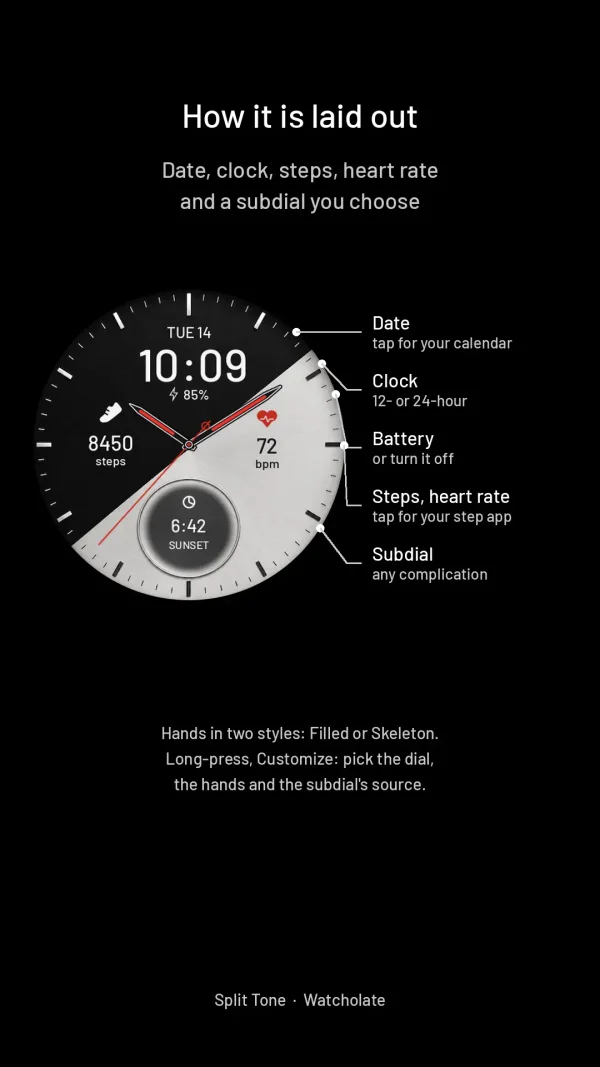
Split Tone ist ein analoges Zifferblatt für Wear OS im Watch Face Format. Eine einzelne Diagonale teilt das Zifferblatt in zwei Hälften – eine helle und eine dunkle –, über die echte Stunden- und Minutenzeiger gleiten. Darüber befindet sich eine Digitaluhr.
DAS ZIFFERBLATT
• Vierundzwanzig zweifarbige Zifferblätter, jedes mit einer anderen Oberflächenkombination: gebürsteter Stahl, Sonnenschliff, Carbon, Leder, Stein
• Stunden- und Minutenzeiger sind abgeschrägt – mit einer dunklen und einer hellen Kante – und heben sich so von beiden Zifferblatthälften und dem schattierten Hilfszifferblatt bei 6 Uhr ab, je nachdem, welche sie überqueren.
Zwei Zeigerstile: Ausgefüllt und Skelettiert. Sie können für jedes Zifferblatt zwischen ihnen wechseln. Beide sind im Zifferblatt enthalten.
Der Sekundenzeiger hat die Akzentfarbe des jeweiligen Zifferblatts und tickt einmal pro Sekunde.
ANZEIGEN
• Die Digitaluhr im 12- oder 24-Stunden-Format ohne führende Null bei der Stunde
• Wochentag und Datum oben Tippen Sie darauf, um Ihren Kalender zu öffnen.
• Ihre Schrittzahl mit eigenem Symbol. Tippen Sie darauf, um die Schritt-App Ihrer Uhr zu öffnen.
• Ihre Herzfrequenz mit einem Herzsymbol, das während der Messung die Akzentfarbe des Zifferblatts annimmt und sich abdunkelt, wenn keine Messung erfolgt.
• Akku mit Ladeanzeige, die sich während des Ladevorgangs ändert. Sie können die Akkuanzeige deaktivieren, wenn Sie sie nicht benötigen.
• Ein Hilfszifferblatt bei 6 Uhr, das als Komplikationsfeld dient – ein Standard-Datenfeld von Wear OS –, sodass Sie die angezeigten Informationen auswählen können: Sonnenaufgang und Sonnenuntergang, Wetter, Timer, Wecker, Kalender, Fitnessziel, Akkustand oder Daten von Drittanbieter-Apps. Die Uhr zeigt standardmäßig Sonnenaufgang und Sonnenuntergang an.
Eine Quelle, die einen Bereich anzeigt, z. B. ein Fitnessziel oder den Akkustand, füllt eine Anzeige um das Hilfszifferblatt in der Akzentfarbe des Zifferblatts.
Tippen Sie auf das Hilfszifferblatt, um die zugehörige App zu öffnen.
Always-on-Display: Das Zifferblatt zeigt Uhrzeit, Datum und Skelettzeiger in Grau auf schwarzem Hintergrund an und beleuchtet nur einen kleinen Teil des Bildschirms, wodurch der Akkuverbrauch minimal ist.
VIERUNDZWANZIG ZIFFERBLÄTTER, SECHS DAVON IHREN
Die Zifferblätter Sterling, Carbon, Onyx Steel, Slate, Saddle und Mocha sind in diesem Zifferblatt enthalten. Mit beiden Zeigerstilen, dem anpassbaren Hilfszifferblatt, der Schrittzählung, der Herzfrequenzmessung, der Datumsanzeige und der Akkuanzeige sind es vollständige, dauerhafte Zifferblätter – keine Testversion und zeitlich unbegrenzt nutzbar.
Das Premium-Set umfasst 18 zusätzliche Zifferblätter: Schwarzgold, Racing Red, Botanica, Bronze, Bumblebee, Tangerine, Pistachio, Deep Forest, Alpine, Aqua, Glacier, Lilac, Iris, Rosewood, Dune, Pearl, Rose Gold und Taupe. Mit einer einmaligen Zahlung von 1,99 US-Dollar schalten Sie alle 18 Zifferblätter auf einmal frei. Es gibt kein Abonnement und keine wiederkehrenden Kosten.
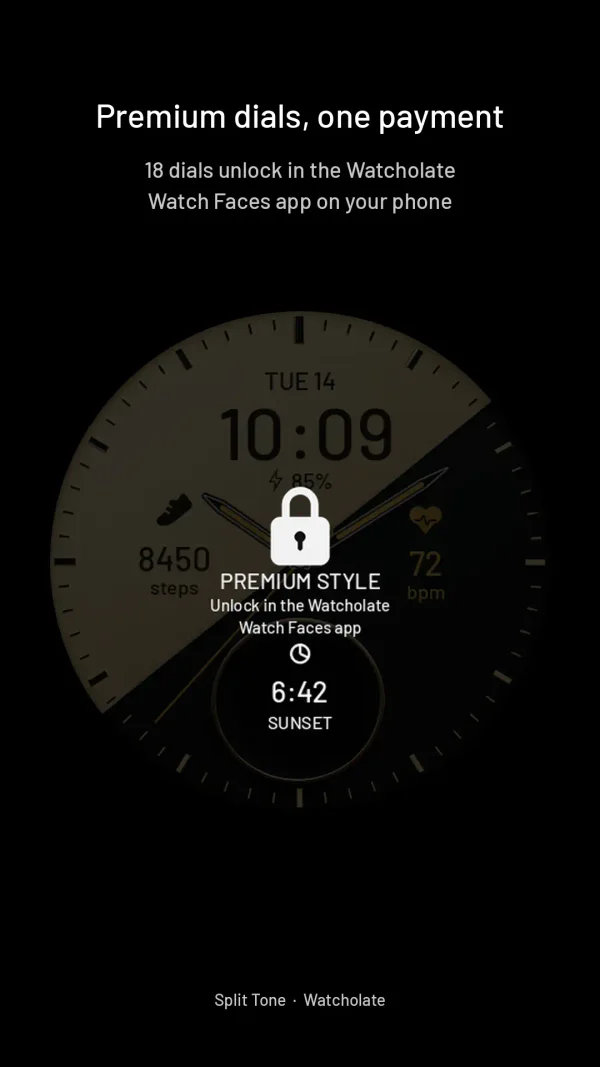
Ein noch nicht freigeschaltetes Premium-Zifferblatt wird beim Tragen mit einem Vorhängeschloss angezeigt, während sich die Zeiger darunter weiterdrehen. So sehen Sie immer genau, was Sie kaufen, bevor Sie sich entscheiden.
SO schalten Sie die Premium-Zifferblätter frei:
1. Installieren Sie die kostenlose Watcholate Watch Faces App von Google Play auf Ihrem Smartphone.
2. Installieren Sie die Watcholate Watch Faces App auch auf Ihrer Smartwatch. Die Smartphone-App öffnet automatisch die richtige Seite auf Ihrer Smartwatch.
3. Öffnen Sie Split Tone in der Smartphone-App und tätigen Sie den einmaligen Kauf. Die Zahlung erfolgt über Google Play.
4. Die Premium-Zifferblätter werden auf Ihrer Uhr in der Regel innerhalb von ein bis zwei Sekunden freigeschaltet. Sie müssen das Zifferblatt nicht neu laden.
Der Kauf ist mit Ihrem Google-Konto verknüpft und gilt daher für jede Uhr, mit der Sie sich anmelden. Er wird auch nach dem Zurücksetzen Ihrer Uhr oder dem Kauf einer neuen Uhr wiederhergestellt.
VORAUSSETZUNGEN
• Eine Wear OS-Uhr mit Wear OS 5 oder höher (Android 14 oder höher)
• Die Watcholate Watch Faces App auf Ihrem Smartphone und Ihrer Uhr für die Premium-Zifferblätter. Die sechs enthaltenen Zifferblätter, beide Zeigerstile und alle Anzeigen benötigen nichts weiter als dieses Zifferblatt.
DATENSCHUTZ
Dieses Zifferblatt enthält keinen Code und sammelt keine Daten. Ihre Schrittzahl, Herzfrequenz, der Akkustand und alle Anzeigen im Hilfszifferblatt werden von Wear OS selbst erfasst und angezeigt und verlassen Ihre Uhr nicht. Auch die Watcholate Watch Faces App sammelt keine Daten. Beide enthalten keinen Tracking-Code. Vollständige Datenschutzrichtlinien: https://watcholate.com/privacy
Von Watcholate
Originaltext anzeigen
Split Tone is an analog watch face for Wear OS, built in Watch Face Format. A single diagonal cuts the dial in two - one half light, one half dark - and real hour and minute hands sweep across both. Above them sits a digital clock.
THE DIAL
• Twenty-four two-tone dials, each one a different pair of finishes: brushed steel, sunburst, carbon, leather, stone
• The hour and minute hands are drawn as a bevel - a dark edge and a light edge - so they stand off both halves of the dial and the shaded subdial at six o'clock, whichever they are crossing
• Two hand styles, Filled and Skeleton, and you can switch between them on any dial. Both are included with the watch face
• The seconds needle takes each dial's own accent color and ticks once a second
WHAT IT SHOWS
• The digital clock, in 12-hour or 24-hour, with no leading zero on the hour
• The day and date at the top. Tap it and your calendar opens
• Your step count, with its own icon. Tap it and your watch's step app opens
• Your heart rate, with a heart that takes the dial's accent color while a reading is live and dims when there is none
• Battery, with a charge indicator that changes while the watch is charging. You can turn the battery readout off if you would rather not see it
• A subdial at six o'clock that is a complication slot - a standard Wear OS data slot - so you choose what it shows: sunrise and sunset, weather, a timer, an alarm, your calendar, a fitness goal, battery, or anything a third-party app publishes. Out of the box it shows sunrise and sunset
• A source that reports a range, such as a fitness goal or battery, fills a gauge around the subdial in the dial's accent color
• Tap the subdial and the app behind it opens
• Always-on display: the face keeps the time, the date and skeleton hands in gray on a black plate and lights only a small fraction of the screen, so it costs your battery very little
TWENTY-FOUR DIALS, SIX OF THEM YOURS
Sterling, Carbon, Onyx Steel, Slate, Saddle and Mocha are the dials included with this watch face. With both hand styles, the customizable subdial, the step count, the heart rate, the date and the battery readout, they are complete, permanent watch faces - not a trial, and they do not expire.
The premium set is 18 more dials: Black Gold, Racing Red, Botanica, Bronze, Bumblebee, Tangerine, Pistachio, Deep Forest, Alpine, Aqua, Glacier, Lilac, Iris, Rosewood, Dune, Pearl, Rose Gold and Taupe. One single payment of US$1.99 unlocks all eighteen at once. There is no subscription and nothing recurring.
A premium dial you have not unlocked shows a padlock when you wear it, with the hands still turning underneath, so you always see exactly what you would be buying before you decide.
HOW TO UNLOCK THE PREMIUM STYLE
1. Install the free Watcholate Watch Faces app on your phone from Google Play.
2. Install the Watcholate Watch Faces app on your watch as well - the phone app will offer to open the right page on your watch for you.
3. Open Split Tone in the phone app and make the one-time purchase. Payment is handled by Google Play.
4. The premium dials unlock on your watch, usually within a second or two. You do not need to reload the face.
The purchase is tied to your Google account, so it applies to every watch you sign in to, and it comes back if you reset your watch or buy a new one.
REQUIREMENTS
• A Wear OS watch running Wear OS 5 or later (Android 14 or later)
• The Watcholate Watch Faces app, on both your phone and your watch, for the premium dials. The six included dials, both hand styles and every reading on the face need nothing but this watch face.
PRIVACY
This watch face contains no code and collects nothing. Your step count, heart rate, battery level and whatever you put in the subdial are read and drawn by Wear OS itself and never leave your watch. The Watcholate Watch Faces app collects nothing either. There is no tracking code in either one. Full policy: https://watcholate.com/privacy
From Watcholate.
Datensicherheit
Was Watcholate bei Google Play zu den Daten angibt, die diese App erfasst und weitergibt.
- Keine Daten werden mit Drittunternehmen oder -organisationen geteiltWeitere Informationen dazu, wie Entwickler Angaben zur Weitergabe von Daten machen
- Keine Daten erhobenWeitere Informationen dazu, wie Entwickler Angaben zur Datenerhebung machen
Neue Funktionen
Version 1.0.2 · 16.09.2026
First public release: 24 two-tone dials, real analog hands in two styles, and a customizable subdial.
Kontakt zum Entwickler
- Websitewatcholate.com
- E-Mailsupport@watcholate.com
- Datenschutzerklärungwatcholate.com
- Adresse14727 Cypress Creek Landing Houston, TX 77068-2527 United States
Informationen
- Angeboten von
- Watcholate
- Kategorie
- Personalisierung
- Version
- 1.0.2
- Aktualisiert
- 16.09.2026
- Veröffentlicht
- 16.09.2026
- Altersfreigabe
- USK ab 0 Jahren
- Preis
- Kostenlos
- Paketname
- com.watcholate.splittone