Split Tone Watch Face
Watcholate- PEGI 3Clasificación por edad
- PersonalizaciónCategoría
- 16/9/2026Actualizado
- GratisPrecio
Enlaza a la ficha oficial de com.watcholate.splittone en Google Play. Última comprobación el 16/11/2026.

Capturas de pantalla




Acerca de esta aplicación
Traducción automática de Google. Idioma original: Inglés (Estados Unidos).
Agujas analógicas reales en una esfera bicolor, con reloj digital y tus propios datos.
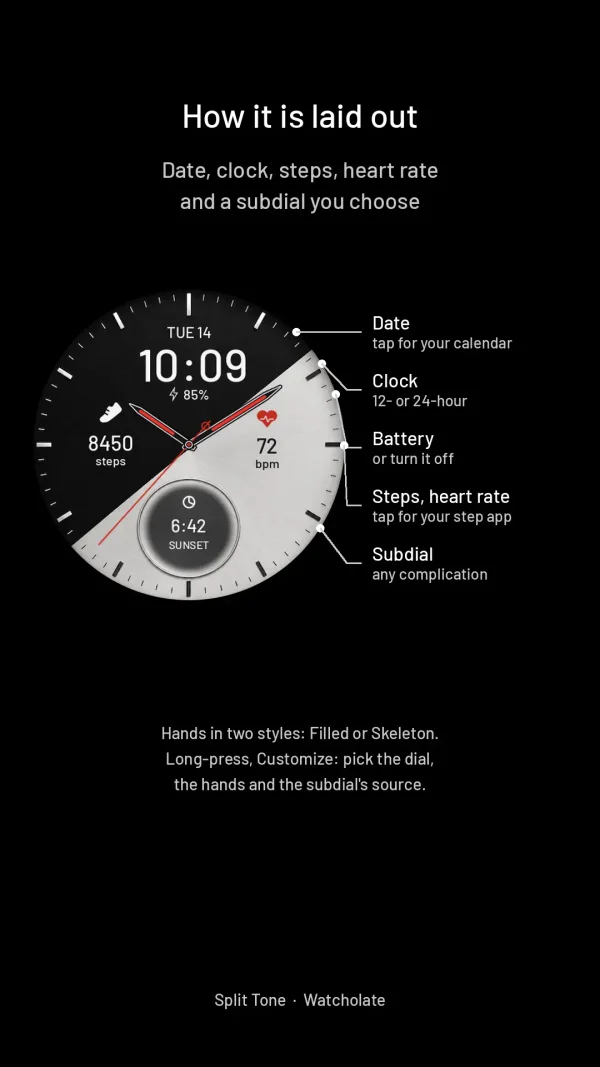
Split Tone es una esfera analógica para Wear OS, creada en formato Watch Face Format. Una sola diagonal divide la esfera en dos: una mitad clara y otra oscura, y las manecillas de las horas y los minutos se mueven a lo largo de ambas. Sobre ellas se encuentra un reloj digital.
LA ESFERA
• Veinticuatro esferas bicolor, cada una con un par de acabados diferentes: acero cepillado, rayos de sol, carbono, cuero y piedra.
• Las manecillas de las horas y los minutos están dibujadas con un bisel (un borde oscuro y otro claro), de modo que sobresalen de ambas mitades de la esfera y de la subesfera sombreada a las seis, independientemente de la que atraviesen.
• Dos estilos de manecillas: rellena y esqueletizada, que se pueden alternar en cualquier esfera. Ambos estilos están incluidos en la esfera.
• El segundero adopta el color de acento de cada esfera y avanza una vez por segundo.
QUÉ MUESTRA
• El reloj digital, en formato de 12 o 24 horas, sin cero inicial en la hora.
• El día y la fecha en la parte superior. Pulsa y se abrirá tu calendario.
• Tu contador de pasos, con su propio icono. Pulsa y se abrirá la app de pasos de tu reloj.
• Tu frecuencia cardíaca, con un corazón que toma el color de acento de la esfera mientras se registra la lectura y se atenúa cuando no la hay.
• Batería, con un indicador de carga que cambia mientras el reloj se carga. Puedes desactivar la lectura de la batería si prefieres no verla.
• Una subesfera a las seis que funciona como ranura para complicaciones (una ranura de datos estándar de Wear OS), para que elijas qué muestra: amanecer y atardecer, el tiempo, un temporizador, una alarma, tu calendario, un objetivo de fitness, la batería o cualquier otra información que publique una app de terceros. De fábrica, muestra el amanecer y el atardecer.
• Una fuente que informa un rango, como un objetivo de actividad física o el nivel de batería, llena un indicador alrededor de la subesfera con el color de acento de la esfera.
• Toca la subesfera y se abrirá la aplicación que está detrás.
• Pantalla siempre activa: la esfera mantiene la hora, la fecha y las manecillas esqueletizadas en gris sobre una placa negra, e ilumina solo una pequeña parte de la pantalla, por lo que consume muy poca batería.
VEINTICUATRO ESFERAS, SEIS DE ELLAS PERSONALIZADAS
Las esferas incluidas con esta esfera son Plata, Carbono, Acero Ónix, Pizarra, Marrón y Moca. Con ambos estilos de manecillas, la subesfera personalizable, el contador de pasos, la frecuencia cardíaca, la fecha y el indicador de batería, son esferas completas y permanentes, no una versión de prueba, y no caducan.
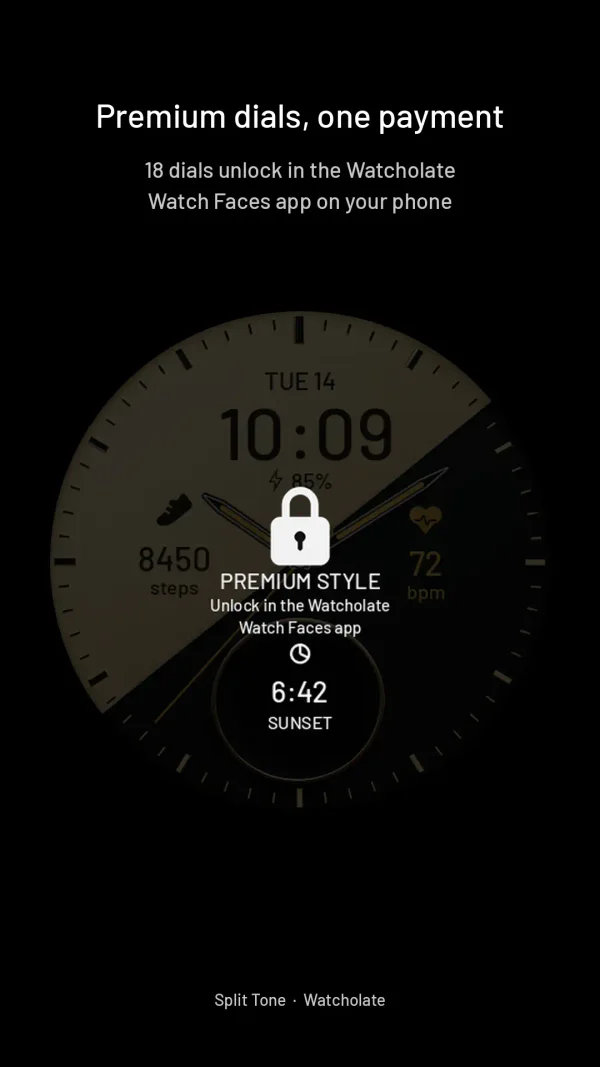
El paquete premium incluye 18 esferas adicionales: Oro Negro, Rojo Racing, Botánica, Bronce, Abejorro, Mandarina, Pistacho, Bosque Profundo, Alpino, Aguamarina, Glaciar, Lila, Iris, Palo de Rosa, Duna, Perla, Oro Rosa y Topo. Un único pago de US$1.99 desbloquea las dieciocho esferas a la vez. No hay suscripción ni cargos recurrentes.
Cuando uses una esfera premium que aún no hayas desbloqueado, verás un candado, con las manecillas girando debajo, para que siempre veas exactamente lo que estás comprando antes de decidirte.
CÓMO DESBLOQUEAR EL ESTILO PREMIUM
1. Instala la aplicación gratuita Watcholate Watch Faces en tu teléfono desde Google Play.
2. Instala también la aplicación Watcholate Watch Faces en tu reloj; la aplicación del teléfono te ofrecerá abrir la página correcta en tu reloj.
3. Abre Split Tone en la aplicación del teléfono y realiza la compra única. El pago se gestiona a través de Google Play.
4. Las esferas premium se desbloquean en tu reloj, normalmente en uno o dos segundos. No necesitas recargar la esfera.
La compra está vinculada a tu cuenta de Google, por lo que se aplica a todos los relojes en los que inicies sesión y se recupera si reinicias tu reloj o compras uno nuevo.
REQUISITOS
• Un reloj Wear OS con Wear OS 5 o posterior (Android 14 o posterior)
• La aplicación Watcholate Watch Faces, tanto en tu teléfono como en tu reloj, para las esferas premium. Las seis esferas incluidas, ambos estilos de manecillas y todas las lecturas de la esfera solo necesitan esta esfera.
PRIVACIDAD
Esta esfera no contiene código ni recopila información. El conteo de pasos, la frecuencia cardíaca, el nivel de batería y cualquier dato que introduzcas en la subesfera son leídos y mostrados por Wear OS y nunca salen de tu reloj. La aplicación Watcholate Watch Faces tampoco recopila información. No hay código de seguimiento en ninguna de las dos. Política completa: https://watcholate.com/privacy
De Watcholate.
Mostrar el texto original
Split Tone is an analog watch face for Wear OS, built in Watch Face Format. A single diagonal cuts the dial in two - one half light, one half dark - and real hour and minute hands sweep across both. Above them sits a digital clock.
THE DIAL
• Twenty-four two-tone dials, each one a different pair of finishes: brushed steel, sunburst, carbon, leather, stone
• The hour and minute hands are drawn as a bevel - a dark edge and a light edge - so they stand off both halves of the dial and the shaded subdial at six o'clock, whichever they are crossing
• Two hand styles, Filled and Skeleton, and you can switch between them on any dial. Both are included with the watch face
• The seconds needle takes each dial's own accent color and ticks once a second
WHAT IT SHOWS
• The digital clock, in 12-hour or 24-hour, with no leading zero on the hour
• The day and date at the top. Tap it and your calendar opens
• Your step count, with its own icon. Tap it and your watch's step app opens
• Your heart rate, with a heart that takes the dial's accent color while a reading is live and dims when there is none
• Battery, with a charge indicator that changes while the watch is charging. You can turn the battery readout off if you would rather not see it
• A subdial at six o'clock that is a complication slot - a standard Wear OS data slot - so you choose what it shows: sunrise and sunset, weather, a timer, an alarm, your calendar, a fitness goal, battery, or anything a third-party app publishes. Out of the box it shows sunrise and sunset
• A source that reports a range, such as a fitness goal or battery, fills a gauge around the subdial in the dial's accent color
• Tap the subdial and the app behind it opens
• Always-on display: the face keeps the time, the date and skeleton hands in gray on a black plate and lights only a small fraction of the screen, so it costs your battery very little
TWENTY-FOUR DIALS, SIX OF THEM YOURS
Sterling, Carbon, Onyx Steel, Slate, Saddle and Mocha are the dials included with this watch face. With both hand styles, the customizable subdial, the step count, the heart rate, the date and the battery readout, they are complete, permanent watch faces - not a trial, and they do not expire.
The premium set is 18 more dials: Black Gold, Racing Red, Botanica, Bronze, Bumblebee, Tangerine, Pistachio, Deep Forest, Alpine, Aqua, Glacier, Lilac, Iris, Rosewood, Dune, Pearl, Rose Gold and Taupe. One single payment of US$1.99 unlocks all eighteen at once. There is no subscription and nothing recurring.
A premium dial you have not unlocked shows a padlock when you wear it, with the hands still turning underneath, so you always see exactly what you would be buying before you decide.
HOW TO UNLOCK THE PREMIUM STYLE
1. Install the free Watcholate Watch Faces app on your phone from Google Play.
2. Install the Watcholate Watch Faces app on your watch as well - the phone app will offer to open the right page on your watch for you.
3. Open Split Tone in the phone app and make the one-time purchase. Payment is handled by Google Play.
4. The premium dials unlock on your watch, usually within a second or two. You do not need to reload the face.
The purchase is tied to your Google account, so it applies to every watch you sign in to, and it comes back if you reset your watch or buy a new one.
REQUIREMENTS
• A Wear OS watch running Wear OS 5 or later (Android 14 or later)
• The Watcholate Watch Faces app, on both your phone and your watch, for the premium dials. The six included dials, both hand styles and every reading on the face need nothing but this watch face.
PRIVACY
This watch face contains no code and collects nothing. Your step count, heart rate, battery level and whatever you put in the subdial are read and drawn by Wear OS itself and never leave your watch. The Watcholate Watch Faces app collects nothing either. There is no tracking code in either one. Full policy: https://watcholate.com/privacy
From Watcholate.
Seguridad de los datos
Lo que Watcholate declara en Google Play sobre los datos que esta aplicación recopila y comparte.
- No se comparten datos con tercerosMás información sobre cómo los desarrolladores declaran lo que comparten
- No se recogen datosMás información sobre cómo los desarrolladores declaran lo que recogen
Novedades
Versión 1.0.2 · 16/9/2026
First public release: 24 two-tone dials, real analog hands in two styles, and a customizable subdial.
Contacto del desarrollador
- Sitio webwatcholate.com
- Correo electrónicosupport@watcholate.com
- Política de privacidadwatcholate.com
- Dirección14727 Cypress Creek Landing Houston, TX 77068-2527 United States
Información
- Ofrecida por
- Watcholate
- Categoría
- Personalización
- Versión
- 1.0.2
- Actualizado
- 16/9/2026
- Publicado
- 16/9/2026
- Clasificación por edad
- PEGI 3
- Precio
- Gratis
- Nombre del paquete
- com.watcholate.splittone