Time Machine
Eugeniy Radzivill- USK ab 0 JahrenAltersfreigabe
- PersonalisierungKategorie
- 26.08.2025Aktualisiert
- 0,99 €Preis
Verlinkt auf den offiziellen Google Play-Eintrag von com.watchfacestudio.gfb. Zuletzt geprüft am 14.11.2026.
Über diese App
Automatische Übersetzung von Google. Originalsprache: Russisch (Russland).
Wählen Sie für Smartwatches auf der Wear OS-Plattform
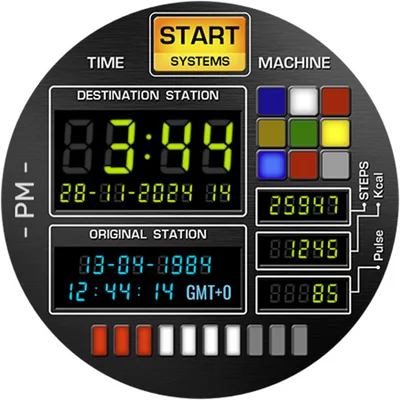
Dies ist ein Fantasy-Zifferblatt, das ich basierend auf der Zeitmaschine aus dem sowjetischen Kinderfilm „Gast aus der Zukunft“ für eine Smartwatch auf der Wear OS-Plattform gezeichnet habe. Es unterstützt die folgende Funktionalität:
Block „ZIELSTATION“
- Aktuelle Uhrzeit mit automatischer Umschaltung des 12-/24-Stunden-Modus. Der Uhranzeigemodus wird mit dem eingestellten Modus auf Ihrem Smartphone synchronisiert
- Aktuelles Datum im Format TT-MM-JJJJ, gefolgt von Sekunden
Block „HOME STATION“.
- Das unveränderliche Datum 13. April 1984 ist das Datum, an dem der Held des Films Kolya Gerasimov eine Zeitmaschine im Keller des Hauses fand
- Aktuelle GMT-Zeit
10 Tasten am unteren Rand des Zifferblatts zeigen den Akkuladestand an
Informationen über die Anzahl der zurückgelegten Schritte, den Kalorienverbrauch und die aktuelle Herzfrequenz werden in den entsprechenden Blöcken auf der rechten Seite des Zifferblatts angezeigt
Die Inschriften auf dem Zifferblatt werden nur in zwei Sprachen angezeigt: Russisch und Englisch. Englisch hat Priorität.
ANPASSUNG:
Dem Zifferblatt wurden 5 anpassbare Tippzonen hinzugefügt, um schnell auf die auf Ihrer Uhr installierten Anwendungen zuzugreifen. Um es zu konfigurieren, müssen Sie das Zifferblattmenü aufrufen und jeder Tippzone die entsprechende Anwendung zuweisen. Ohne dies sind die Tap-Zonen inaktiv.
Für dieses Zifferblatt habe ich einen Original-AOD-Modus erstellt. Damit es angezeigt wird, müssen Sie es im Menü Ihrer Uhr aktivieren.
Für Kommentare und Vorschläge schreiben Sie bitte an E-Mail: eradzivill@mail.ru
Treten Sie uns in den sozialen Netzwerken bei
https://vk.com/eradzivill
https://radzivill.com
https://t.me/eradzivill
https://www.facebook.com/groups/radzivill
Aufrichtig
Evgeniy
Originaltext anzeigen
This is a fantasy watch face that I drew based on the time machine from the Soviet children's film "Guest from the Future", for a smartwatch on the Wear OS platform. It supports the following functionality:
DESTINATION STATION block
- Current time with automatic switching of 12/24 hour modes. The watch display mode is synchronized with the mode set on your smartphone
- Current date in DD-MM-YYYY format and seconds next to it
ORIGINAL STATION block
- Unchangeable date April 13, 1984 is the date when the hero of the film Kolya Gerasimov found the Time Machine in the basement of the house
- Current time according to Greenwich Mean Time
10 buttons at the bottom of the dial are the battery charge indicator
Information about the number of steps taken, calories burned and the current heart rate is displayed in the corresponding blocks on the right side of the dial
The inscriptions on the dial are shown only in two languages: Russian and English. English is the priority language.
CUSTOMIZATION:
5 customizable tap zones have been added to the dial for quick access to applications installed on your watch. To set them up, you need to go into the watch face menu and assign the appropriate app to each tap zone. Without this, the tap zones will be inactive.
I made an original AOD mode for this watch face. To display it, you need to activate it in your watch menu.
For comments and suggestions, please write to e-mail: eradzivill@mail.ru
Join us on social networks
https://vk.com/eradzivill
https://radzivill.com
https://t.me/eradzivill
https://www.facebook.com/groups/radzivill
Sincerely,
Eugeniy Radzivill
Datensicherheit
Was Eugeniy Radzivill bei Google Play zu den Daten angibt, die diese App erfasst und weitergibt.
- Keine Daten werden mit Drittunternehmen oder -organisationen geteiltWeitere Informationen dazu, wie Entwickler Angaben zur Weitergabe von Daten machen
- Keine Daten erhobenWeitere Informationen dazu, wie Entwickler Angaben zur Datenerhebung machen
Kontakt zum Entwickler
- Websiteradzivill.com
- E-Maileradzivill@mail.ru
- Datenschutzerklärungeradzivill.wixsite.com
- Adresseдер. Терновка, ул. Песочная, д. 4 Наро-Фоминск Московская область Россия 143300
Informationen
- Angeboten von
- Eugeniy Radzivill
- Kategorie
- Personalisierung
- Aktualisiert
- 26.08.2025
- Veröffentlicht
- 28.11.2024
- Altersfreigabe
- USK ab 0 Jahren
- Preis
- 0,99 €
- Paketname
- com.watchfacestudio.gfb