Time Machine
Eugeniy Radzivill- 3 歳以上対象年齢
- カスタマイズカテゴリ
- 2025/8/26更新日
- ¥110価格
com.watchfacestudio.gfbのGoogle Play公式ページにリンクしています。最終確認:2026/11/14。
このアプリについて
Googleによるロシア語 (ロシア)からの自動翻訳です。
Wear OS プラットフォーム上のスマート ウォッチ用ダイヤル
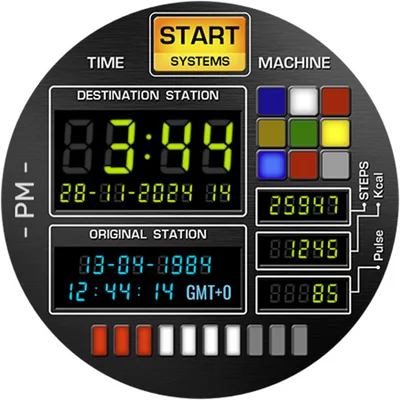
これは、ソ連の児童映画「未来からの客」のタイムマシンをベースに、Wear OS プラットフォームのスマート ウォッチ用に描いたファンタジーの文字盤です。次の機能をサポートしています。
「目的地駅」をブロックする
- 12/24 時間モードの自動切り替えによる現在時刻。時計表示モードはスマートフォンの設定モードと同期します
- DD-MM-YYYY 形式の現在の日付とその後に秒が続く
「ホームステーション」ブロック
- 1984年4月13日という不変の日付は、映画の主人公コーリャ・ゲラシモフが家の地下室でタイムマシンを見つけた日です。
- 現在のGMT時間
ダイヤルの下部にある 10 個のボタンはバッテリーの充電量を示します
歩数、消費カロリー、現在の心拍数に関する情報が文字盤右側の対応するブロックに表示されます。
文字盤の碑文はロシア語と英語の 2 か国語のみで表示されます。英語が最優先です。
カスタマイズ:
ウォッチフェイスに 5 つのカスタマイズ可能なタップゾーンが追加され、ウォッチにインストールされているアプリケーションにすばやくアクセスできるようになりました。設定するには、ウォッチフェイスメニューに入り、対応するアプリケーションを各タップゾーンに割り当てる必要があります。これがないと、タップ ゾーンは非アクティブになります。
このウォッチフェイス用にオリジナルのAODモードを作成しました。表示するには、ウォッチのメニューで有効にする必要があります。
コメントや提案については、電子メールでご連絡ください:eradzivill@mail.ru
ソーシャルネットワークに参加しましょう
https://vk.com/eradzivill
https://radzivill.com
https://t.me/eradzivill
https://www.facebook.com/groups/radzivill
心から
エフゲニー
原文を表示
This is a fantasy watch face that I drew based on the time machine from the Soviet children's film "Guest from the Future", for a smartwatch on the Wear OS platform. It supports the following functionality:
DESTINATION STATION block
- Current time with automatic switching of 12/24 hour modes. The watch display mode is synchronized with the mode set on your smartphone
- Current date in DD-MM-YYYY format and seconds next to it
ORIGINAL STATION block
- Unchangeable date April 13, 1984 is the date when the hero of the film Kolya Gerasimov found the Time Machine in the basement of the house
- Current time according to Greenwich Mean Time
10 buttons at the bottom of the dial are the battery charge indicator
Information about the number of steps taken, calories burned and the current heart rate is displayed in the corresponding blocks on the right side of the dial
The inscriptions on the dial are shown only in two languages: Russian and English. English is the priority language.
CUSTOMIZATION:
5 customizable tap zones have been added to the dial for quick access to applications installed on your watch. To set them up, you need to go into the watch face menu and assign the appropriate app to each tap zone. Without this, the tap zones will be inactive.
I made an original AOD mode for this watch face. To display it, you need to activate it in your watch menu.
For comments and suggestions, please write to e-mail: eradzivill@mail.ru
Join us on social networks
https://vk.com/eradzivill
https://radzivill.com
https://t.me/eradzivill
https://www.facebook.com/groups/radzivill
Sincerely,
Eugeniy Radzivill
データ セーフティ
このアプリが収集・共有するデータについて、Eugeniy RadzivillがGoogle Playで申告している内容です。
- 第三者と共有されるデータはありません詳しくは、デベロッパーが共有を申告する方法についての説明をご覧ください
- データは収集されません詳しくは、デベロッパーが収集を申告する方法についての説明をご覧ください
開発元の連絡先
- ウェブサイトradzivill.com
- メールeradzivill@mail.ru
- プライバシーポリシーeradzivill.wixsite.com
- 住所дер. Терновка, ул. Песочная, д. 4 Наро-Фоминск Московская область Россия 143300
情報
- 提供元
- Eugeniy Radzivill
- カテゴリ
- カスタマイズ
- 更新日
- 2025/8/26
- リリース
- 2024/11/28
- 対象年齢
- 3 歳以上
- 価格
- ¥110
- パッケージ名
- com.watchfacestudio.gfb