Wizard Stadium Watch Face
Tempus Arcanum- USK ab 0 JahrenAltersfreigabe
- PersonalisierungKategorie
- 20.10.2026Aktualisiert
- 0,99 €Preis
Verlinkt auf den offiziellen Google Play-Eintrag von com.tempusarcanum.stadium. Zuletzt geprüft am 26.11.2026.
Über diese App
Automatische Übersetzung von Google. Originalsprache: Englisch (Vereinigte Staaten).
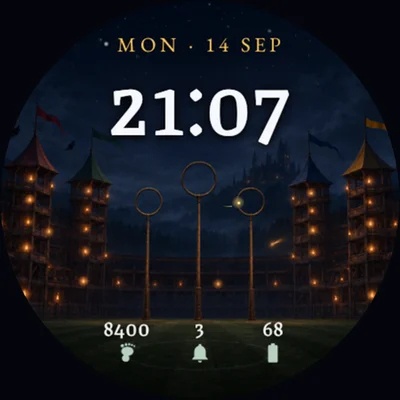
Animiertes Zauberstadion bei Nacht: wehende Wimpel, flackernde Fackeln, eine Burg
Ein animiertes Fantasy-Zifferblatt für Wear OS: Ein Zauberstadion in der Nacht eines wichtigen Spiels, dessen digitale Zeitanzeige hoch im Nachthimmel thront. Hohe Türme umgeben das Spielfeld, Wimpel in Purpurrot, Smaragdgrün, Saphirblau und Bernstein wehen über ihren Dächern, Fackeln leuchten auf den Tribünen und drei goldene Ringe warten über dem Rasen. Eine Burg wacht vom Hügel dahinter.
HAUPTMERKMALE
• Große, gut lesbare digitale Zeitanzeige im Nachthimmel, darüber Wochentag und Datum.
• Solange Ihre Uhr aktiv ist, wehen die Wimpel und die Fackeln flackern.
• Tippen Sie auf einen Ring, um ein Tor zu erzielen: Er erstrahlt in hellem Licht.
• Neigen Sie Ihr Handgelenk, und das Stadion bewegt sich hinter dem Glas, während die Zeitanzeige unverändert bleibt.
• Drei Komplikationen entlang des Spielfelds zeigen Ihre Schritte, ungelesene Benachrichtigungen und den Akkustand auf einen Blick.
PERSONALISIEREN SIE ES
• Akzentfarbe: Purpurrot, Smaragdgrün, Saphirblau oder Bernstein.
• Zeitformat: 12- oder 24-Stunden-Anzeige.
Drei Komplikationen: Schritte, ungelesene Benachrichtigungen und Akkuanzeige (standardmäßig). Im Zifferblatt-Editor können Sie weitere Daten für diese Komplikationen auswählen.
ALWAYS-ON-DISPLAY
Im Always-On-Modus bleibt das Stadion dunkel und statisch. Nur Uhrzeit, Datum, Schritte und Akkuanzeige bleiben an, um Energie zu sparen.
KOMPATIBILITÄT
Funktioniert mit Wear OS 6 oder höher, z. B. mit Galaxy Watch-Modellen, die auf One UI 8 Watch aktualisiert wurden, und Pixel Watch. Erstellt im Watch Face Format: Keine Berechtigungen erforderlich, keine Datenerfassung.
INSTALLATION
1. Installieren Sie die App über Google Play auf Ihrer Smartwatch oder tippen Sie in der Smartphone-App auf „Auf meiner Smartwatch installieren“.
2. Halten Sie Ihr Zifferblatt gedrückt, wischen Sie zu „Stadion“ und tippen Sie darauf. Zum Anpassen halten Sie es gedrückt und tippen Sie anschließend auf „Anpassen“.
Weitere Zifferblätter: Dieses Zifferblatt ist Teil von Tempus Arcanum, einer App mit über 200 animierten Zifferblättern für Wear OS, die kostenlos heruntergeladen werden kann. Suchen Sie auf Google Play nach „Tempus Arcanum“, durchstöbern Sie die gesamte Kollektion auf Ihrem Smartphone und senden Sie jedes Zifferblatt mit einem Fingertipp an Ihre Smartwatch.
Originaltext anzeigen
An animated fantasy watch face for Wear OS: a wizard stadium on the night of a big match, with the digital time standing tall in the night sky. Tall towers ring the pitch, pennants in crimson, emerald, sapphire and amber fly above their roofs, torches glow along the stands, and three golden hoops wait above the grass. A castle watches from the hill beyond.
KEY FEATURES
• Big, easy-to-read digital time in the night sky, with the day and the date above it.
• While your watch is awake, the pennants wave and the torches flicker.
• Tap a hoop to score: it bursts into light.
• Tilt your wrist and the stadium shifts behind the glass, while the time stays put.
• Three complications along the pitch show your steps, unread notifications and battery at a glance.
MAKE IT YOURS
• Accent color: Crimson, Emerald, Sapphire or Amber.
• Time format: 12- or 24-hour.
• Three complications: steps, unread notifications and battery by default; choose other data for any of them in the watch face editor.
ALWAYS-ON DISPLAY
In always-on mode the stadium goes dark and still: only the time, the date, your steps and battery stay lit, to save power.
COMPATIBILITY
Works on Wear OS 6 or later, such as Galaxy Watch models updated to One UI 8 Watch and Pixel Watch. Made in Watch Face Format: no permissions, no data collected.
HOW TO INSTALL
1. Install it from Google Play on your watch, or tap Install on my watch in the phone app.
2. Touch and hold your watch face, swipe to Stadium and tap it. To customize, touch and hold it, then tap Customize.
More watch faces: this face is part of Tempus Arcanum, an app with 200+ animated watch faces for Wear OS, free to download. Search for "Tempus Arcanum" on Google Play, browse the whole collection on your phone and send any face to your watch with one tap.
Datensicherheit
Was Tempus Arcanum bei Google Play zu den Daten angibt, die diese App erfasst und weitergibt.
- Keine Daten werden mit Drittunternehmen oder -organisationen geteiltWeitere Informationen dazu, wie Entwickler Angaben zur Weitergabe von Daten machen
- Keine Daten erhobenWeitere Informationen dazu, wie Entwickler Angaben zur Datenerhebung machen
Neue Funktionen
20.10.2026
Refreshed with the new Tempus Arcanum icon. Small fixes and improvements.
Kontakt zum Entwickler
- E-Mailbicher09@gmail.com
- Datenschutzerklärungtelegra.ph
- Adresseвулиця Будівельників, будинок 7 30 Помічна Кіровоградська область Ukraine 27030
Informationen
- Angeboten von
- Tempus Arcanum
- Kategorie
- Personalisierung
- Aktualisiert
- 20.10.2026
- Veröffentlicht
- 14.09.2026
- Altersfreigabe
- USK ab 0 Jahren
- Preis
- 0,99 €
- Paketname
- com.tempusarcanum.stadium