Wizard Stadium Watch Face
Tempus Arcanum- 3 歳以上対象年齢
- カスタマイズカテゴリ
- 2026/10/20更新日
- ¥170価格
com.tempusarcanum.stadiumのGoogle Play公式ページにリンクしています。最終確認:2026/11/26。
このアプリについて
Googleによる英語 (アメリカ合衆国)からの自動翻訳です。
夜の魔法使いスタジアム:揺れる旗、揺らめく松明、城
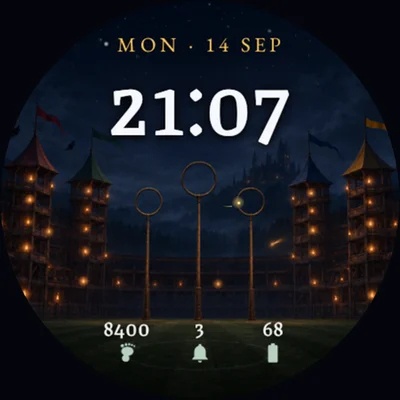
Wear OS向けのアニメーションファンタジーウォッチフェイス:大試合の夜、魔法使いのスタジアムを舞台に、夜空にそびえ立つデジタル時刻。ピッチを囲む高い塔、クリムゾン、エメラルド、サファイア、アンバーのペナントが屋根の上を舞い、スタンド沿いには松明が灯り、芝生の上には3つの黄金の輪が輝いています。丘の向こうには城がそびえ立ち、試合を見守っています。
主な機能
• 夜空に浮かぶ大きく見やすいデジタル時刻。その上には曜日と日付が表示されます。
• ウォッチが起動している間、ペナントが揺れ、松明が揺らめきます。
• ゴールを決めるには、ゴールをタップしてください。光り輝きます。
• 手首を傾けると、時刻はそのままに、スタジアムがガラス越しに動きます。
• ピッチ上の3つのコンプリケーションで、歩数、未読通知、バッテリー残量が一目でわかります。
カスタマイズ
• アクセントカラー:クリムゾン、エメラルド、サファイア、アンバーからお選びいただけます。 • 時刻表示形式:12時間または24時間
• デフォルトで表示されるコンプリケーション:歩数、未読通知、バッテリー残量。ウォッチフェイスエディターで、それぞれのコンプリケーションに別のデータを設定できます。
常時表示
常時表示モードでは、スタジアムの文字盤は消灯し、時刻、日付、歩数、バッテリー残量のみが点灯して電力消費を抑えます。
互換性
Wear OS 6以降(One UI 8にアップデートされたGalaxy WatchやPixel Watchなど)に対応しています。ウォッチフェイス形式で作成されているため、権限の取得やデータ収集は一切行いません。
インストール方法
1. ウォッチのGoogle Playからインストールするか、スマートフォンアプリで「ウォッチにインストール」をタップします。
2. ウォッチフェイスを長押しし、「スタジアム」までスワイプしてタップします。カスタマイズするには、長押しして「カスタマイズ」をタップします。
その他のウォッチフェイス:このウォッチフェイスは、Wear OS向けの200種類以上のアニメーションウォッチフェイスを収録したアプリ「Tempus Arcanum」の一部です。無料でダウンロードできます。Google Playで「Tempus Arcanum」を検索し、スマートフォンでコレクション全体を閲覧して、ワンタップでウォッチフェイスを送信できます。
原文を表示
An animated fantasy watch face for Wear OS: a wizard stadium on the night of a big match, with the digital time standing tall in the night sky. Tall towers ring the pitch, pennants in crimson, emerald, sapphire and amber fly above their roofs, torches glow along the stands, and three golden hoops wait above the grass. A castle watches from the hill beyond.
KEY FEATURES
• Big, easy-to-read digital time in the night sky, with the day and the date above it.
• While your watch is awake, the pennants wave and the torches flicker.
• Tap a hoop to score: it bursts into light.
• Tilt your wrist and the stadium shifts behind the glass, while the time stays put.
• Three complications along the pitch show your steps, unread notifications and battery at a glance.
MAKE IT YOURS
• Accent color: Crimson, Emerald, Sapphire or Amber.
• Time format: 12- or 24-hour.
• Three complications: steps, unread notifications and battery by default; choose other data for any of them in the watch face editor.
ALWAYS-ON DISPLAY
In always-on mode the stadium goes dark and still: only the time, the date, your steps and battery stay lit, to save power.
COMPATIBILITY
Works on Wear OS 6 or later, such as Galaxy Watch models updated to One UI 8 Watch and Pixel Watch. Made in Watch Face Format: no permissions, no data collected.
HOW TO INSTALL
1. Install it from Google Play on your watch, or tap Install on my watch in the phone app.
2. Touch and hold your watch face, swipe to Stadium and tap it. To customize, touch and hold it, then tap Customize.
More watch faces: this face is part of Tempus Arcanum, an app with 200+ animated watch faces for Wear OS, free to download. Search for "Tempus Arcanum" on Google Play, browse the whole collection on your phone and send any face to your watch with one tap.
データ セーフティ
このアプリが収集・共有するデータについて、Tempus ArcanumがGoogle Playで申告している内容です。
- 第三者と共有されるデータはありません詳しくは、デベロッパーが共有を申告する方法についての説明をご覧ください
- データは収集されません詳しくは、デベロッパーが収集を申告する方法についての説明をご覧ください
新機能
2026/10/20
Refreshed with the new Tempus Arcanum icon. Small fixes and improvements.
開発元の連絡先
- メールbicher09@gmail.com
- プライバシーポリシーtelegra.ph
- 住所вулиця Будівельників, будинок 7 30 Помічна Кіровоградська область Ukraine 27030
情報
- 提供元
- Tempus Arcanum
- カテゴリ
- カスタマイズ
- 更新日
- 2026/10/20
- リリース
- 2026/9/14
- 対象年齢
- 3 歳以上
- 価格
- ¥170
- パッケージ名
- com.tempusarcanum.stadium