
anyPWA
Web apps: ad block, PiP, audio
Entwickelt für iPhone, iPad
Kostenlos · In-App-Käufe
- Altersfreigabe17+
- KategorieDienstprogramme
- EntwicklerAdam Wallner
- Größe9,7 MB
Verlinkt auf die offizielle App Store-Seite
Download.org hostet keine Datei von anyPWA. Die Schaltfläche öffnet die App-Seite bei App Store, wo Adam Wallner die App veröffentlicht. Eintrag zuletzt geprüft am 20.11.2026.
Screenshots

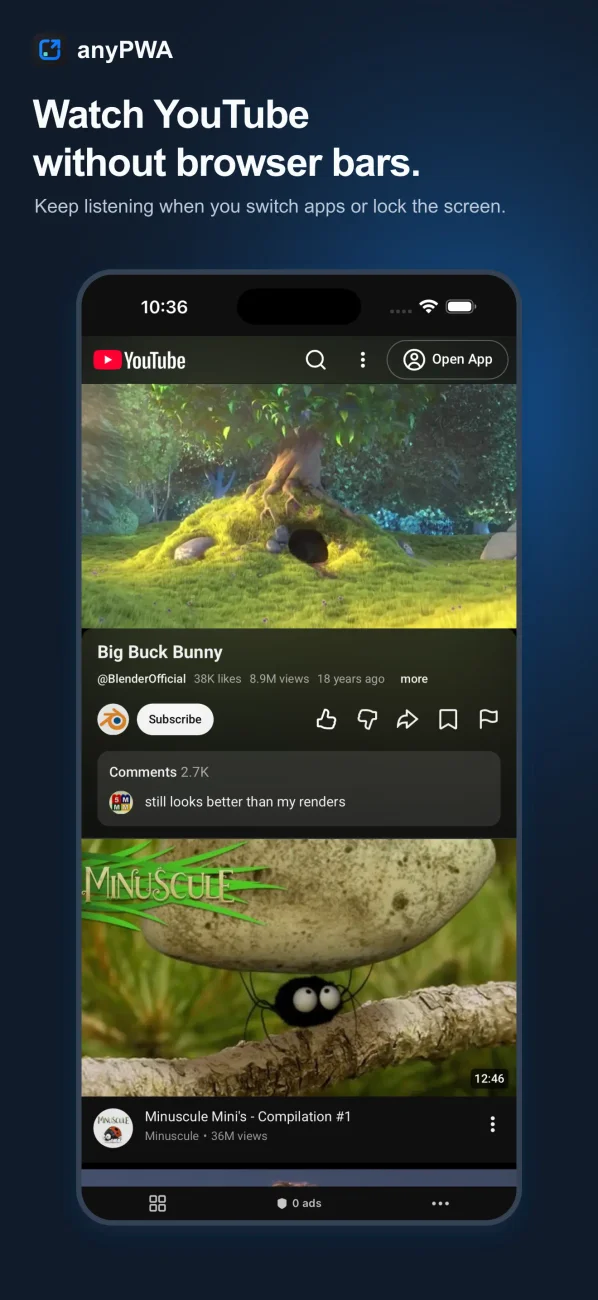


Info
Der Entwickler hat diesen Text nicht in Ihrer Sprache bereitgestellt.
Block ads on your favorite websites, keep music playing with the screen locked, and watch videos in Picture in Picture. Your first saved website is free.
Open websites as fullscreen apps on iPhone and iPad, with separate accounts for each saved website. anyPWA also runs on Macs with Apple silicon.
Your websites, ready to open
Choose an example such as YouTube, Spotify or Wikipedia, or paste any website address. Open it from your library in a dedicated view, without browser bars. When you return to the library, the website stays open so you can pick up where you left off.
Make websites easier to read
Adjust page zoom and text size separately for each saved website.
Open from your Home Screen
Add an anyPWA widget and choose which saved websites it shows. Tap a website to open it directly. You can also use Apple Shortcuts to create a separate Home Screen icon with each saved website’s own name and image. The icon helper requires iOS 18 or later. For setup instructions, tap "Add to Home Screen" at the bottom of your library.
Two accounts, one website
Each saved web app has its own cookies and storage. Add the same website twice to stay signed in to different accounts.
On iPhone Duo
Browser controls and page layouts adapt to the available space, including the system side rail.
Room to work on iPad
Open your web apps in separate windows and use them side by side.
On your Mac
Open websites in separate windows on a Mac with Apple silicon. You can listen to Spotify on Mac too.
Keep listening and watching
Audio keeps playing when you switch apps or lock the screen. Use the Lock Screen and Control Center to play or pause, and Picture in Picture to watch compatible videos while you do something else.
YouTube and YouTube Music support background playback, Lock Screen controls and Picture in Picture. Spotify supports individual tracks, full albums and next/previous controls.
Playback preferences
The optional Media Controls purchase saves video quality and audio-only preferences for YouTube and YouTube Music, with separate Wi-Fi and cellular profiles and an audio-only background rule. It also lets you hide YouTube Shorts. A sleep timer pauses audio and video across your open web apps after a preset or custom duration up to 12 hours.
For YouTube, YouTube Music, Spotify and SoundCloud, choose whether Lock Screen and CarPlay player buttons skip within the current item or go to the previous and next track or video. Save the choice separately for each web app.
Built-in ad blocking
Filter ads and hide empty ad spaces using automatically updated community filter lists. Blocking also works with video and audio ads on YouTube, YouTube Music and Spotify. You can turn it off for any website.
Skip YouTube sponsors
SponsorBlock is a separate one-time purchase for all your saved YouTube websites. It skips sponsor segments using community timestamps, with an option to undo a skip or turn it off per website. Coverage varies by video.
Free for your first website
Use one web app for free, including ad blocking, background playback and Lock Screen controls. Unlimited Websites is a one-time purchase for all saved web apps and library rearranging. Media Controls is a separate one-time purchase for playback preferences, player button choices, YouTube Shorts hiding and the sleep timer. All three purchases support Family Sharing. There is no anyPWA subscription.
Your library stays on your device
No anyPWA account is needed. Your saved websites and sign-ins stay on your device, and anyPWA has no analytics or tracking of its own. Websites you visit have their own privacy practices.
YouTube, YouTube Music and Spotify open as websites inside anyPWA. Features depend on the websites and may change. anyPWA is independent and is not affiliated with or endorsed by these services.
Neue Funktionen
Version 1.7.0 · 03.11.2026
SponsorBlock is now available as a separate one-time purchase. Automatically skip sponsor segments in YouTube videos using community-submitted timestamps, undo a skip, or turn it off for each saved YouTube website. One purchase covers all your saved YouTube websites. Coverage depends on the segments available for each video.
Media Controls now includes a sleep timer. Choose a preset or a custom duration up to 12 hours to pause audio and video across your open web apps. Existing Media Controls owners receive it at no extra cost.
Added iPhone Duo support, with layouts and browser controls that adapt as the available space changes.
This update also improves YouTube fullscreen layouts and error handling when saving or editing a website.
App-Datenschutz
Was Adam Wallner im App Store zum Umgang dieser App mit Daten angibt.
-
Keine Daten erfasst
Der Entwickler erfasst keine Daten von dieser App.
Die Datenschutzpraktiken können variieren, zum Beispiel je nach den von Ihnen verwendeten Funktionen oder Ihrem Alter.
Informationen
- Anbieter
- Adam Wallner
- Kategorie
- Dienstprogramme
- Version
- 1.7.0
- Aktualisiert
- 03.11.2026
- Veröffentlicht
- 07.10.2026
- Größe
- 9,7 MB
- Erfordert
- iOS 17.0 oder neuer
- Altersfreigabe
- 17+
- Preis
- Kostenlos
- In-App-Käufe
- Ja
- Copyright
- © 2026 Adam Wallner
Das könnte Ihnen auch gefallen
-
 Capsule BrowserDienstprogramme
-
 So Annoying! AdblockerWerbeblocker ohne Cookiebanner
-
 Private Browser: Safe & SecureWerbeblocker & Privat surfen
-
 Crest BrowserDienstprogramme
-
 OutSpan - Fullscreen BrowsingDienstprogramme
-
 Ad Blocker - pop up blockerDienstprogramme
-
 ProxyX BrowserDienstprogramme
-
 SmartTube: PIP, No ads videoDienstprogramme
-
 wBlock: Ad Blocker for SafariDienstprogramme
-
 Sill – Mac StreamingDienstprogramme