apptoken
QR & NFC App Blocker for Focus
Entwickelt für iPhone
Kostenlos · In-App-Käufe
- Altersfreigabe4+
- KategorieProduktivität
- EntwicklerFokusbloks Oy
- Größe8,6 MB
Verlinkt auf die offizielle App Store-Seite
Download.org hostet keine Datei von apptoken. Die Schaltfläche öffnet die App-Seite bei App Store, wo Fokusbloks Oy die App veröffentlicht. Eintrag zuletzt geprüft am 12.11.2026.
Screenshots

Info
Der Entwickler hat diesen Text nicht in Ihrer Sprache bereitgestellt.
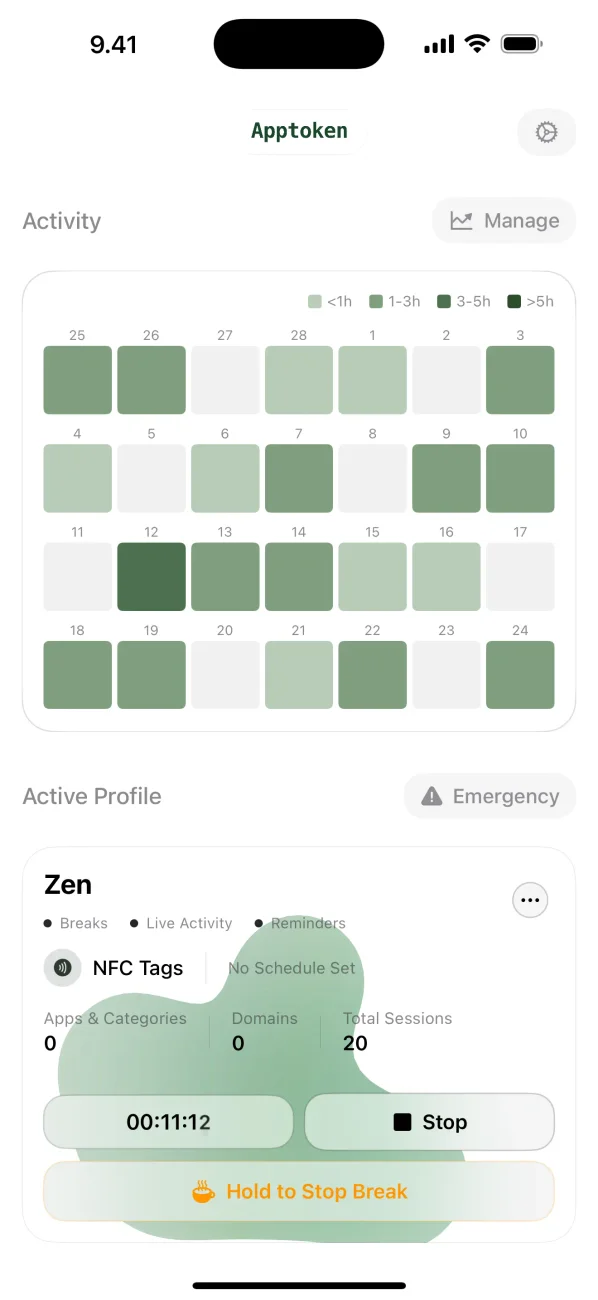
Apptoken helps you create real friction before opening distracting apps.
Instead of relying on willpower, Apptoken lets you create blocking profiles, choose the apps and websites you want to restrict, and start focused sessions using Apple's Screen Time controls. When you need access again, unlock using the method that fits your setup: NFC token, QR code, timer, schedule, widget, or manual control.
Apptoken is free. There are no subscriptions, no in-app purchases, no paywall, and no account required.
HOW IT WORKS
1. Create a blocking profile
2. Select distracting apps and websites
3. Grant Screen Time permission
4. Start a blocking session
5. Unlock only when you choose to
BUILT FOR PRACTICAL FOCUS
Apptoken is designed for people who want a stronger boundary than a reminder, but still need controlled access when life happens.
Use it to:
- Reduce mindless scrolling
- Protect work and study blocks
- Build better phone habits
- Keep social apps out of easy reach
- Add physical friction with an NFC token
- Use a QR code as a simple unlock method
- Schedule recurring focus time
- Control active sessions from widgets
UNLOCK OPTIONS
NFC unlock
Pair blocking with a physical NFC tag or token so access requires a deliberate tap.
QR unlock
Use a QR code as a lightweight unlock method when you want separation without extra setup.
Timers
Start timed sessions and return to your selected restrictions when the session ends.
Schedules
Create recurring blocks for work, school, mornings, evenings, or any routine you want to protect.
Widgets and Live Activities
Control active sessions and keep track of focus time from the places you already use on iPhone.
PRIVACY-FIRST BY DEFAULT
Apptoken does not require an account. Your profiles, selected restrictions, NFC and QR identifiers, schedules, timers, and session history are stored locally on your device or in the app group container used by the app and its extensions.
The app does not use third-party app analytics, advertising SDKs, behavioral tracking, subscriptions, or in-app purchases.
REQUIREMENTS
Apptoken uses Apple's Screen Time, Family Controls, Managed Settings, Device Activity, NFC, Camera, WidgetKit, Live Activities, and Background Tasks frameworks to provide blocking and unlock features.
You can revoke app permissions at any time in iOS Settings.
Apptoken is developed by Fokusbloks Oy.
Support: benjam@fokusbloks.com
Website: apptoken.co
Neue Funktionen
Version 3.1 · 12.05.2026
Apptoken is now free.
This update removes subscriptions, in-app purchases, paywalls, and account sign-in. Every blocking strategy is available to every user.
What changed:
- No subscription required
- No in-app purchase required
- No account or Sign in with Apple step
- Simpler onboarding with Welcome and Screen Time permission
- Cleaner first onboarding screen with the Apptoken logo centered correctly
- NFC, QR, timer, schedule, widget, and manual controls are all included
- Updated privacy handling for local, on-device app data
App-Datenschutz
Was Fokusbloks Oy im App Store zum Umgang dieser App mit Daten angibt.
-
Keine Daten erfasst
Der Entwickler erfasst keine Daten von dieser App.
Die Datenschutzpraktiken können variieren, zum Beispiel je nach den von Ihnen verwendeten Funktionen oder Ihrem Alter.
Informationen
- Anbieter
- Fokusbloks Oy
- Kategorie
- Produktivität
- Version
- 3.1
- Aktualisiert
- 12.05.2026
- Veröffentlicht
- 07.06.2025
- Größe
- 8,6 MB
- Erfordert
- iOS 17.6 oder neuer
- Altersfreigabe
- 4+
- Preis
- Kostenlos
- In-App-Käufe
- Ja
- Copyright
- © Fokusbloks Oy
Das könnte Ihnen auch gefallen
-
 TapLock - Block AppsLock Apps. Tap to Unlock.
-
 NoffProduktivität
-
 Normal: Screen Time ControlProduktivität
-
 VantaFocus: NFC App BlockerApps blockieren & Fokus Timer
-
 SmartDocs LibraryProduktivität
-
 Clank: Screen Time BlockerProduktivität
-
 TezBlock: Screen Time ControlProduktivität
-
 Scrollless - Screen Time BlockProduktivität
-
 AppTimeLock: Apps blockierenApp-Zeitlimit & Bildschirmzeit
-
 FocusRabbit: Handy-DetoxBildschirmzeit & App Blocker